
Views
Views are the building blocks of the front-end experience in Spruce. Every Skill can register Skill Views that are comprised of CardViewControllers. A Skill View also renders a NavigationViewController that is comprised of NavigationButtonViews. By default, the skill’s RootSkillViewController is the first view that is rendered.

A CardViewController has a CardHeader, CardBody, and CardFooter. The CardBody is comprised of many CardSections. See the diagrams below to understand how cards are constructed.
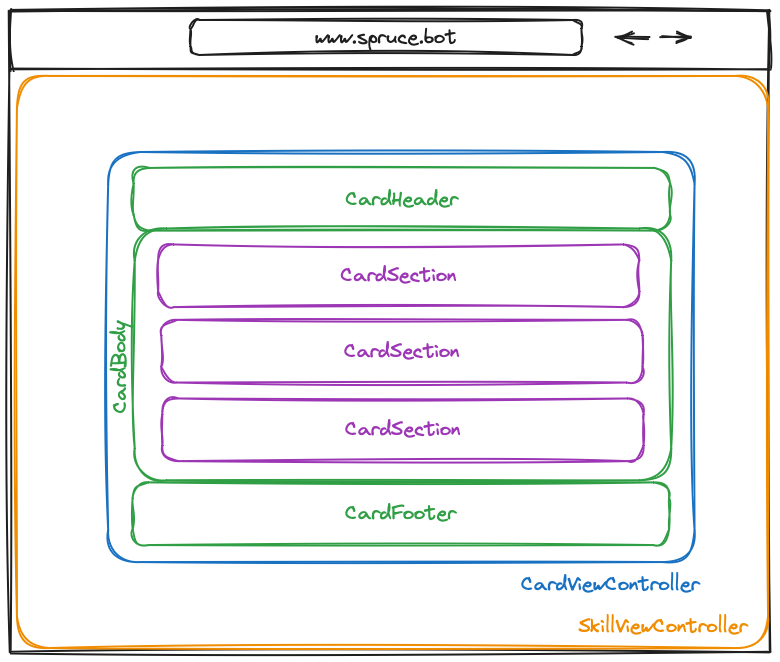
Every other type of ViewController (listed below) is rendered inside a CardSection. This allows for a consistent look and feel across all views in the Spruce ecosystem.
View Controllers and Heartwood
@sprucelabs/heartwood-view-controllers is where view controllers are declared. It is what you work with when you code. You can use built-in controllers provided by @sprucelabs/heartwood-view-controllers or create custom ones by extending AbstractViewController or AbstractSkillViewController and encapsulating built-in controllers.
The Heartwood Skill (spruce-heartwood-skill) serves the whole front end and imports @sprucelabs/heartwood-view-controllers. It takes the ViewModel returned from render() on any view controller and renders the UI.
Note: This is why we assert against
ViewModelsand controller behavior instead of HTML output.
Important Classes
All classes in this list are declared in @sprucelabs/heartwood-view-controllers.
Note: Tables list only methods declared on the controller. Inherited public methods come from base classes.
Base Controllers
AbstractAppController - Base class for app-wide controllers that can share state and render lock screens.
API
| Method | Returns | Description |
|---|---|---|
load(options:AppControllerLoadOptions) | Promise<void> | Loads data and prepares the controller. Called once when the app starts. |
renderNavigation() | Navigation| null | undefined | Optional. Returns navigation to render app-wide. |
renderToolBelt() | ToolBelt| null | undefined | Optional. Returns tool belt to render app-wide. |
protected renderLockScreen(options:LockScreenOptions) | LockScreenSkillViewController | Renders a lock screen over the current view. |
Interfaces
| Interface | Description |
|---|---|
AppControllerLoadOptions | Options passed to load() including router, authenticator, etc. |
LockScreenOptions | Options for rendering a lock screen. |
Navigation | Navigation view model. |
ToolBelt | Tool belt view model. |
AppControllerLoadOptions
interface AppControllerLoadOptions {
    router: Router
    authenticator: Authenticator
    authorizer: Authorizer
    locale: Locale
    scope: Scope
    themes: ThemeManager
    dependencyLoader: DependencyLoader
}
LockScreenOptions
interface LockScreenOptions {
    id?: string
    controller?: SkillViewController
    shouldCenterVertically?: boolean
    isFullScreen?: boolean
    title?: string
    subtitle?: string
    description?: string
    width?: 'wide' | 'tight' | 'full'
    layouts?: SkillViewLayout[]
}
Navigation
interface Navigation {
    controller?: ViewController<Navigation>
    isVisible?: boolean
    shouldRenderButtonLabels?: boolean
    buttons?: NavigationButton[]
}
ToolBelt
interface ToolBelt {
    controller?: ToolBeltViewController
    lineIcon?: LineIcon
    tools?: ToolBeltTool[]
}
Testing
- Tools:
navigationAssert. - Examples:
src/__tests__/behavioral/app/UsingAppViewController.test.ts.
AbstractCalendarEventViewController - Base class for custom calendar event controllers.
API
| Method | Returns | Description |
|---|---|---|
setIsBusy(isBusy: boolean) | void | Sets busy state on the event. |
getIsBusy() | boolean | Returns whether the event is busy. |
getIsOrphaned() | boolean | Returns whether the event no longer exists in the calendar. |
deselect() | void | Called when the event is deselected. |
select() | void | Called when the event is selected. |
mixinChanges(changes: Partial<CalendarEvent>) | void | Merges changes into the event. |
render() | CalendarEvent | Builds and returns the event view model. |
Interfaces
| Interface | Description |
|---|---|
CalendarEvent | Calendar event view model. |
CalendarEvent
interface CalendarEvent {
    id: string
    target: CalendarEventTarget
    calendarId: string
    eventTypeSlug?: string
    startDateTimeMs: number
    isBusy?: boolean
    isResizeable?: boolean
    style?: 'draft' | 'tentative' | 'upcoming' | 'unavailable' | 'blocked' | 'active' | 'past' | 'warn' | 'critical'
    groupId?: string
    timeBlocks: EventTimeBlock[]
    repeats?: 'weekly' | 'monthly' | 'daily'
    daysOfWeek?: ('sun' | 'mon' | 'tue' | 'wed' | 'thur' | 'fri' | 'sat')[]
    daysOfMonth?: string[]
    repeatsUntil?: number
    occurrences?: number
    interval?: number
    nthOccurrences?: number[]
    activeUntilDate?: number
    exclusionDates?: EventExclusionDate[]
    nthInRepeating?: number
    totalInRepeating?: number
    meta?: Record<string, any>
    venue?: Venue
    error?: Error
    isSelected?: boolean
    colors?: CalendarEventColorOverride
    controller?: CalendarEventViewController
}
Testing
- Tools:
calendarInteractor,calendarSeeder,vcAssert. - Examples:
src/__tests__/behavioral/calendars/AssertingCalendars.test.ts,src/__tests__/behavioral/calendars/ControllingACalendar.test.ts,src/__tests__/behavioral/calendars/ControllingACalendarEvent.test.ts.
AbstractInputViewController - Base class for custom input controllers.
API
| Method | Returns | Description |
|---|---|---|
setHandlers(options:FormInputHandlers<Model>) | void | Sets the handlers for getting/setting values and model. Called by the form. |
setValue(value: string | null | undefined, renderedValue?: string | null) | Promise<void> | Sets the input value and optionally the rendered value. |
setRenderedValue(renderedValue: any) | Promise<void> | Sets the displayed value (may differ from stored value). |
getRenderedValue() | any | Returns the currently displayed value. |
didFocus() | Promise<void | undefined> | Called when the input receives focus. |
didBlur() | Promise<void | undefined> | Called when the input loses focus. |
getValue() | any | Returns the current stored value. |
render() | Model | Builds and returns the input view model. |
Interfaces
| Interface | Description |
|---|---|
FormInputHandlers | Handlers for value and model management. |
FormInputOptions | Base options for form inputs. |
FormInputHandlers
interface FormInputHandlers<View> {
    getValue: () => any
    setValue: (value: any) => Promise<void>
    setModel: (model: View) => void
    getModel: () => View
}
FormInputOptions
interface FormInputOptions {
    id?: string
    renderedValue?: any
    label?: string
    hint?: string
    isRequired?: boolean
    isInteractive?: boolean
    onChange?: (value: any) => void | Promise<void | boolean> | boolean
    onChangeRenderedValue?: (value: any) => void | Promise<void | boolean> | boolean
    onFocus?: () => void | Promise<void>
    onBlur?: () => void | Promise<void>
    rightButtons?: InputButton[]
}
Testing
- Tools:
vcAssertand standard test utilities from@sprucelabs/heartwood-view-controllers. - Examples:
src/__tests__/behavioral/forms/UpdatingFast.test.ts.
AbstractSkillViewController - Base class for Skill View controllers; `render()` returns a `SkillView`.
API
| Method | Returns | Description |
|---|---|---|
load(options:SkillViewControllerLoadOptions<Args>) | Promise<void> | Called when the skill view loads. Override to fetch data, set up state, etc. |
focus() | Promise<void> | Called when the skill view gains focus. |
blur() | Promise<void> | Called when the skill view loses focus. |
getTitle() | string | undefined | Returns the skill view title. |
getSubtitle() | string | undefined | Returns the skill view subtitle. |
protected setTitle(title: string | null | undefined) | void | Sets the skill view title. |
protected setSubtitle(subtitle: string | null | undefined) | void | Sets the skill view subtitle. |
protected renderLockScreen(options:LockScreenOptions) | LockScreenSkillViewController | Renders a lock screen over the current view. |
abstract render() | SkillView | Builds and returns the skill view model. |
Interfaces
| Interface | Description |
|---|---|
SkillViewControllerLoadOptions | Options passed to load(). |
SkillView | Skill view model returned by render(). |
LockScreenOptions | Options for rendering a lock screen. |
SkillViewControllerLoadOptions
interface SkillViewControllerLoadOptions<Args = Record<string, any>> {
    router: Router
    args: Args
    authenticator: Authenticator
    authorizer: Authorizer
    locale: Locale
    scope: Scope
    themes: ThemeManager
    dependencyLoader: DependencyLoader
}
SkillView
interface SkillView {
    id?: string
    controller?: SkillViewController
    shouldCenterVertically?: boolean
    isFullScreen?: boolean
    title?: string
    subtitle?: string
    description?: string
    width?: 'wide' | 'tight' | 'full'
    layouts?: SkillViewLayout[]
}
LockScreenOptions
interface LockScreenOptions {
    id?: string
    controller?: SkillViewController
    shouldCenterVertically?: boolean
    isFullScreen?: boolean
    title?: string
    subtitle?: string
    description?: string
    width?: 'wide' | 'tight' | 'full'
    layouts?: SkillViewLayout[]
}
Testing
- Tools:
vcAssert. - Examples:
src/__tests__/behavioral/skillViews/ControllingSkillViews.test.ts.
AbstractViewController - Base class for most view controllers, providing lifecycle, rendering, and helpers.
API
| Method | Returns | Description |
|---|---|---|
triggerRender() | void | Triggers a re-render of this view controller. |
setTriggerRenderHandler(handler:TriggerRenderHandler) | void | Sets the callback invoked when triggerRender() is called. |
renderOnce(cb: () => any | Promise<any>) | Promise<void> | Suspends rendering, executes callback, then triggers a single render. |
renderOnceSync(cb: () => any) | void | Synchronous version of renderOnce. |
Controller<N>(name: N, options: ControllerOptions<N>) | ViewControllerMap[N] | Creates a child view controller. |
destroy() | Promise<void> | Destroys this controller and all its children. |
protected confirm(options:ConfirmOptions) | Promise<boolean> | Shows a confirmation dialog. Returns true if accepted. |
protected renderInDialog(dialog:DialogOptions) | DialogViewController | Renders a dialog. |
protected hideDialog() | Promise<void> | Hides the currently active dialog. |
protected toast(options:ToastMessage) | void | Shows a toast notification. |
protected alert(options:AlertOptions) | Promise<void> | Shows an alert dialog. |
abstract render() | ViewModel | Builds and returns the view model. |
Interfaces
| Interface | Description |
|---|---|
TriggerRenderHandler | Callback type for render triggers. |
ConfirmOptions | Options for confirmation dialogs. |
ToastMessage | Toast notification options. |
AlertOptions | Alert dialog options. |
DialogOptions | Dialog rendering options. |
TriggerRenderHandler
type TriggerRenderHandler = () => void
ConfirmOptions
interface ConfirmOptions {
    title?: string
    subtitle?: string
    message?: string
    isDestructive?: boolean
    body?: CardBody
}
ToastMessage
interface ToastMessage {
    headline: string
    text?: string
    style?: 'info' | 'success' | 'error'
}
AlertOptions
interface AlertOptions {
    title?: string
    message: string
    style?: 'error' | 'success' | 'info'
    okButtonLabel?: string
}
DialogOptions
interface DialogOptions {
    header?: CardHeader
    body?: CardBody
    footer?: CardFooter
    shouldShowCloseButton?: boolean
    isVisible?: boolean
    onClose?: () => void | Promise<void>
}
Testing
- Tools:
MockToastMessageHandler,formAssert,interactor,listAssert,toastAssert,vcAssert,vcDurationAssert. - Examples:
src/__tests__/behavioral/BuildingViewControllers.test.ts,src/__tests__/behavioral/LoggingInAView.test.ts,src/__tests__/behavioral/assertions/AssertingDurationUtil.test.ts.
Skill View Controllers
LockScreenSkillViewController - Built-in Skill View controller for lock screens.
API
| Method | Returns | Description |
|---|---|---|
setHideHandler(hideHandler:HideDialogHandler) | void | Sets the callback invoked when the lock screen is hidden. |
hide() | Promise<void> | Hides the lock screen. |
getSkillViewVc() | SkillViewController | undefined | Returns the skill view controller rendered inside the lock screen. |
getIsVisible() | boolean | Returns whether the lock screen is currently visible. |
render() | LockScreen | Builds and returns the lock screen view model. |
Interfaces
| Interface | Description |
|---|---|
LockScreen | Lock screen view model. |
HideDialogHandler | Callback type for hide handler. |
LockScreen
interface LockScreen {
    id?: string
    controller?: ViewController<LockScreen>
    shouldCenterVertically?: boolean
    isFullScreen?: boolean
    title?: string
    subtitle?: string
    description?: string
    width?: 'wide' | 'tight' | 'full'
    layouts?: SkillViewLayout[]
    skillViewController?: SkillViewController
}
HideDialogHandler
type HideDialogHandler = () => Promise<void> | void
Testing
- Tools:
lockScreenAssert,vcAssert. - Examples:
src/__tests__/behavioral/lockScreens/AssertLockScreens.test.ts,src/__tests__/behavioral/lockScreens/LockingTheScreen.test.ts.
Cards and Dialogs
CardViewController - Core card building block (header/body/footer/sections).
API
| Method | Returns | Description |
|---|---|---|
setFooter(footer:CardFooter| undefined) | void | Sets footer. |
getHasCriticalError() | boolean | Checks whether it has critical error. |
setCriticalError(criticalError:CriticalError) | void | Sets critical error. |
clearCriticalError() | void | Clears critical error. |
getSectionVc(section: string | number) | ViewController<CardSection> | Gets section vc. |
setHeaderTitle(title: string | null) | void | Sets header title. |
setHeaderSubtitle(subtitle: string | null) | void | Sets header subtitle. |
getHeaderTitle() | string | undefined | Gets header title. |
getHeader() | CardHeader| null | undefined | Gets header. |
getFooter() | CardFooter| null | undefined | Gets footer. |
getFooterLayout() | CardFooterLayout| null | undefined | Gets footer layout. |
getHeaderSubtitle() | string | undefined | Gets header subtitle. |
setHeaderImage(image: string | null) | void | Sets header image. |
setBackgroundImage(image: string | null) | void | Sets background image. |
getSection(idOrIdx: number | string) | CardSection | Gets section. |
updateSection(idOrIdx: number | string, updates: Partial<CardSection>) | void | Handles update section. |
setSection(idOrIdx: number | string, section:CardSection) | void | Sets section. |
setSections(sections:CardSection[]) | void | Sets sections. |
addSection(section:CardSection) | void | Adds section. |
getSections() | CardSection[] | null | undefined | Gets sections. |
removeSection(idOrIdx: number | string) | void | Removes section. |
addSectionAtIndex(idx: number, section:CardSection) | void | Adds section at index. |
getTotalSections() | number | Gets total sections. |
isBusy() | boolean | Checks if busy. |
getIsFooterEnabled() | boolean | Checks whether footer enabled. |
getIsFooterBusy() | boolean | Checks whether footer busy. |
disableFooter() | void | Disables footer. |
enableFooter() | void | Enables footer. |
setIsBusy(isBusy: boolean) | void | Sets busy state. |
setFooterIsBusy(isBusy: boolean) | void | Sets footer is busy. |
setBody(body:CardBody| null | undefined) | void | Sets body. |
getBody() | CardBody| null | undefined | Gets body. |
payAttentionToMe() | void | Handles pay attention to me. |
setHeader(header:CardHeader| null | undefined) | void | Sets header. |
setFooterLayout(layout:CardFooterLayout) | void | Sets footer layout. |
render() | Card | Builds and returns the ViewModel. |
Interfaces
| Interface | Description |
|---|---|
Card | Card view model. |
CardBody | Card body containing sections and busy state. |
CardFooter | Card footer with buttons and layout. |
CardFooterLayout | Footer layout style. |
CardHeader | Card header with title, subtitle, and image. |
CardSection | Card section within the body. |
CriticalError | Critical error display configuration. |
ViewController | Base view controller interface. |
Card
interface Card {
    id?: string
    className?: string
    controller?: CardViewController
    header?: CardHeader
    criticalError?: CriticalError
    shouldFadeIn?: boolean
    style?: 'standard' | 'informational' | 'visual' | 'heading'
    backgroundImage?: string
    backgroundImageSize?: 'cover' | 'contain'
    onClick?: () => Promise<any> | any
    body?: CardBody
    footer?: CardFooter
}
CardBody
interface CardBody {
    shouldShowSectionSeparators?: boolean
    isBusy?: boolean
    swipeController?: (controller: SwipeController) => void
    shouldEnableSectionSwiping?: boolean
    shouldRenderSwipePagination?: boolean
    shouldSwipeBreakIntoCardsOnLandscape?: boolean
    onSelectSlideTitle?: (id: number) => void
    onChangeSlide?: (slide: number) => void
    shouldRenderSectionsAsGrid?: boolean
    sections?: CardSection[]
}
CardFooter
interface CardFooter {
    controller?: ViewController<CardFooter>
    buttons?: CardFooterButton[]
    isBusy?: boolean
    isSticky?: boolean
    isEnabled?: boolean
    pager?: Pager
    shouldRenderBorder?: boolean
    hAlignment?: 'left' | 'center' | 'right'
    layout?: 'vertical' | 'horizontal'
}
CardFooterLayout
type CardFooterLayout = 'vertical' | 'horizontal'
CardHeader
interface CardHeader {
    title?: string
    subtitle?: string
    altTitle?: string
    controller?: ViewController<CardHeader>
    icon?: FancyIcon
    image?: string
    imageSize?: 'cover' | 'contain'
    form?: Form
    closeHandler?: () => Promise<void> | void
}
CardSection
interface CardSection {
    id?: string
    title?: string
    isComplete?: boolean
    controller?: ViewController<CardSection>
    shouldBePadded?: boolean
    shouldContentBeCentered?: boolean
    text?: Text
    image?: string
    video?: Video
    avatar?: string
    form?: Form
    talkingSprucebot?: TalkingSprucebot
    bigForm?: BigForm
    map?: Map
    buttons?: Button[]
    buttonBar?: ButtonBar
    list?: List
    calendar?: Calendar
    stats?: Stats
    countdownTimer?: CountdownTimer
    progress?: Progress
    ratings?: Ratings
    receipt?: Receipt
    polarArea?: PolarArea
    feed?: Feed
    pager?: Pager
    barChart?: BarChart
    lineGraph?: LineGraph
    shouldRenderContentsAsGrid?: boolean
    gridSize?: 'small' | 'medium' | 'large'
    portal?: Portal
    webRtcPlayer?: WebRtcPlayer
    alignment?: 'left' | 'center' | 'right'
    style?: 'standard' | 'primary' | 'secondary'
    layout?: 'vertical' | 'horizontal'
}
CriticalError
interface CriticalError {
    title?: string
    message?: string
    buttons?: Button[]
}
ViewController
interface ViewController<ViewModel extends Record<string, any>> {
    render(): ViewModel
    setTriggerRenderHandler: (handler: TriggerRenderHandler) => void
    triggerRender: TriggerRender
    destroy?: () => Promise<void> | void
    willBlur?: () => void | Promise<void>
    didBlur?: () => void | Promise<void>
    willFocus?: () => void | Promise<void>
    didFocus?: () => void | Promise<void>
    didHide?: () => void | Promise<void>
}
Testing
- Tools:
interactor,vcAssert. - Examples:
src/__tests__/behavioral/cards/AssertingAndInteractingWithCriticalErrors.test.ts,src/__tests__/behavioral/cards/AssertingCardFooters.test.ts,src/__tests__/behavioral/cards/AssertingCardSectionRendersButton.test.ts.
ConfirmViewController - Opinionated confirm/cancel dialog.
API
| Method | Returns | Description |
|---|---|---|
handleDecline() | void | Invokes the decline handler. Called when user clicks “No”. |
handleAccept() | void | Invokes the accept handler. Called when user clicks “Yes”. |
hide() | Promise<void> | Hides the confirmation dialog. |
render() | Dialog | Builds and returns the dialog view model. |
Interfaces
| Interface | Description |
|---|---|
ConfirmViewControllerOptions | Options for creating a confirm dialog. |
Dialog | Dialog view model. |
ConfirmViewControllerOptions
interface ConfirmViewControllerOptions {
    title?: string
    subtitle?: string
    message?: string
    isDestructive?: boolean
    body?: CardBody
    onAccept: () => void
    onDecline: () => void
}
Dialog
interface Dialog {
    id?: string
    controller?: ViewController<Dialog>
    header?: CardHeader
    body?: CardBody
    footer?: CardFooter
    shouldShowCloseButton?: boolean
    isVisible?: boolean
    cardController?: CardViewController
    onClose?: () => void | Promise<void>
}
Testing
- Tools:
confirmTestPatcher,interactor,vcAssert. - Examples:
src/__tests__/behavioral/confirms/AssertingConfirms.test.ts,src/__tests__/behavioral/confirms/ConfirmingAnAction.test.ts,src/__tests__/behavioral/confirms/ControllingAConfirmationDialog.test.ts.
DialogViewController - Renders a card as a modal dialog.
API
| Method | Returns | Description |
|---|---|---|
show() | void | Shows the dialog. |
getIsVisible() | boolean | Returns whether the dialog is visible. |
getShouldShowCloseButton() | boolean | Returns whether the close button should be shown. |
hide() | Promise<void> | Hides the dialog. Calls onClose handler if set. |
getCardVc() | ViewController<Card> | Returns the card view controller inside the dialog. |
setIsBusy(isBusy: boolean) | void | Sets the busy state on the card. |
wait() | Promise<void> | Returns a promise that resolves when the dialog is hidden. |
render() | DialogOptions | Builds and returns the dialog view model. |
Interfaces
| Interface | Description |
|---|---|
DialogViewControllerOptions | Options for creating a dialog. |
DialogOptions | Dialog view model (extends Card and Dialog). |
DialogViewControllerOptions
interface DialogViewControllerOptions {
    id?: string
    controller?: ViewController<Card>
    header?: CardHeader
    body?: CardBody
    footer?: CardFooter
    shouldShowCloseButton?: boolean
    isVisible?: boolean
    width?: 'wide' | 'tight' | 'full'
    onClose?: () => void | Promise<void | boolean>
}
DialogOptions
interface DialogOptions {
    id?: string
    controller?: ViewController<Dialog>
    header?: CardHeader
    body?: CardBody
    footer?: CardFooter
    shouldShowCloseButton?: boolean
    isVisible?: boolean
    width?: 'wide' | 'tight' | 'full'
    cardController?: ViewController<Card>
    closeHandler?: () => void | Promise<void>
    onClose?: () => void | Promise<void | boolean>
}
Testing
- Tools:
dialogTestPatcher,interactor,vcAssert. - Examples:
src/__tests__/behavioral/dialogs/AssertingDialogs.test.ts,src/__tests__/behavioral/dialogs/InteractingWithDialogs.test.ts,src/__tests__/behavioral/dialogs/RenderingInADialog.test.ts.
LoginCardViewController - Built-in login flow rendered as a card.
API
| Method | Returns | Description |
|---|---|---|
getIsBusy() | boolean | Returns whether the login form is busy. |
getLoginForm() | BigFormViewController<LoginSchema> | Returns the big form controller for the login flow. |
render() | Card | Builds and returns the card view model. |
Interfaces
| Interface | Description |
|---|---|
LoginCardViewControllerOptions | Options for creating a login card. |
LoginHandler | Callback when login succeeds. |
OnLoginOptions | Options passed to the login handler. |
LoginCardViewControllerOptions
interface LoginCardViewControllerOptions {
    onLogin?: LoginHandler
    onLoginFailed?: (err: Error) => void
    id?: string | null
    smsDisclaimer?: string | null
    shouldAllowEmailLogin?: boolean
    shouldAllowPhoneLogin?: boolean
    shouldRequireCheckboxForSmsOptIn?: boolean
}
LoginHandler
type LoginHandler = (options: OnLoginOptions) => Promise<void> | void
OnLoginOptions
interface OnLoginOptions {
    person: Person
}
Card
See CardViewController for the Card interface.
Testing
- Tools:
buttonAssert,formAssert,interactor. - Examples:
src/__tests__/behavioral/loggingIn/LoggingInAsPerson.test.ts.
SwipeCardViewController - Swipeable card deck controller.
API
| Method | Returns | Description |
|---|---|---|
jumpToSlide(slide: number | string) | Promise<void> | Jumps to the specified slide by index or id. |
getPresentSlide() | number | Returns the current slide index. |
getPresentSlideId() | string | null | undefined | Returns the current slide id. |
setSlide(idOrIdx: number | string, slide: Partial<Slide>) | void | Replaces a slide at the given index or id. |
updateSlide(idOrIdx: number | string, updates: Partial<Slide>) | void | Partially updates a slide. |
markSlideAsComplete(slideIdx: number) | void | Marks a slide as complete. |
getSlides() | Slide[] | null | undefined | Returns all slides. |
removeSlide(idOrIdx: number | string) | void | Removes a slide. |
addSlideAtIndex(idx: number, slide:Slide) | void | Inserts a slide at the given index. |
addSlide(slide:Slide) | void | Appends a slide. |
getSlide(idOrIdx: number | string) | Slide | Returns a slide by index or id. |
setFooter(footer:CardFooter| null | undefined) | void | Sets the card footer. |
setShouldRenderNull(shouldRenderNull: boolean) | void | Temporarily hides the card content. |
getTotalSlides() | number | Returns the total number of slides. |
render() | Card | Builds and returns the card view model. |
Interfaces
| Interface | Description |
|---|---|
SwipeViewControllerOptions | Options for creating a swipe card. |
Slide | Slide (alias for CardSection). |
SwipeViewControllerOptions
interface SwipeViewControllerOptions {
    slides: Slide[]
    shouldBreakIntoCardsOnLandscape?: boolean
    onSlideChange?: (slide: number) => void
    isBusy?: boolean
    header?: CardHeader
    footer?: CardFooter
    id?: string
}
Slide
type Slide = CardSection
See CardSection for the full interface.
Testing
- Tools:
vcAssert. - Examples:
src/__tests__/behavioral/swipes/AssertingSwipeViews.test.ts,src/__tests__/behavioral/swipes/ControllingASwipeView.test.ts.
Forms and Inputs
AutocompleteInputViewController - Autocomplete text input controller.
API
| Method | Returns | Description |
|---|---|---|
hideSuggestions() | void | Hides the suggestions dropdown. |
showSuggestions(suggestions:AutocompleteSuggestion[]) | void | Shows suggestions in a dropdown. |
getRenderedValue() | string | Returns the currently displayed value. |
getIsShowingSuggestions() | boolean | Returns whether suggestions are visible. |
render() | AutocompleteInput | Builds and returns the input view model. |
Interfaces
| Interface | Description |
|---|---|
AutocompleteInput | Autocomplete input view model. |
AutocompleteSuggestion | A suggestion item. |
AutocompleteInput
interface AutocompleteInput {
    id?: string
    value?: string
    renderedValue?: any
    label?: string
    hint?: string
    isRequired?: boolean
    isInteractive?: boolean
    onChange?: (value: any) => void | Promise<void | boolean> | boolean
    onChangeRenderedValue?: (value: any) => void | Promise<void | boolean> | boolean
    onFocus?: () => void | Promise<void>
    onBlur?: () => void | Promise<void>
    rightButtons?: InputButton[]
    placeholder?: string
    controller?: AutocompleteInputViewController
    suggestions?: AutocompleteSuggestion[]
}
AutocompleteSuggestion
interface AutocompleteSuggestion {
    id: string
    label: string
    onClick?: (id: string) => void | Promise<void>
}
Testing
- Tools:
autocompleteAssert,autocompleteInteractor,vcAssert. - Examples:
src/__tests__/behavioral/autocompletes/ControllingAndTestingAnAutocompleteInput.test.ts.
BigFormViewController - One-question-at-a-time form controller.
Extends FormViewController with slide-based navigation for step-by-step forms.
API
| Method | Returns | Description |
|---|---|---|
setShouldRenderSlideTitles(shouldRender: boolean) | void | Sets whether to render slide titles. |
isSlideValid(idx: number) | boolean | Returns whether the slide at the given index is valid. |
setOnSubmit(cb: SubmitHandler<S>) | void | Sets the final submit handler. |
setOnSubmitSlide(cb: SubmitSlideHandler<S>) | void | Sets the per-slide submit handler. |
getPresentSlide() | number | Returns the current slide index. |
jumpToSlide(idx: number) | Promise<void> | Jumps to the specified slide. |
getTotalSlides() | number | Returns the total number of slides. |
replaySlideHeading(idx: number) | void | Replays the slide heading animation. |
goForward() | Promise<void> | Advances to the next slide. |
goBack() | Promise<void> | Goes back to the previous slide. |
submit() | Promise<void> | Submits the current slide. Advances if valid, shows errors otherwise. |
getIsLastSlide() | boolean | Returns whether on the last slide. |
isPresentSlideValid() | boolean | Returns whether the current slide is valid. |
setShouldRenderFirstFieldsLabel(should: boolean) | void | Sets whether to render the label for the first field. |
render() | BigForm<S> | Builds and returns the form view model. |
Interfaces
| Interface | Description |
|---|---|
BigFormViewControllerOptions | Options for creating a big form. |
BigForm | Big form view model. |
BigFormOnSubmitOptions | Options passed to submit handlers. |
BigFormViewControllerOptions
interface BigFormViewControllerOptions<S extends Schema> {
    id: string
    schema: S
    sections: BigFormSection<S>[]
    values?: SchemaPartialValues<S>
    onSubmit?: SubmitHandler<S>
    onSubmitSlide?: SubmitSlideHandler<S>
    onSlideChange?: BigFormSlideChangeHandler
    onChange?: (options: FormOnChangeOptions<S>) => void | Promise<void>
    shouldRenderFirstFieldsLabel?: boolean
    shouldRenderSlideTitles?: boolean
    sprucebotAvatar?: SprucebotAvatar
    footer?: CardFooter
    isBusy?: boolean
}
BigForm
interface BigForm<S extends Schema> {
    id: string
    controller?: BigFormViewController<S>
    schema: S
    sections: BigFormSection<S>[]
    values?: SchemaPartialValues<S>
    presentSlide?: number
    onSubmit?: SubmitHandler<S>
    onSubmitSlide?: SubmitSlideHandler<S>
    onSlideChange?: BigFormSlideChangeHandler
    onChange?: (options: FormOnChangeOptions<S>) => void | Promise<void>
    shouldRenderSlideTitles?: boolean
    shouldRenderFirstFieldsLabel?: boolean
    sprucebotAvatar?: SprucebotAvatar
    talkingSprucebot?: TalkingSprucebot
    footer?: CardFooter
    isBusy?: boolean
    isEnabled?: boolean
    errorsByField?: FormErrorsByField<S>
}
BigFormOnSubmitOptions
interface BigFormOnSubmitOptions<S extends Schema> {
    values: SchemaPartialValues<S>
    errorsByField: FormErrorsByField<S>
    isValid: boolean
    presentSlide: number
    controller: BigFormViewController<S>
}
Testing
- Tools:
formAssert,interactor,vcAssert. - Examples:
src/__tests__/behavioral/forms/AddingRemovingFormSections.test.ts,src/__tests__/behavioral/forms/AssertingForms.test.ts,src/__tests__/behavioral/forms/ControllingABigForm.test.ts.
ButtonBarViewController - Horizontal button bar controller.
API
| Method | Returns | Description |
|---|---|---|
getButtonGroupVc() | ButtonGroupViewController | Returns the underlying button group controller. |
setSelectedButtons(ids: string[]) | Promise<void> | Sets which buttons are selected by id. |
getSelectedButtons() | string[] | Returns the ids of selected buttons. |
selectButton(id: string) | Promise<void> | Selects a button by id. |
setButtons(buttons:ButtonBarButton[]) | void | Replaces all buttons. |
deselectButton(id: string) | Promise<void> | Deselects a button by id. |
render() | ButtonBar | Builds and returns the button bar view model. |
Interfaces
| Interface | Description |
|---|---|
ButtonBar | Button bar view model. |
ButtonBarButton | A button in the bar. |
ButtonBar
interface ButtonBar {
    controller?: ButtonBarViewController
    buttons: ButtonBarButton[]
}
ButtonBarButton
interface ButtonBarButton {
    id: string
    label?: string
    controller?: ButtonController
    isSelected?: boolean
    isEnabled?: boolean
    shouldQueueShow?: boolean
    shouldShowHintIcon?: boolean
    hint?: Text
    type?: 'primary' | 'secondary' | 'tertiary' | 'destructive'
    image?: string
    avatar?: string
    lineIcon?: LineIcon
    selectedLineIcon?: LineIcon
}
Testing
- Tools:
buttonAssert,interactor,vcAssert. - Examples:
src/__tests__/behavioral/buttons/AssertingButtonBars.test.ts,src/__tests__/behavioral/buttons/AssertingButtonBarsInCards.test.ts,src/__tests__/behavioral/buttons/AssertingButtons.test.ts.
ButtonGroupViewController - Selectable button group controller.
API
| Method | Returns | Description |
|---|---|---|
triggerRender() | void | Triggers a render of all buttons. |
getIsMultiSelect() | boolean | Returns whether multi-select is enabled. |
setSelectedButtons(ids: string[]) | Promise<void> | Sets which buttons are selected by id. |
setButtons(buttons:ButtonGroupButton[]) | void | Replaces all buttons. |
selectButton(id: string) | Promise<void> | Adds a button to the selection. |
deselectButton(id: string) | Promise<void> | Removes a button from the selection. |
getSelectedButtons() | string[] | Returns the ids of selected buttons. |
render() | Button[] | Builds and returns the button view models. |
Interfaces
| Interface | Description |
|---|---|
ButtonGroupViewControllerOptions | Options for creating a button group. |
ButtonGroupButton | A button in the group. |
ButtonGroupChanges | Change info passed to selection handlers. |
ButtonGroupViewControllerOptions
interface ButtonGroupViewControllerOptions {
    buttons: ButtonGroupButton[]
    onSelectionChange?: SelectionChangeHandler
    onWillChangeSelection?: WillChangeSelectionHandler
    onClickHintIcon?: (id: string) => void
    shouldAllowMultiSelect?: boolean
    selected?: string[]
    lineIcon?: LineIcon
    selectedLineIcon?: LineIcon
    lineIconPosition?: LineIconPosition
}
ButtonGroupButton
interface ButtonGroupButton {
    id: string
    label?: string
    isSelected?: boolean
    isEnabled?: boolean
    shouldShowHintIcon?: boolean
    hint?: Text
    type?: 'primary' | 'secondary' | 'tertiary' | 'destructive'
    image?: string
    avatar?: string
    lineIcon?: LineIcon
    selectedLineIcon?: LineIcon
}
ButtonGroupChanges
interface ButtonGroupChanges {
    added: string[]
    removed: string[]
}
Testing
- Tools:
buttonAssert,interactor,vcAssert. - Examples:
src/__tests__/behavioral/buttons/AssertingButtonBars.test.ts,src/__tests__/behavioral/buttons/AssertingButtonBarsInCards.test.ts,src/__tests__/behavioral/buttons/AssertingButtons.test.ts.
EditFormBuilderFieldCardViewController - Edits a form builder field.
Extends CardViewController. Renders a form for editing field properties (label, type, hint, required, etc.).
API
| Method | Returns | Description |
|---|---|---|
handleFormChange() | void | Called when the form changes. Updates sections based on field type. |
getFormVc() | FormViewController<EditFieldFormSchema> | Returns the form view controller. |
render() | Card | Builds and returns the card view model. |
Interfaces
| Interface | Description |
|---|---|
EditFormBuilderFieldOptions | Options for creating the field editor. |
EditFormBuilderFieldOptions
interface EditFormBuilderFieldOptions {
    name: string
    field: Partial<FieldDefinitions>
    renderOptions?: Partial<FieldRenderOptions<Schema>> | null
    onDone: (fieldDefinition: FieldDefinitions, renderOptions: FieldRenderOptions<Schema>) => void | Promise<void>
}
Testing
- Tools:
calendarSeeder,formAssert,interactor,listAssert,vcAssert. - Examples:
src/__tests__/behavioral/formBuilders/AddingAFormBuilderSection.test.ts,src/__tests__/behavioral/formBuilders/AddingARatingsField.test.ts,src/__tests__/behavioral/formBuilders/AddingASignatureField.test.ts.
EditFormBuilderSectionCardViewController - Edits a form builder section.
Extends CardViewController. Renders a form for editing section properties (title, type, fields).
API
| Method | Returns | Description |
|---|---|---|
getFormVc() | FormViewController<EditSectionSchema> | Returns the form view controller. |
getFieldListVc() | ListViewController | Returns the field list view controller. |
addField() | void | Adds a new field to the section. |
render() | Card | Builds and returns the card view model. |
Interfaces
| Interface | Description |
|---|---|
EditFormBuilderSectionOptions | Options for creating the section editor. |
SimpleSection | Simplified section data. |
SimpleRow | Simplified field/row data. |
EditFormBuilderSectionOptions
interface EditFormBuilderSectionOptions {
    onDone: (section: SimpleSection) => void | Promise<void>
    editSection?: SimpleSection
    defaultTitle: string
}
SimpleSection
interface SimpleSection {
    title: string
    type: 'form' | 'text'
    shouldRenderAsGrid?: boolean
    text?: string
    fields?: SimpleRow[]
}
SimpleRow
interface SimpleRow {
    label: string
    type: FormBuilderFieldType
    renderOptions: FieldRenderOptions<Schema>
}
Testing
- Tools:
calendarSeeder,formAssert,interactor,listAssert,vcAssert. - Examples:
src/__tests__/behavioral/formBuilders/AddingAFormBuilderSection.test.ts,src/__tests__/behavioral/formBuilders/AddingARatingsField.test.ts,src/__tests__/behavioral/formBuilders/AddingASignatureField.test.ts.
FormBuilderCardViewController - Form builder UI rendered as a card.
API
| Method | Returns | Description |
|---|---|---|
buildField(fieldIdx: number) | { type: string; label: string } | Returns a default field definition for the given index; used when adding new fields. |
getTotalPages() | number | Returns the number of pages (slides) in the builder. |
setHeaderTitle(title: string) | void | Updates the header title on the underlying swipe card. |
setHeaderSubtitle(title: string) | void | Updates the header subtitle on the underlying swipe card. |
addPage(options?: { atIndex?: number; title?: string } & Partial<FormBuilderPage>) | Promise<void> | Adds a new page, optionally inserting at atIndex and merging `FormBuilderPage` values; rebuilds footer buttons. |
removePage(idx: number) | Promise<void> | Removes the page at idx, refreshes the footer, and jumps to the previous page (or index 0). |
removePresentPage() | Promise<void> | Removes the currently displayed page. |
getPage(idx: number) | `CardSection` | Returns the raw slide model for the page at idx. |
getPageVc(idx: number) | `FormBuilderPageViewController` | Wraps the page’s form controller in a page VC; throws if the form controller is missing. |
getPresentPage() | number | Returns the index of the currently displayed page. |
getPresentPageVc() | `FormBuilderPageViewController` | Returns the page VC for the current page. |
jumpToPage(idx: number) | Promise<void> | Navigates to the requested page index. |
getPageVcs() | `FormBuilderPageViewController`[] | Returns a page VC for every page in the builder. |
handleClickDeletePage() | Promise<void> | Shows a destructive confirm dialog and removes the current page when confirmed. |
handleClickAddPage() | Promise<void> | Opens the add-page dialog, then creates a page with the submitted title. |
handleClickAddSection(clickedSectionIdx: number) | void | Opens the edit-section dialog and inserts the new section after clickedSectionIdx. |
setShouldAllowEditing(shouldAllow: boolean) | void | Sets whether the rendered model exposes editing affordances. |
getShouldAllowEditing() | boolean | Returns the current editability flag (defaults to true). |
handleClickEditSection(clickedSectionIdx: number) | void | Opens the edit-section dialog prefilled with the chosen section; writes updates back to the page. |
handleClickPageTitles() | void | Opens the manage-page-titles dialog for renaming pages. |
EditSectionVc(options: { onDone: EditFormBuilderSectionOptions['onDone']; editingSection?: SimpleSection }) | EditFormBuilderSectionCardViewController | Creates and returns the edit-section card VC; uses `EditFormBuilderSectionOptions`. |
handleClickEditField(fieldName: string) | void | Opens the edit-field dialog for fieldName and updates the field definition (and name) on save. |
toObject() | `FormBuilder` | Renders the card and exports a stripped `FormBuilder` object. |
importObject(imported: FormBuilder<any>) | Promise<void> | Clears existing pages, then rebuilds the builder from the imported `FormBuilder` data. |
getValues() | `SchemaPartialValues`<`Schema`>[] | Returns page values in page order (one entry per page). |
setValues(values: Record<string, any>[]) | Promise<void> | Sets values per page by index; throws SchemaError if values is not an array. |
render() | `Card` | Returns the swipe-card model with controller and shouldAllowEditing applied. |
Interfaces
| Interface | Description |
|---|---|
Card | Card view model with shouldAllowEditing. |
CardSection | Card section (slide) model. |
FormBuilder | Import/export representation of a form builder. |
FormBuilderPage | Import/export representation of a page. |
FormBuilderPageViewController | Page-level controller for a form builder page. |
FormBuilderPageViewControllerEnhancements | Form-builder-specific methods added on top of the form controller. |
FieldBuilder | Builder for default field definitions. |
AddSectionOptions | Options for adding a new section to a page. |
EditFormBuilderSectionOptions | Options for the edit-section dialog. |
SimpleSection | Simplified section shape used by the editor. |
SimpleRow | Simplified field row shape used by the editor. |
EditFormBuilderSectionValues | Form values captured by the edit-section dialog. |
EditSectionSectionSchema | Schema for the edit-section form. |
formBuilderFieldTypes | Field type labels used in the form builder. |
FormBuilderFieldType | Allowed field types in a form builder section. |
RenderAsInputComponentType | Literal input component names. |
RenderAsInputComponent | Input component overrides for fields. |
RatingsInputComponent | Ratings input render configuration. |
MediaInputComponent | Media input render configuration. |
FieldHint | Hint content for form fields. |
FieldRenderOptions | Render configuration for form fields. |
FormViewController | Schema-backed form controller type. |
SchemaFieldsByName | Schema fields map type. |
Schema | Schema definition type. |
SchemaPartialValues | Partial value map for schema values. |
StaticSchemaPartialValues | Partial value map for static schemas. |
DynamicSchemaPartialValues | Partial value map for dynamic schemas. |
Card
// Extends base Card with shouldAllowEditing
interface Card {
    id?: string | undefined | null
    className?: string | undefined | null
    /** Controller. */
    controller?: CardViewController | undefined | null
    /** Header. */
    header?: CardHeader | undefined | null
    /** Critical error. */
    criticalError?: CriticalError | undefined | null
    /** Fade in. */
    shouldFadeIn?: boolean | undefined | null
    /** Style. */
    style?: ("standard" | "informational" | "visual" | "heading") | undefined | null
    /** Background image URL. */
    backgroundImage?: string | undefined | null
    /** Background image size. */
    backgroundImageSize?: ("cover" | "contain") | undefined | null
    /** Click handler. */
    onClick?: (() => Promise<any> | any) | undefined | null
    /** Body. Card bodies are comprised of sections. */
    body?: CardBody | undefined | null
    /** Footer. */
    footer?: CardFooter | undefined | null
    /** Form builder specific: whether editing is allowed. */
    shouldAllowEditing?: boolean
}
CardSection
interface CardSection {
    /** Id. */
    id?: string | undefined | null
    /** Title. */
    title?: string | undefined | null
    /** Complete. */
    isComplete?: boolean | undefined | null
    /** Collapsible. */
    isCollapsed?: boolean | undefined | null
    /** Padding. */
    shouldBePadded?: boolean | undefined | null
    /** Centered. */
    isCentered?: boolean | undefined | null
    /** Controller. */
    controller?: ViewController<CardSection>
    /** Has top padding. */
    shouldHaveTopPadding?: boolean | undefined | null
    /** Has bottom padding. */
    shouldHaveBottomPadding?: boolean | undefined | null
    /** Alignment. */
    alignment?: ("left" | "center" | "right")
    text?: Text | undefined | null
    image?: string | undefined | null
    avatar?: string | undefined | null
    buttons?: Button[] | undefined | null
    form?: Form<Schema> | undefined | null
    bigForm?: BigForm<Schema> | undefined | null
    swipeCard?: SwipeCard | undefined | null
    talkingSprucebot?: TalkingSprucebot | undefined | null
    calendar?: Calendar | undefined | null
    buttonBar?: ButtonBar | undefined | null
    stats?: Stats | undefined | null
    cellButton?: CellButton | undefined | null
    countdownTimer?: CountdownTimer | undefined | null
    progressNavigator?: ProgressNavigator | undefined | null
    activeRecordCard?: ActiveRecordCard | undefined | null
    feed?: Feed | undefined | null
    map?: Map | undefined | null
    markdown?: string | undefined | null
    list?: List | undefined | null
    polarArea?: PolarArea | undefined | null
    lineGraph?: LineGraph | undefined | null
    barChart?: BarChart | undefined | null
    progress?: Progress | undefined | null
    ratings?: Ratings | undefined | null
    buttonGroup?: ButtonGroup | undefined | null
    embeddedVideo?: EmbeddedVideo | undefined | null
    webRtcPlayer?: WebRtcPlayer | undefined | null
    receipt?: Receipt | undefined | null
}
FormBuilder
interface FormBuilder<S extends Schema = Schema> {
    /** Title. */
    title: string
    /** Subtitle. */
    subtitle?: string | undefined | null
    /** Pages. */
    pages: FormBuilderPage<S>[]
}
FormBuilderPage
interface FormBuilderPage<S extends Schema = Schema> {
    /** Page title. */
    title: string
    /** Schema. */
    schema: Schema
    /** Sections. */
    sections: FormSection<S>[]
}
FormBuilderPageViewController
export type FormBuilderPageViewController = Omit<
    FormViewController<Schema>,
    keyof FormBuilderPageViewControllerEnhancements
> &
    FormBuilderPageViewControllerEnhancements
FormBuilderPageViewControllerEnhancements
export interface FormBuilderPageViewControllerEnhancements {
    getId(): string
    addSection(options?: AddSectionOptions): void
    setSection(sectionIdx: number, section: SimpleSection): void
    addField(
        sectionIdx: number,
        options?: { name?: string; type?: string; label?: string }
    ): void
    getIndex(): number
    getTitle(): string
    setTitle(string: string): void
    getSection(sectionIdx: number): SimpleSection
}
FieldBuilder
export type FieldBuilder = FormBuilderCardViewController['buildField']
AddSectionOptions
export type AddSectionOptions = Partial<SimpleSection> & {
    atIndex?: number
}
EditFormBuilderSectionOptions
export interface EditFormBuilderSectionOptions {
    onDone: (section: SimpleSection) => void | Promise<void>
    editSection?: SimpleSection
    defaultTitle: string
}
SimpleSection
export type SimpleSection = EditFormBuilderSectionValues & {
    fields?: SimpleRow[]
}
SimpleRow
export type SimpleRow = Omit<FieldDefinitions, 'type'> & {
    type: FormBuilderFieldType
    renderOptions: FieldRenderOptions<Schema>
}
EditFormBuilderSectionValues
export type EditFormBuilderSectionValues =
    SchemaValues<EditSectionSectionSchema>
EditSectionSectionSchema
export type EditSectionSectionSchema = typeof addSectionSchema
formBuilderFieldTypes
export const formBuilderFieldTypes = {
    address: 'Address',
    date: 'Date',
    dateTime: 'Date & Time',
    select: 'Dropdown',
    image: 'Image',
    number: 'Number',
    phone: 'Phone',
    signature: 'Signature',
    ratings: 'Ratings',
    text: 'Text',
    boolean: 'Toggle',
}
FormBuilderFieldType
export type FormBuilderFieldType = keyof typeof formBuilderFieldTypes
RenderAsInputComponentType
export type RenderAsInputComponentType =
    | 'colorPicker'
    | 'number'
    | 'textarea'
    | 'ratings'
    | 'checkbox'
    | 'autocomplete'
    | 'tags'
    | 'signature'
    | 'password'
    | 'search'
    | 'slider'
    | 'markdownInput'
    | 'media'
RenderAsInputComponent
export type RenderAsInputComponent =
    | RenderAsInputComponentType
    | RatingsInputComponent
    | MediaInputComponent
RatingsInputComponent
interface RatingsInputComponent {
    type: 'ratings'
    /** Steps. How many choices does a person have? Defaults to 5. */
    steps?: number | undefined | null
    /** Left Label. The label on the left side of the ratings. */
    leftLabel?: string | undefined | null
    /** Right Label. The label on the right side of the ratings. */
    rightLabel?: string | undefined | null
    /** Middle Label. The label in the middle of the ratings. */
    middleLabel?: string | undefined | null
    /** Style. How should I render the ratings? Defaults to 'star'. */
    icon?: ("star" | "radio") | undefined | null
}
MediaInputComponent
export interface MediaInputComponent {
    type: 'media'
}
FieldHint
export type FieldHint =
    | string
    | null
    | {
          markdown?: string
      }
FieldRenderOptions
export interface FieldRenderOptions<S extends Schema> {
    name: SchemaFieldNames<S>
    renderAs?: RenderAsInputComponent
    renderHintAs?: 'subtitle' | 'tooltip'
    placeholder?: string | null
    label?: string | null
    hint?: FieldHint
    vc?: FormInputViewController
    fieldDefinition?: FieldDefinitions
    rightButtons?: InputButton[]
}
FormViewController
export type FormViewController<S extends Schema> = FormViewControllerImpl<S>
SchemaFieldsByName
export type SchemaFieldsByName = Record<string, FieldDefinitions>
Schema
export interface Schema {
    id: string
    name?: string
    version?: string
    namespace?: string
    description?: string
    importsWhenLocal?: string[]
    importsWhenRemote?: string[]
    moduleToImportFromWhenRemote?: string
    typeSuffix?: string
    dynamicFieldSignature?: FieldDefinitions & {
        keyName: string
        keyTypeLiteral?: string
    }
    fields?: SchemaFieldsByName
}
SchemaPartialValues
export type SchemaPartialValues<
    S extends Schema,
    CreateEntityInstances extends boolean = false,
> =
    IsDynamicSchema<S> extends true
        ? DynamicSchemaPartialValues<S, CreateEntityInstances>
        : StaticSchemaPartialValues<S, CreateEntityInstances>
StaticSchemaPartialValues
export type StaticSchemaPartialValues<
    T extends Schema,
    CreateEntityInstances extends boolean = false,
> = {
    [K in SchemaFieldNames<T>]?:
        | SchemaFieldValueType<T, K, CreateEntityInstances>
        | undefined
        | null
}
DynamicSchemaPartialValues
export type DynamicSchemaPartialValues<
    S extends Schema,
    CreateEntityInstances extends boolean = false,
> = Partial<
    Record<
        string,
        S['dynamicFieldSignature'] extends FieldDefinitions
            ? FieldDefinitionValueType<
                  S['dynamicFieldSignature'],
                  CreateEntityInstances
              >
            : never
    >
>
Testing
- Notes: Use
vcAssertto open dialogs/confirmations,formAssertandlistAssertto validate form/row rendering, andinteractorto drive click flows. - Tools:
errorAssert,formAssert,interactor,listAssert,vcAssert. - Examples:
src/__tests__/behavioral/formBuilders/ControllingAFormBuilder.test.ts,src/__tests__/behavioral/formBuilders/GettingAndSettingFormBuilderValues.test.ts,src/__tests__/behavioral/formBuilders/ImportingABuiltForm.test.ts,src/__tests__/behavioral/formBuilders/ExportingABuiltForm.test.ts.
FormBuilderPageViewController - Page-level controller inside the form builder.
API
| Method | Returns | Description |
|---|---|---|
getTitle() | string | Returns the page title. |
getId() | string | Returns a kebab-case id derived from the title. |
setTitle(title: string) | void | Sets the page title and triggers the title handler. |
addField(sectionIdx: number, options?:AddFieldOptions) | void | Adds a new field to the specified section. |
getIndex() | number | Returns this page’s index in the form builder. |
setSection(sectionIdx: number, section:SimpleSection) | void | Replaces the section at the given index. |
addSection(options?:AddSectionOptions) | void | Adds a new section to the page. |
getSection(sectionIdx: number) | SimpleSection | Returns the section at the given index as a SimpleSection. |
Interfaces
| Interface | Description |
|---|---|
AddFieldOptions | Options for adding a field to a section. |
AddSectionOptions | Options for adding a new section to a page. |
SimpleSection | Simplified section shape used by the form builder. |
FieldBuilder | Builder function for default field definitions. |
FormBuilderPageViewControllerEnhancements | Form-builder-specific methods added on top of the form controller. |
AddFieldOptions
interface AddFieldOptions {
    name?: string
    type?: string
    label?: string
}
AddSectionOptions
type AddSectionOptions = Partial<SimpleSection> & {
    atIndex?: number
}
SimpleSection
type SimpleSection = EditFormBuilderSectionValues & {
    fields?: SimpleRow[]
}
FieldBuilder
type FieldBuilder = FormBuilderCardViewController['buildField']
FormBuilderPageViewControllerEnhancements
interface FormBuilderPageViewControllerEnhancements {
    getId(): string
    addSection(options?: AddSectionOptions): void
    setSection(sectionIdx: number, section: SimpleSection): void
    addField(sectionIdx: number, options?: { name?: string; type?: string; label?: string }): void
    getIndex(): number
    getTitle(): string
    setTitle(string: string): void
    getSection(sectionIdx: number): SimpleSection
}
Testing
- Tools:
calendarSeeder,formAssert,interactor,listAssert,vcAssert. - Examples:
src/__tests__/behavioral/formBuilders/AddingAFormBuilderSection.test.ts,src/__tests__/behavioral/formBuilders/AddingARatingsField.test.ts,src/__tests__/behavioral/formBuilders/AddingASignatureField.test.ts.
FormViewController - Schema-backed form controller.
API
| Method | Returns | Description |
|---|---|---|
getId() | string | Returns the form’s id. |
focusInput(named: string) | void | Focuses the input for the given field name. |
setValue<N extends SchemaFieldNames<S>>(name: N, value: SchemaPartialValues<S>[N]) | Promise<void> | Sets a single field value. |
isFieldBeingRendered(name: SchemaFieldNames<S>) | boolean | Checks if a field is currently being rendered in any section. |
setTriggerRenderForInput(fieldName: SchemaFieldNames<S>, cb:TriggerRender) | void | Sets a render trigger callback for a specific input field. |
setTriggerRenderForFooter(cb:TriggerRender) | void | Sets a render trigger callback for the footer. |
getFieldVc(fieldName: SchemaFieldNames<S>) | FormInputViewController | Returns the view controller for the given field. |
setValues(values: SchemaPartialValues<S>) | Promise<void> | Sets multiple field values at once. |
setErrors(errors:TypedFieldError<S>[]) | void | Sets errors from an array of typed field errors. |
setErrorsByField(errorsByField:FormErrorsByField<S>) | void | Sets errors keyed by field name. |
validate() | FormErrorsByField<S> | Validates all visible fields and returns errors by field. |
isValid() | boolean | Returns true if the form has no validation errors. |
disable() | void | Disables the form (prevents submission). |
enable() | void | Enables the form. |
getIsBusy() | boolean | Returns true if the form is in a busy state. |
setIsBusy(isBusy: boolean) | void | Sets the form’s busy state. |
getIsDirty() | boolean | Returns true if any field has been modified. |
submit() | Promise<void> | Triggers form submission and calls onSubmit handler. |
getErrorsByField() | FormErrorsByField<S> | Returns current errors keyed by field name. |
hasErrors() | boolean | Returns true if the form has any errors. |
hideSubmitControls() | void | Hides the submit button controls. |
showSubmitControls() | void | Shows the submit button controls. |
getShouldRenderSubmitControls() | boolean | Returns whether submit controls should be rendered. |
getShouldRenderCancelButton() | boolean | Returns whether cancel button should be rendered. |
getSubmitButtonLabel() | string | Returns the submit button label. |
reset() | Promise<void> | Resets the form to original values. |
clearDirty() | void | Clears the dirty state without changing values. |
addSection(section:FormSection<S> & { atIndex?: number }) | void | Adds a new section, optionally at a specific index. |
setSectionTitle(sectionIdx: number, title: string) | void | Sets the title of a section by index. |
updateField(fieldName: SchemaFieldNames<S>, updates:UpdateFieldOptions) | void | Updates a field’s definition and/or render options. |
isFieldRendering<N extends SchemaFieldNames<S>>(fieldName: N) | boolean | Returns true if the field is currently being rendered. |
getField<N extends SchemaFieldNames<S>>(fieldName: N) | CompiledFieldOptions<S, N> | Returns the compiled field options for a field. |
updateSection(section: number | string, newSection:FormSection<S>) | void | Replaces a section by index or id. |
removeSection(section: number | string) | void | Removes a section by index or id. |
setSections(sections:FormSection<S>[]) | void | Replaces all sections. |
resetField<N extends SchemaFieldNames<S>>(name: N) | Promise<void> | Resets a single field to its original value. |
getSections() | FormSection<S>[] | Returns all form sections. |
getTotalSections() | number | Returns the total number of sections. |
getSection(idOrIdx: number | string) | FormSection<S> | Returns a section by index or id. |
hasSection(idOrIdx: number | string) | boolean | Returns true if a section exists with the given index or id. |
getSchema() | S | Returns the form’s schema. |
removeField<N extends SchemaFieldNames<S>>(fieldName: N) | void | Removes a field from being rendered. |
addFieldToSection<N extends SchemaFieldNames<S>>(sectionIdOrIdx: string | number, fieldNameOrRenderOptions: N |FieldRenderOptions<S>) | void | Adds a field to a specific section. |
addFields(options:AddFieldsOptions) | void | Adds multiple fields with their definitions. |
getValue<N extends SchemaFieldNames<S>>(named: N, options?:GetValueOptions) | SchemaValues<S>[N] | Returns a single field’s value. |
getValues(options?:GetValueOptions) | SchemaPartialValues<S> | Returns all visible field values. |
setFooter(footer?:CardFooter| null) | void | Sets or clears the form footer. |
getIsEnabled() | boolean | Returns true if the form is enabled. |
render() | Form<S> | Builds and returns the form view model. |
Interfaces
| Interface | Description |
|---|---|
FormViewControllerOptions | Options for creating a form view controller. |
FormSection | A section within a form. |
FormInputViewController | View controller for a form input field. |
FormErrorsByField | Errors keyed by field name. |
TypedFieldError | A typed field validation error. |
UpdateFieldOptions | Options for updating a field. |
CompiledFieldOptions | Compiled field definition with render options. |
FieldRenderOptions | Render configuration for form fields. |
AddFieldsOptions | Options for adding multiple fields. |
GetValueOptions | Options for getting values. |
TriggerRender | Callback to trigger a re-render. |
CardFooter | Footer for a card/form. |
Form | Form view model. |
FormViewControllerOptions
type FormViewControllerOptions<S extends Schema> = Pick<
    Form<S>,
    | 'schema'
    | 'sections'
    | 'onSubmit'
    | 'onChange'
    | 'onCancel'
    | 'onWillChange'
    | 'shouldRenderCancelButton'
    | 'shouldRenderSubmitControls'
    | 'submitButtonLabel'
    | 'cancelButtonLabel'
    | 'values'
    | 'footer'
    | 'isBusy'
    | 'isEnabled'
> & Partial<Pick<Form<S>, 'id' | 'isBusy'>>
FormSection
interface FormSection<S extends Schema = Schema> {
    id?: string | undefined | null
    title?: string | undefined | null
    shouldRenderAsGrid?: boolean | undefined | null
    fields?: (string | FieldRenderOptions<S>)[] | undefined | null
    text?: { content?: string } | undefined | null
}
FormInputViewController
interface FormInputViewController<
    Value = any,
    RenderedValue = any
> {
    setValue?(value: Value): Promise<void> | void
    getValue?(): Value
    setRenderedValue?(value: RenderedValue): Promise<void> | void
    getRenderedValue?(): RenderedValue
    setHandlers?(handlers: {
        setValue: (value: Value) => Promise<void>
        getValue: () => Value
        getModel: () => any
        setModel: (model: any) => void
    }): void
    render(): any
}
FormErrorsByField
type FormErrorsByField<S extends Schema> = Partial<
    Record<SchemaFieldNames<S>, TypedFieldError<S>[]>
>
TypedFieldError
interface TypedFieldError<S extends Schema, N extends SchemaFieldNames<S> = SchemaFieldNames<S>> {
    code: string
    name: N
    friendlyMessage?: string
    label?: string
}
UpdateFieldOptions
interface UpdateFieldOptions {
    newName?: string
    fieldDefinition?: FieldDefinitions
    renderOptions?: Partial<FieldRenderOptions<Schema>>
}
CompiledFieldOptions
type CompiledFieldOptions<S extends Schema, N extends SchemaFieldNames<S>> =
    S['fields'][N] & {
        renderOptions: FieldRenderOptions<S>
    }
FieldRenderOptions
interface FieldRenderOptions<S extends Schema> {
    name: SchemaFieldNames<S>
    renderAs?: RenderAsInputComponent
    renderHintAs?: 'subtitle' | 'tooltip'
    placeholder?: string | null
    label?: string | null
    hint?: string | null | { markdown?: string }
    vc?: FormInputViewController
    fieldDefinition?: FieldDefinitions
    rightButtons?: InputButton[]
}
AddFieldsOptions
interface AddFieldsOptions {
    sectionIdx: number
    fields: Record<string, FieldDefinitions & {
        renderOptions?: Partial<FieldRenderOptions<any>>
    }>
}
GetValueOptions
interface GetValueOptions {
    shouldIncludePendingValues?: boolean
}
TriggerRender
type TriggerRender = () => void
CardFooter
interface CardFooter {
    buttons?: Button[] | undefined | null
    isSticky?: boolean | undefined | null
    shouldRenderBorder?: boolean | undefined | null
}
Form
interface Form<S extends Schema = Schema> {
    id?: string | undefined | null
    className?: string | undefined | null
    controller?: FormViewController<S>
    schema: S
    sections: FormSection<S>[]
    values?: SchemaPartialValues<S>
    errorsByField?: FormErrorsByField<S>
    shouldRenderSubmitControls?: boolean
    shouldRenderCancelButton?: boolean
    submitButtonLabel?: string
    cancelButtonLabel?: string
    isBusy?: boolean
    isEnabled?: boolean
    footer?: CardFooter | null
    onSubmit?: (options: FormOnSubmitOptions<S>) => Promise<any> | any
    onChange?: (options: FormOnChangeOptions<S>) => Promise<any> | any
    onCancel?: () => Promise<any> | any
    onWillChange?: (options: FormWillChangeOptions<S>) => Promise<boolean | void> | boolean | void
    setValue?: <N extends SchemaFieldNames<S>>(name: N, value: SchemaPartialValues<S>[N]) => Promise<void>
}
Testing
- Tools:
formAssert,interactor,vcAssert. - Examples:
src/__tests__/behavioral/forms/AddingRemovingFormSections.test.ts,src/__tests__/behavioral/forms/AssertingForms.test.ts,src/__tests__/behavioral/forms/ControllingABigForm.test.ts.
ManagePageTitlesCardViewController - Manages form builder page titles.
API
| Method | Returns | Description |
|---|---|---|
getListVc() | ListViewController | Returns the list view controller that displays page titles. |
Interfaces
| Interface | Description |
|---|---|
ManagePageTitlesCardViewControllerOptions | Options for creating the manage page titles card. |
ManagePageTitlesCardViewControllerOptions
interface ManagePageTitlesCardViewControllerOptions {
    onDone(): void
    formBuilderVc: FormBuilderCardViewController
}
Testing
- Tools:
calendarSeeder,formAssert,interactor,listAssert,vcAssert. - Examples:
src/__tests__/behavioral/formBuilders/AddingAFormBuilderSection.test.ts,src/__tests__/behavioral/formBuilders/AddingARatingsField.test.ts,src/__tests__/behavioral/formBuilders/AddingASignatureField.test.ts.
PagerViewController - Pagination controller.
API
| Method | Returns | Description |
|---|---|---|
setTotalPages(totalPages: number) | void | Sets the total number of pages. |
setCurrentPage(page: number) | void | Sets the current page (validates against totalPages). |
getTotalPages() | number | Returns the total number of pages (-1 if not set). |
clear() | void | Clears currentPage and totalPages. |
shouldRender() | boolean | Returns true if both currentPage and totalPages are set. |
getCurrentPage() | number | Returns the current page (-1 if not set). |
render() | Pager | Builds and returns the pager view model. |
Interfaces
| Interface | Description |
|---|---|
PagerViewControllerOptions | Options for creating a pager view controller. |
Pager | Pager view model. |
PagerViewControllerOptions
type PagerViewControllerOptions = Omit<Pager, 'controller' | 'setCurrentPage'>
Pager
interface Pager {
    /** Controller. */
    controller?: PagerViewController | undefined | null
    id?: string | undefined | null
    totalPages?: number | undefined | null
    currentPage?: number | undefined | null
    onChangePage?: ((page: number) => Promise<any> | any) | undefined | null
    setCurrentPage: ((page: number) => Promise<any> | any)
}
Testing
- Tools:
interactor,pagerAssert,vcAssert. - Examples:
src/__tests__/behavioral/pagers/AssertingPagers.test.ts,src/__tests__/behavioral/pagers/ControllingAPager.test.ts,src/__tests__/behavioral/pagers/InteractingWithPagers.test.ts.
ProgressNavigatorViewController - Step navigation controller for multi-step flows.
API
| Method | Returns | Description |
|---|---|---|
completeStep(stepId: string) | void | Marks a step as complete. |
setCurrentStepAndCompletePrevious(id: string) | void | Sets current step and marks all previous steps as complete. |
isStepComplete(id: string) | boolean | Returns true if the step is complete. |
openStep(id: string) | void | Marks a complete step as incomplete (throws if not complete). |
openStepAndAllAfter(id: string) | void | Opens the step and all steps after it. |
reset() | void | Opens all steps and sets current to the first step. |
setCurrentStep(stepId: string) | void | Sets the current step (throws if step doesn’t exist). |
getCurrentStep() | string | null | undefined | Returns the current step id. |
render() | ProgressNavigator | Builds and returns the progress navigator view model. |
Interfaces
| Interface | Description |
|---|---|
ProgressNavigatorViewControllerOptions | Options for creating a progress navigator. |
ProgressNavigator | Progress navigator view model. |
ProgressNavigatorStep | A step in the progress navigator. |
ProgressNavigatorViewControllerOptions
type ProgressNavigatorViewControllerOptions = Omit<ProgressNavigator, 'controller'>
ProgressNavigator
interface ProgressNavigator {
    currentStepId?: string | undefined | null
    processLabel?: string | undefined | null
    /** Line icon. */
    lineIcon?: LineIcon | undefined | null
    controller?: ProgressNavigatorViewController | undefined | null
    steps: ProgressNavigatorStep[]
}
ProgressNavigatorStep
interface ProgressNavigatorStep {
    id: string
    label: string
    isComplete?: boolean | undefined | null
    hasError?: boolean | undefined | null
}
Testing
- Tools:
progressNavigatorAssert,vcAssert. - Examples:
src/__tests__/behavioral/progressNavigator/AssertingProgressNavigator.test.ts,src/__tests__/behavioral/progressNavigator/ControllingProgressNavigator.test.ts.
Navigation
NavigationViewController - Control bar navigation controller.
API
| Method | Returns | Description |
|---|---|---|
hide() | void | Hides the navigation. |
show() | void | Shows the navigation. |
setButtons(buttons:NavigationButton[]) | void | Replaces all navigation buttons. |
setShouldRenderButtonLabels(shouldRender: boolean) | void | Sets whether button labels should be rendered. |
updateButton(id: string, updates: Partial<NavigationItem>) | void | Updates a button by id (throws if not found). |
render() | Navigation | Builds and returns the navigation view model. |
Interfaces
| Interface | Description |
|---|---|
Navigation | Navigation view model. |
NavigationButton | A button in the navigation. |
NavigationItem | Navigation item (button or divider). |
Navigation
interface Navigation {
    /** Render button labels. Should the button labels be rendered? */
    shouldRenderButtonLabels?: boolean | undefined | null
    /** Is visible. Should the navigation be visible? Defaults to true. */
    isVisible?: boolean | undefined | null
    /** Controller. */
    controller?: NavigationViewController | undefined | null
    buttons?: NavigationItem[] | undefined | null
    additionalValidRoutes?: NavigationRoute[] | undefined | null
}
NavigationButton
interface NavigationButton {
    /** Line icon. */
    lineIcon?: LineIcon | undefined | null
    id: string
    viewPermissionContract?: PermissionContractReference | undefined | null
    /** Destination skill view controller. */
    destination?: RouterDestination | undefined | null
    /** Selected. */
    isEnabled?: boolean | undefined | null
    /** Label. */
    label?: string | undefined | null
    /** Click handler. */
    onClick?: (() => Promise<any> | any) | undefined | null
    /** Image. */
    image?: string | undefined | null
    /** Avatar. */
    avatar?: string | undefined | null
    /** Dropdown. */
    dropdown?: Dropdown | undefined | null
}
NavigationItem
type NavigationItem = NavigationButton | 'divider'
Testing
- Tools:
interactor,navigationAssert,vcAssert. - Examples:
src/__tests__/behavioral/navigation/AssertingNavigation.test.ts,src/__tests__/behavioral/navigation/ControllingNavigation.test.ts,src/__tests__/behavioral/navigation/InteractingWithNavigation.test.ts.
Lists and Records
ActiveRecordCardViewController - Card wrapper around an active record list.
API
| Method | Returns | Description |
|---|---|---|
static setShouldThrowOnResponseError(shouldThrow: boolean) | void | Sets whether to throw on response errors. |
setCriticalError(error:CriticalError) | void | Sets a critical error on the card. |
getHasCriticalError() | boolean | Returns true if the card has a critical error. |
load() | Promise<void> | Loads data and prepares the controller. |
getIsLoaded() | boolean | Returns true if the card has been loaded. |
clearCriticalError() | void | Clears any critical error. |
getRecords() | Record<string, any>[] | Returns all loaded records. |
upsertRow(id: string, row: Omit<ListRow, 'id'>) | void | Updates or inserts a row. |
getTarget() | Record<string, any> | undefined | Returns the current target. |
setTarget(target?: Record<string, any>) | void | Sets the fetch target. |
setPayload(payload?: Record<string, any>) | void | Sets the fetch payload. |
deleteRow(id: string) | void | Deletes a row by id. |
setIsBusy(isBusy: boolean) | void | Sets the card’s busy state. |
refresh() | Promise<void> | Refreshes the data (requires prior load). |
setHeaderTitle(title: string) | void | Sets the card header title. |
setHeaderSubtitle(subtitle: string) | void | Sets the card header subtitle. |
selectRow(row: string | number) | void | Selects a row by id. |
deselectRow(row: string | number) | void | Deselects a row by id. |
addRow(row:ListRow) | void | Adds a new row. |
setSelectedRows(rows: (string | number)[]) | void | Sets which rows are selected. |
getRowVc(row: string | number) | ListRowViewController | Returns the view controller for a row. |
getValues() | RowValues[] | Returns values from all rows. |
setValue(rowId: string | number, name: string, value: any) | Promise<void> | Sets a value in a specific row. |
getValue(rowId: string | number, name: string) | any | Gets a value from a specific row. |
getPayload() | Record<string, any> | undefined | Returns the current payload. |
setFooter(footer:CardFooter| null) | void | Sets the card footer. |
disableFooter() | void | Disables the footer. |
enableFooter() | void | Enables the footer. |
getListVc() | ListViewController | Returns the list VC (throws if paging enabled). |
doesRowExist(id: string) | boolean | Returns true if a row with the id exists. |
getCardVc() | CardViewController | Returns the underlying card view controller. |
render() | Card | Builds and returns the card view model. |
Interfaces
| Interface | Description |
|---|---|
ActiveRecordCardViewControllerOptions | Options for creating an active record card. |
ListRow | A row in the list. |
CardFooter | Card footer configuration. |
CriticalError | Critical error display. |
ActiveRecordCardViewControllerOptions
interface ActiveRecordCardViewControllerOptions extends ActiveRecordListViewControllerOptions {
    header?: CardHeader | null
    footer?: CardFooter | null
    criticalError?: CriticalError | null
}
ListRow
interface ListRow {
    id: string
    cells: ListCell[]
    isSelected?: boolean | undefined | null
    isEnabled?: boolean | undefined | null
    height?: 'standard' | 'content' | undefined | null
    style?: 'standard' | 'critical' | undefined | null
    onClick?: (() => Promise<any> | any) | undefined | null
    controller?: ListRowViewController | undefined | null
}
CardFooter
interface CardFooter {
    buttons?: Button[] | undefined | null
    isSticky?: boolean | undefined | null
    shouldRenderBorder?: boolean | undefined | null
    pager?: Pager | undefined | null
}
CriticalError
interface CriticalError {
    title?: string | undefined | null
    message?: string | undefined | null
    buttons?: Button[] | undefined | null
}
RowValues
type RowValues = Record<string, any>
Card
// See CardViewController for full Card interface
Testing
- Tools:
activeRecordCardAssert,activeRecordListAssert,formAssert,interactor,listAssert,pagerAssert,vcAssert. - Examples:
src/__tests__/behavioral/activeRecord/ActiveRecordCardNotUsingIdFieldAsRowId.test.ts,src/__tests__/behavioral/activeRecord/ActiveRecordCardsWithClientSidePaging.test.ts,src/__tests__/behavioral/activeRecord/ActiveRecordCardsWithClientSideSearch.test.ts.
ActiveRecordListViewController - List controller with paging, searching, and loading helpers.
API
| Method | Returns | Description |
|---|---|---|
load() | Promise<void> | Loads data and prepares the controller. |
doesRowExist(id: string) | boolean | Returns true if a row with the id exists. |
setRecords(records: Record<string, any>[]) | void | Sets the records. |
getIsLoaded() | boolean | Returns true if the list has been loaded. |
isRowSelected(id: string | number) | boolean | Returns true if the row is selected. |
selectRow(id: string | number) | void | Selects a row by id. |
setSelectedRows(rows: (string | number)[]) | void | Sets which rows are selected. |
deselectRow(id: string | number) | void | Deselects a row by id. |
getRecords() | Record<string, any>[] | Returns all records. |
upsertRow(id: string, row: Omit<ListRow, 'id'>) | void | Updates or inserts a row. |
getTarget() | Record<string, any> | undefined | Returns the current target. |
setTarget(target?: Record<string, any>) | void | Sets the fetch target. |
setPayload(payload?: Record<string, any>) | void | Sets the fetch payload. |
deleteRow(id: string) | void | Deletes a row by id. |
refresh() | Promise<void> | Refreshes the data. |
getValues() | Record<string, any>[] | Returns values from all rows. |
addRow(row: ListRow) | void | Adds a new row. |
getRowVc(row: string | number) | ListRowViewController | Returns the view controller for a row. |
getPayload() | Record<string, any> | undefined | Returns the current payload. |
getListVc() | ListViewController | Returns the underlying list view controller. |
render() | List | Builds and returns the list view model. |
Testing
- Tools:
activeRecordCardAssert,activeRecordListAssert,formAssert,interactor,listAssert,pagerAssert,vcAssert. - Examples:
src/__tests__/behavioral/activeRecord/ActiveRecordCardNotUsingIdFieldAsRowId.test.ts,src/__tests__/behavioral/activeRecord/ActiveRecordCardsWithClientSidePaging.test.ts,src/__tests__/behavioral/activeRecord/ActiveRecordCardsWithClientSideSearch.test.ts.
ListCellViewController - Cell controller for lists.
API
| Method | Returns | Description |
|---|---|---|
triggerRender() | void | Triggers a re-render of the cell. |
setTriggerRenderHandler(handler: () => void) | void | Sets the render trigger callback. |
setValue(name: string, value: any) | Promise<void> | Sets a value in the cell. |
getIsDeleted() | boolean | Returns true if the cell has been deleted. |
hasInput(name: string) | boolean | Returns true if the cell has an input with the name. |
render() | ListCell | Builds and returns the cell view model. |
Testing
- Tools:
interactor,listAssert,vcAssert. - Examples:
src/__tests__/behavioral/lists/AssertingButtonBarsInLists.test.ts,src/__tests__/behavioral/lists/AssertingCalendarsInLists.test.ts,src/__tests__/behavioral/lists/AssertingCellsInLists.test.ts.
ListRowViewController - Row controller for lists.
API
| Method | Returns | Description |
|---|---|---|
triggerRender() | void | Triggers a re-render of the row. |
setTriggerRenderHandler(handler: () => void) | void | Sets the render trigger callback. |
setValue(name: string, value: any) | Promise<void> | Sets a value in the row. |
hasInput(name: string) | boolean | Returns true if the row has an input with the name. |
getValues() | Record<string, any> | Returns all values from the row. |
getValue(fieldName: string) | any | Returns a specific field value. |
isLastRow() | boolean | Returns true if this is the last row. |
delete() | void | Marks the row as deleted. |
getId() | string | Returns the row’s id. |
getIsSelected() | boolean | Returns true if the row is selected. |
setIsEnabled(isEnabled: boolean) | void | Sets whether the row is enabled. |
getIsEnabled() | boolean | Returns true if the row is enabled. |
setIsSelected(isSelected: boolean) | void | Sets whether the row is selected. |
getIsDeleted() | boolean | Returns true if the row has been deleted. |
getCellVc(idx: number) | ListCellViewController | Returns the cell view controller at the index. |
render() | ListRow | Builds and returns the row view model. |
Testing
- Tools:
interactor,listAssert,vcAssert. - Examples:
src/__tests__/behavioral/lists/AssertingButtonBarsInLists.test.ts,src/__tests__/behavioral/lists/AssertingCalendarsInLists.test.ts,src/__tests__/behavioral/lists/AssertingCellsInLists.test.ts.
ListViewController - Row/cell list controller.
API
| Method | Returns | Description |
|---|---|---|
getRows() | ListRow[] | Returns all rows. |
addRows(rows: ListRow[]) | void | Adds multiple rows. |
setColumnWidths(widths: List['columnWidths']) | void | Sets the column widths. |
addRow(row: ListRow) | void | Adds a single row. |
getRowVc(row: string | number) | ListRowViewController | Returns the view controller for a row. |
getTotalRows() | number | Returns the total number of rows. |
getRowVcs() | ListRowViewController[] | Returns all row view controllers. |
getValues() | Record<string, any>[] | Returns values from all rows. |
setValue(row: string | number, name: string, value: any) | Promise<void> | Sets a value in a specific row. |
getValue(row: string | number, name: string) | any | Gets a value from a specific row. |
setRows(rows: ListRow[]) | void | Replaces all rows. |
deleteRow(rowIdx: string | number) | void | Deletes a row by id or index. |
upsertRowById(id: string, row: Omit<ListRow, 'id'>) | void | Updates or inserts a row by id (deprecated). |
upsertRow(id: string, row: Omit<ListRow, 'id'>) | void | Updates or inserts a row. |
doesRowExist(idOrIdx: string | number) | boolean | Returns true if a row exists. |
doesIdExist(id: string) | boolean | Returns true if a row with the id exists. |
getSelectedRows() | string[] | Returns ids of selected rows. |
selectRow(id: string | number) | void | Selects a row. |
deselectRow(id: string | number) | void | Deselects a row. |
isRowSelected(row: string | number) | boolean | Returns true if the row is selected. |
setSelectedRows(rows: (string | number)[]) | void | Sets which rows are selected. |
deleteAllRows() | void | Deletes all rows. |
getIsDragAndDropSortingEnabled() | boolean | Returns true if drag-and-drop sorting is enabled. |
disableDragAndDropSorting() | void | Disables drag-and-drop sorting. |
enableDragAndDropSorting() | void | Enables drag-and-drop sorting. |
render() | List | Builds and returns the list view model. |
Testing
- Tools:
interactor,listAssert,vcAssert. - Examples:
src/__tests__/behavioral/lists/AssertingButtonBarsInLists.test.ts,src/__tests__/behavioral/lists/AssertingCalendarsInLists.test.ts,src/__tests__/behavioral/lists/AssertingCellsInLists.test.ts.
Calendars and Time
CalendarEventViewController - Controller for a calendar event instance.
API
No public methods declared on this class. This is a base/marker class for calendar events.
Testing
- Tools:
calendarInteractor,calendarSeeder,vcAssert. - Examples:
src/__tests__/behavioral/calendars/AssertingCalendars.test.ts,src/__tests__/behavioral/calendars/ControllingACalendar.test.ts,src/__tests__/behavioral/calendars/ControllingACalendarEvent.test.ts.
CalendarViewController - Calendar controller for day/month views.
API
| Method | Returns | Description |
|---|---|---|
getPeople() | CalendarPerson[] | Returns all people. |
setPeople(people: CalendarPerson[]) | void | Sets the people. |
setMinTime(time: CalendarTime) | void | Sets the minimum time. |
setMaxTime(time: CalendarTime) | void | Sets the maximum time. |
getIsAnimationEnabled() | boolean | Returns true if animation is enabled. |
setShifts(shifts: CalendarShift[]) | void | Sets the shifts. |
enableAnimation() | void | Enables animation. |
disableAnimations() | void | Disables animations. |
setTimezoneOffsetMs(offsetMs: number) | void | Sets timezone offset in milliseconds. |
getTimezoneOffsetMs() | number | Returns timezone offset in milliseconds. |
getShifts() | CalendarShift[] | null | undefined | Returns the shifts. |
selectEvent(id: string) | Promise<void> | Selects an event by id. |
deselectEvent() | Promise<void> | Deselects the current event. |
deselectDate(year: number, month: number, day: number) | void | Deselects a date. |
getSelectedDates() | CalendarSelectedDate[] | Returns selected dates. |
clearSelectedDates() | void | Clears all selected dates. |
isDateSelected(year: number, month: number, day: number) | boolean | Returns true if the date is selected. |
getSelectedEvent() | CalendarEvent | undefined | Returns the selected event. |
getView() | 'day' | 'month' | null | undefined | Returns the current view. |
setView(view: 'day' | 'month') | void | Sets the view mode. |
addEvent(event: CalendarEvent) | void | Adds an event. |
removeEvent(id: string) | Promise<void> | Removes an event by id. |
removeEvents(ids: string[]) | Promise<void> | Removes multiple events. |
clearEvents() | void | Clears all events. |
removePerson(id: string) | void | Removes a person by id. |
addPerson(person: CalendarPerson) | void | Adds a person. |
updateEvent(id: string, updates: Partial<CalendarEvent>) | CalendarEvent | Updates an event. |
getEvent(id: string) | CalendarEvent | Returns an event by id. |
getDefaultControllerForEvents() | string | undefined | Returns the default event controller. |
setDefaultControllerForEvents(vcId: string) | void | Sets the default event controller. |
setEnabledDays(expected: CalendarSelectedDate[]) | void | Sets which days are enabled. |
getEnabledDays() | CalendarSelectedDate[] | null | undefined | Returns enabled days. |
setControllerForEventType(type: string, vcId: string) | void | Sets controller for event type. |
getEventVc(eventId: string) | CalendarEventViewController | Returns the event view controller. |
hasEvent(id: string) | boolean | Returns true if event exists. |
mixinEvents(events: CalendarEvent[]) | void | Merges events into existing events. |
getEvents() | CalendarEvent[] | Returns all events. |
setStartDate(date: number) | Promise<void> | Sets the start date (timestamp). |
getStartDate() | number | null | undefined | Returns the start date. |
setSelectedDates(dates: CalendarSelectedDate[]) | void | Sets selected dates. |
selectDate(year: number, month: number, day: number) | void | Selects a date. |
replaceEventsInRange(events: CalendarEvent[], startDate: number, endDate: number) | void | Replaces events in date range. |
render() | Calendar & { events: CalendarEvent[] } | Builds and returns the calendar view model. |
Testing
- Tools:
calendarInteractor,calendarSeeder,vcAssert. - Examples:
src/__tests__/behavioral/calendars/AssertingCalendars.test.ts,src/__tests__/behavioral/calendars/ControllingACalendar.test.ts,src/__tests__/behavioral/calendars/ControllingACalendarEvent.test.ts.
CountdownTimerViewController - Countdown timer controller.
API
| Method | Returns | Description |
|---|---|---|
start(toMs: number) | void | Starts the countdown to the specified timestamp. |
stop() | void | Stops the countdown. |
render() | CountdownTimer | Builds and returns the timer view model. |
Testing
- Tools:
countdownTimerAssert,countdownTimerInteractor. - Examples:
src/__tests__/behavioral/countdownTimers/AssertingCountdownTimers.test.ts,src/__tests__/behavioral/countdownTimers/ControllingCountdownTimers.test.ts,src/__tests__/behavioral/countdownTimers/InteractingWithCountdownTimers.test.ts.
Tools and Utilities
ToolBeltViewController - Tool belt controller with optional sticky tools.
API
| Method | Returns | Description |
|---|---|---|
addTool(tool: ToolBeltTool) | void | Adds a tool. |
setStickyTool(sticky: StickyTool) | void | Sets a sticky tool at a position. |
getStickyTools() | Record<StickyToolPosition, ToolBeltTool | undefined> | Returns all sticky tools. |
clearStickyTools() | void | Clears all sticky tools. |
setTools(tools: ToolBeltTool[]) | void | Replaces all tools. |
removeTool(id: string) | void | Removes a tool by id. |
removeStickyTool(position: StickyToolPosition) | void | Removes a sticky tool by position. |
getTools() | ToolBeltTool[] | Returns all tools. |
clearTools() | void | Clears all tools. |
getTool(id: string) | ToolBeltTool | undefined | Returns a tool by id. |
focusTool(id: string) | void | Focuses a tool by id. |
renderTools() | ToolBeltTool[] | Returns tools for rendering. |
close() | void | Closes the tool belt. |
open(options?: { toolId?: string }) | void | Opens the tool belt (optionally to a specific tool). |
render() | ToolBelt | Builds and returns the tool belt view model. |
Testing
- Tools:
toolBeltAssert,vcAssert. - Examples:
src/__tests__/behavioral/toolbelts/AddingStickyToolsToToolBelt.test.ts,src/__tests__/behavioral/toolbelts/AssertingStickyTools.test.ts,src/__tests__/behavioral/toolbelts/AssertingTools.test.ts.
Communication and Media
FeedViewController - Feed/chat-style controller.
API
| Method | Returns | Description |
|---|---|---|
addItem(item: FeedItem) | void | Adds an item to the feed. |
removeItem(id: string) | void | Removes an item by id. |
setItems(items: FeedItem[]) | void | Replaces all items. |
getItems() | FeedItem[] | Returns all items. |
setScrollMode(mode: 'bottom' | 'top') | void | Sets the scroll mode. |
render() | Feed | Builds and returns the feed view model. |
Testing
- Tools:
feedAssert,feedInteractor,vcAssert. - Examples:
src/__tests__/behavioral/feed/ControllingTheFeed.test.ts,src/__tests__/behavioral/feed/InteractingWithTheFeed.test.ts.
MapViewController - Map controller with pins and view state.
API
| Method | Returns | Description |
|---|---|---|
getPins() | MapPin[] | null | undefined | Returns all pins. |
setPins(pins: MapPin[]) | void | Sets the pins. |
addPin(pin: MapPin) | void | Adds a pin. |
getZoom() | 'house' | 'block' | 'longWalk' | 'shortDrive' | 'city' | 'state' | null | undefined | Returns the zoom level. |
setZoom(zoom: MapZoom) | void | Sets the zoom level. |
render() | Map | Builds and returns the map view model. |
Testing
TalkingSprucebotViewController - Sprucebot conversation controller.
API
| Method | Returns | Description |
|---|---|---|
play() | Promise<void> | Starts playing the sentences. |
restart() | void | Restarts from the beginning. |
pause() | void | Pauses playback. |
getIsPlaying() | boolean | Returns true if currently playing. |
setSentences(sentences: SprucebotTypedMessageSentence[]) | void | Sets the sentences to speak. |
render() | TalkingSprucebot | Builds and returns the talking sprucebot view model. |
Testing
- Tools:
talkingSprucebotInteractor,vcAssert. - Examples:
src/__tests__/behavioral/talkingSprucebots/AssertingTalkingSprucebots.test.ts,src/__tests__/behavioral/talkingSprucebots/ControllingATalkingSprucebot.test.ts,src/__tests__/behavioral/talkingSprucebots/InteractingWithTalkingSprucebot.test.ts.
WebRtcPlayerViewController - Video streaming player controller.
API
| Method | Returns | Description |
|---|---|---|
setStreamer(streamer: WebRtcStreamer) | void | Sets the WebRTC streamer. |
createOffer(offerOptions?: RTCOfferOptions) | Promise<string> | Creates an SDP offer. |
setAnswer(answerSdp: string) | Promise<void> | Sets the SDP answer. |
getCrop() | WebRtcCropPoint | null | undefined | Returns the current crop point. |
enableCropping() | void | Enables crop mode. |
disableCropping() | void | Disables crop mode. |
setCrop(point?: WebRtcCropPoint) | void | Sets the crop point. |
render() | WebRtcPlayer | Builds and returns the WebRTC player view model. |
Testing
- Tools:
generateCropPointValues,vcAssert,webRtcAssert,webRtcInteractor. - Examples:
src/__tests__/behavioral/webRtcStreaming/AssertingWebrtcPlayer.test.ts,src/__tests__/behavioral/webRtcStreaming/ControllingAWebRtcPlayer.test.ts,src/__tests__/behavioral/webRtcStreaming/InteractingWithWebRtcPlayers.test.ts.
Reporting and Charts
BarChartViewController - Bar chart controller.
API
| Method | Returns | Description |
|---|---|---|
setDataSets(dataSets: BarChartDataSet[]) | void | Sets the bar chart data sets. |
render() | BarChart | Builds and returns the bar chart view model. |
Testing
- Tools:
chartAssert. - Examples:
src/__tests__/behavioral/charts/barChart/AssertingBarCharts.test.ts,src/__tests__/behavioral/charts/barChart/ControllingBarCharts.test.ts.
LineGraphViewController - Line graph controller.
API
| Method | Returns | Description |
|---|---|---|
setDataSets(dataSets: LineGraphDataSet[]) | void | Sets the line graph data sets. |
render() | LineGraph | Builds and returns the line graph view model. |
Testing
- Tools:
chartAssert. - Examples:
src/__tests__/behavioral/charts/lineGraph/AssertingLineGraphs.test.ts,src/__tests__/behavioral/charts/lineGraph/ControllingLineGraph.test.ts.
PolarAreaViewController - Polar area chart controller.
API
| Method | Returns | Description |
|---|---|---|
setData(data: PolarAreaDataItem[]) | void | Sets the polar area data. |
render() | PolarArea | Builds and returns the polar area view model. |
Testing
- Tools:
vcAssert. - Examples:
src/__tests__/behavioral/polarArea/PolarAreaViewController.test.ts.
ProgressViewController - Progress metrics controller.
API
| Method | Returns | Description |
|---|---|---|
setPercentComplete(percentComplete: number) | void | Sets the percentage complete (0-1). |
setTitle(title: string) | void | Sets the title. |
getPercentComplete() | number | null | undefined | Returns the percentage complete. |
render() | Progress | Builds and returns the progress view model. |
Testing
- Tools:
progressNavigatorAssert,vcAssert. - Examples:
src/__tests__/behavioral/progress/AssertingProgress.test.ts,src/__tests__/behavioral/progress/ControllingAProgressView.test.ts,src/__tests__/behavioral/progressNavigator/AssertingProgressNavigator.test.ts.
RatingsViewController - Ratings UI controller.
API
| Method | Returns | Description |
|---|---|---|
setIcon(icon: 'star' | 'radio') | void | Sets the icon style. |
getIcon() | 'star' | 'radio' | null | undefined | Returns the icon style. |
setCanBeChanged(canBeChanged: boolean) | void | Sets whether the rating can be changed. |
getCanBeChanged() | boolean | Returns true if the rating can be changed. |
setValue(value: number) | void | Sets the rating value. |
getValue() | number | null | undefined | Returns the rating value. |
render() | Ratings | Builds and returns the ratings view model. |
Testing
- Tools:
vcAssert. - Examples:
src/__tests__/behavioral/ratings/AssertingRatingsViews.test.ts,src/__tests__/behavioral/ratings/ControllingARatingsView.test.ts.
StatsViewController - Statistic tiles controller.
API
| Method | Returns | Description |
|---|---|---|
setValue(idx: number, value: string | number) | void | Sets the value at the given index. |
render() | Stats | Builds and returns the stats view model. |
Testing
- Tools:
vcAssert. - Examples:
src/__tests__/behavioral/stats/AssertingStats.test.ts,src/__tests__/behavioral/stats/ControllingStats.test.ts.
Assertion Tools
All assertion tools in this list are declared in @sprucelabs/heartwood-view-controllers and are used for testing view controllers. Import them from @sprucelabs/heartwood-view-controllers/build/tests/utilities/.
Note: Methods that start with
assertare typically deprecated in favor of shorter method names (e.g.,assertCardRendersForm→cardRendersForm).
vcAssert
The main assertion utility for testing view controllers. Handles dialogs, alerts, confirms, cards, skill views, redirects, calendars, and general view controller assertions.
vcAssert - Primary view controller assertion utility.
API
| Method | Returns | Description |
|---|---|---|
attachTriggerRenderCounter(vc: ViewController<any>) | () => number | Attaches a render counter to track how many times triggerRender() is called. |
assertTriggerRenderCount(vc: ViewController<any>, expected: number) | void | Asserts the render count equals expected. Call attachTriggerRenderCounter first. |
assertRendersAsInstanceOf<Vc>(vc: ViewController<any>, Class: new (...args: any[]) => Vc, msg?: string) | Vc | Asserts the controller is an instance of the given class. |
assertSkillViewRendersCard(vc: SkillViewController, id?: string) | CardViewController | Asserts a skill view renders a card, optionally by id. |
assertSkillViewRendersCards(vc: SkillViewController, ids: string[]) | CardViewController[] | Asserts a skill view renders multiple cards by ids. |
assertSkillViewDoesNotRenderCard(vc: SkillViewController, id: string) | void | Asserts a skill view does not render a card with the given id. |
assertSkillViewDoesNotRenderCards(vc: SkillViewController, ids: string[]) | void | Asserts a skill view does not render any of the given card ids. |
assertCardRendersSection(vc: ViewController<Card>, sectionIdOrIdx: string | number) | CardSection | Asserts a card renders a section by id or index. |
assertCardRendersSections(vc: ViewController<Card>, ids: string[]) | CardSection[] | Asserts a card renders multiple sections. |
assertCardDoesNotRenderSection(vc: ViewController<Card>, sectionIdOrIdx: string | number) | void | Asserts a card does not render a section. |
assertCardRendersList(vc: ViewController<Card>, id?: string) | ListViewController | Asserts a card renders a list, optionally by id. |
assertCardRendersLists(vc: ViewController<Card>, ids: string[]) | ListViewController[] | Asserts a card renders multiple lists by ids. |
assertCardDoesNotRenderList(vc: ViewController<Card>, id?: string) | void | Asserts a card does not render a list. |
assertCardRendersHeader(vc: ViewController<Card>) | CardHeader | Asserts a card renders a header. |
assertCardRendersFooter(vc: ViewController<Card>) | CardFooter | Asserts a card renders a footer. |
assertCardDoesNotRenderHeader(vc: ViewController<Card>) | void | Asserts a card does not render a header. |
assertCardDoesNotRenderFooter(vc: ViewController<Card>) | void | Asserts a card does not render a footer. |
assertSkillViewRendersCalendar(vc: SkillViewController) | CalendarViewController | Asserts a skill view renders a calendar. |
assertCardRendersCalendar(vc: ViewController<Card>, id?: string) | CalendarViewController | Asserts a card renders a calendar, optionally by id. |
assertRendersDialog(vc: ViewController<any>, action: () => Promise<any> | any, DialogVc?: new (...args: any[]) => ViewController<any>) | Promise<DialogViewController> | Asserts an action renders a dialog. |
assertDoesNotRenderDialog(vc: ViewController<any>, action: () => Promise<any> | any) | Promise<void> | Asserts an action does not render a dialog. |
assertRendersAlert(vc: ViewController<any>, action: () => Promise<any> | any) | Promise<void> | Asserts an action renders an alert dialog. |
assertDoesNotRenderAlert(vc: ViewController<any>, action: () => Promise<any> | any) | Promise<void> | Asserts an action does not render an alert. |
assertRendersConfirm(vc: ViewController<any>, action: () => Promise<any> | any, options?: { accept?: boolean }) | Promise<ConfirmViewController> | Asserts an action renders a confirm dialog. |
assertDoesNotRenderConfirm(vc: ViewController<any>, action: () => Promise<any> | any) | Promise<void> | Asserts an action does not render a confirm. |
assertActionRedirects(options: { action: () => Promise<any>, router: Router, destination: { id: SkillViewControllerId, args?: Record<string, any> } }) | Promise<void> | Asserts an action redirects to a destination. |
assertActionDoesNotRedirect(options: { action: () => Promise<any>, router: Router }) | Promise<void> | Asserts an action does not redirect. |
assertControllerInstanceOf(controller: ViewController<any>, Class: any) | ViewController<any> | Asserts a controller is an instance of a class. |
assertIsFullScreen(vc: SkillViewController) | void | Asserts a skill view is full screen. |
assertIsNotFullScreen(vc: SkillViewController) | void | Asserts a skill view is not full screen. |
assertIsCentered(vc: SkillViewController) | void | Asserts a skill view is centered vertically. |
assertIsNotCentered(vc: SkillViewController) | void | Asserts a skill view is not centered vertically. |
assertLayoutEquals(vc: SkillViewController, expected: 'grid' | 'big-left' | 'big-right' | 'big-top' | 'big-top-left') | void | Asserts the skill view layout type. |
assertCardIsBusy(vc: ViewController<Card>) | void | Asserts a card is in busy state. |
assertCardIsNotBusy(vc: ViewController<Card>) | void | Asserts a card is not busy. |
assertCardSectionIsBusy(vc: ViewController<Card>, sectionIdOrIdx: string | number) | void | Asserts a card section is busy. |
assertCardSectionIsNotBusy(vc: ViewController<Card>, sectionIdOrIdx: string | number) | void | Asserts a card section is not busy. |
assertCardSectionWillFadeIn(vc: ViewController<Card>, sectionIdOrIdx: string | number) | void | Asserts a card section has fade-in enabled. |
assertCardSectionWillNotFadeIn(vc: ViewController<Card>, sectionIdOrIdx: string | number) | void | Asserts a card section does not have fade-in. |
assertRendersValidCard(vc: ViewController<any>) | void | Asserts the view model passes schema validation. |
Testing
- Examples:
src/__tests__/behavioral/vcAssert.test.ts.
formAssert
Assertion utility for testing form view controllers.
formAssert - Form view controller assertion utility.
API
| Method | Returns | Description |
|---|---|---|
cardRendersForm(vc: ViewController<Card>, id?: string) | FormViewController<any> | Asserts a card renders a form, optionally by id. |
skillViewRendersForm(vc: SkillViewController, formId?: string) | FormViewController<any> | Asserts a skill view renders a form. |
cardDoesNotRenderForm(vc: ViewController<Card>, id?: string) | void | Asserts a card does not render a form. |
formRendersSection(vc: FormViewController<any>, sectionIdOrIdx: string | number) | FormSection<any> | Asserts a form renders a section. |
formDoesNotRenderSection(vc: FormViewController<any>, sectionIdOrIdx: string | number) | void | Asserts a form does not render a section. |
formRendersField(vc: FormViewController<any>, fieldName: string) | FieldRenderOptions<any> | Asserts a form renders a field. |
formDoesNotRenderField(vc: FormViewController<any>, fieldName: string) | void | Asserts a form does not render a field. |
formIsDisabled(vc: FormViewController<any>) | void | Asserts a form is disabled. |
formIsEnabled(vc: FormViewController<any>) | void | Asserts a form is enabled. |
formIsValid(vc: FormViewController<any>) | void | Asserts a form has no validation errors. |
formIsInvalid(vc: FormViewController<any>) | void | Asserts a form has validation errors. |
formFieldRendersAs(vc: FormViewController<any>, fieldName: string, renderAs: FieldRenderAs) | void | Asserts a field renders with a specific type. |
formFieldRendersUsingInstanceOf(vc: FormViewController<any>, fieldName: string, Class: any) | ViewController<any> | Asserts a field renders using a specific controller class. |
inputVcIsValid(vc: FormInputViewController) | void | Asserts an input view controller is valid. |
inputVcIsInvalid(vc: FormInputViewController) | void | Asserts an input view controller is invalid. |
skillViewRendersFormBuilder(vc: SkillViewController) | FormBuilderCardViewController | Asserts a skill view renders a form builder. |
cardRendersFormBuilder(vc: ViewController<Card>) | FormBuilderCardViewController | Asserts a card renders a form builder. |
formFieldIsRequired(vc: FormViewController<any>, fieldName: string) | void | Asserts a form field is required. |
formFieldIsNotRequired(vc: FormViewController<any>, fieldName: string) | void | Asserts a form field is not required. |
Testing
- Examples:
src/__tests__/behavioral/forms/AssertingForms.test.ts.
listAssert
Assertion utility for testing list view controllers.
listAssert - List view controller assertion utility.
API
| Method | Returns | Description |
|---|---|---|
cardRendersList(vc: ViewController<Card>, id?: string) | ListViewController | Asserts a card renders a list. |
listRendersRows(vc: ListViewController, ids: string[]) | void | Asserts a list renders rows with the given ids. |
listDoesNotRenderRows(vc: ListViewController, ids: string[]) | void | Asserts a list does not render rows with the given ids. |
listRendersRow(vc: ListViewController, id: string) | ListRow | Asserts a list renders a row and returns it. |
listDoesNotRenderRow(vc: ListViewController, id: string) | void | Asserts a list does not render a row. |
rowRendersCell(vc: ListViewController, rowId: string, cellId: string) | ListCell | Asserts a row renders a cell. |
rowDoesNotRenderCell(vc: ListViewController, rowId: string, cellId: string) | void | Asserts a row does not render a cell. |
rowRendersCheckBox(vc: ListViewController, rowId: string) | void | Asserts a row renders a checkbox. |
rowDoesNotRenderCheckBox(vc: ListViewController, rowId: string) | void | Asserts a row does not render a checkbox. |
rowRendersToggle(vc: ListViewController, rowId: string) | void | Asserts a row renders a toggle. |
rowDoesNotRenderToggle(vc: ListViewController, rowId: string) | void | Asserts a row does not render a toggle. |
rowRendersButton(vc: ListViewController, rowId: string, buttonId?: string) | Button | Asserts a row renders a button. |
rowDoesNotRenderButton(vc: ListViewController, rowId: string, buttonId?: string) | void | Asserts a row does not render a button. |
rowRendersContent(vc: ListViewController, rowId: string) | string | Asserts a row renders content text. |
rowRendersInput(vc: ListViewController, rowId: string, cellIdOrIdx?: string | number) | FormInputViewController | Asserts a row renders an input. |
rowRendersSelect(vc: ListViewController, rowId: string, cellIdOrIdx?: string | number) | SelectViewController | Asserts a row renders a select. |
rowRendersImage(vc: ListViewController, rowId: string) | void | Asserts a row renders an image. |
rowRendersAvatar(vc: ListViewController, rowId: string, avatarId?: string) | void | Asserts a row renders an avatar. |
rowRendersRatings(vc: ListViewController, rowId: string) | RatingsViewController | Asserts a row renders ratings. |
rowIsEnabled(vc: ListViewController, rowId: string) | void | Asserts a row is enabled. |
rowIsDisabled(vc: ListViewController, rowId: string) | void | Asserts a row is disabled. |
rowIsSelected(vc: ListViewController, rowId: string) | void | Asserts a row is selected. |
rowIsNotSelected(vc: ListViewController, rowId: string) | void | Asserts a row is not selected. |
rowIsChecked(vc: ListViewController, rowId: string) | void | Asserts a row checkbox is checked. |
rowIsNotChecked(vc: ListViewController, rowId: string) | void | Asserts a row checkbox is not checked. |
rowIsDeleted(vc: ListViewController, rowId: string) | void | Asserts a row has been deleted (style). |
rowIsNotDeleted(vc: ListViewController, rowId: string) | void | Asserts a row is not deleted. |
rowIsToggled(vc: ListViewController, rowId: string) | void | Asserts a row toggle is on. |
rowIsNotToggled(vc: ListViewController, rowId: string) | void | Asserts a row toggle is off. |
listIsBusy(vc: ListViewController) | void | Asserts a list is in busy state. |
listIsNotBusy(vc: ListViewController) | void | Asserts a list is not busy. |
rowsAreSelectable(vc: ListViewController) | void | Asserts list rows are selectable. |
rowsAreNotSelectable(vc: ListViewController) | void | Asserts list rows are not selectable. |
Testing
- Examples:
src/__tests__/behavioral/lists/AssertingLists.test.ts.
buttonAssert
Assertion utility for testing buttons in cards and button bars.
buttonAssert - Button assertion utility.
API
| Method | Returns | Description |
|---|---|---|
cardRendersButton(vc: ViewController<Card>, id: string) | ButtonViewController | Asserts a card renders a button with the given id. |
cardRendersButtons(vc: ViewController<Card>, ids: string[]) | ButtonViewController[] | Asserts a card renders multiple buttons. |
cardDoesNotRenderButton(vc: ViewController<Card>, id: string) | void | Asserts a card does not render a button. |
cardDoesNotRenderButtons(vc: ViewController<Card>, ids: string[]) | void | Asserts a card does not render any of the given buttons. |
buttonIsEnabled(vc: ViewController<Card>, id: string) | void | Asserts a button is enabled. |
buttonIsDisabled(vc: ViewController<Card>, id: string) | void | Asserts a button is disabled. |
buttonIsSelected(vc: ViewController<Card>, id: string) | void | Asserts a button is selected. |
buttonBarRendersButton(buttonBarVc: ButtonBarViewController, buttonId: string) | void | Asserts a button bar renders a button. |
cardRendersButtonBar(cardVc: ViewController<Card>) | ButtonBarViewController | Asserts a card renders a button bar. |
cardRendersButtonGroup(cardVc: ViewController<Card>) | ButtonGroupViewController | Asserts a card renders a button group. |
buttonGroupIsMultiSelect(buttonGroupVc: ButtonGroupViewController) | void | Asserts a button group allows multi-select. |
cardSectionRendersButton(vc: ViewController<Card>, sectionIdOrIdx: string | number, buttonId?: string) | void | Asserts a card section renders a button. |
footerRendersButtonWithType(vc: ViewController<Card | Dialog>, type?: Button['type']) | void | Asserts footer renders a button of the given type. |
lastButtonInCardFooterIsPrimaryIfThereAreAnyButtons(vc: ViewController<Card>) | void | Asserts the last footer button is primary. |
Testing
- Examples:
src/__tests__/behavioral/buttons/AssertingButtons.test.ts.
toolBeltAssert
Assertion utility for testing tool belt view controllers.
toolBeltAssert - Tool belt assertion utility.
API
| Method | Returns | Description |
|---|---|---|
rendersToolBelt(svcOrToolBelt: SkillViewController | ToolBeltViewController, assertHasAtLeast1Tool?: boolean) | ToolBeltViewController | Asserts a skill view renders a tool belt. |
doesNotRenderToolBelt(svc: SkillViewController) | void | Asserts a skill view does not render a tool belt. |
hidesToolBelt(svc: SkillViewController) | void | Asserts a tool belt is hidden (returns null). |
toolBeltRendersTool(svcOrToolBelt: SkillViewController | ToolBeltViewController, toolId: string) | ViewController<Card> | Asserts a tool belt renders a tool. |
toolBeltDoesNotRenderTool(svc: SkillViewController | ToolBeltViewController, toolId: string) | void | Asserts a tool belt does not render a tool. |
toolInstanceOf(svcOrToolBelt: SkillViewController | ToolBeltViewController, toolId: string, Class: any) | ViewController<any> | Asserts a tool is an instance of a class. |
toolBeltStickyToolInstanceOf(options: { toolBeltVc: ToolBeltViewController, position: StickyToolPosition, Class: any }) | ViewController<any> | Asserts a sticky tool is an instance of a class. |
toolBeltDoesNotRenderStickyTools(svcOrToolBelt: SkillViewController | ToolBeltViewController) | void | Asserts no sticky tools are rendered. |
actionFocusesTool(svcOrToolBelt: SkillViewController | ToolBeltViewController, toolId: string, action: () => Promise<any> | any) | Promise<void> | Asserts an action focuses a tool. |
actionOpensToolBelt(svcOrToolBelt: SkillViewController | ToolBeltViewController, action: () => Promise<any> | any, options?: OpenToolBeltOptions) | Promise<void> | Asserts an action opens the tool belt. |
actionDoesNotOpenToolBelt(svcOrToolBelt: SkillViewController | ToolBeltViewController, action: () => Promise<any> | any) | Promise<void> | Asserts an action does not open the tool belt. |
actionClosesToolBelt(svcOrToolBelt: SkillViewController | ToolBeltViewController, action: () => Promise<any> | any) | Promise<void> | Asserts an action closes the tool belt. |
actionDoesNotCloseToolBelt(svcOrToolBelt: SkillViewController | ToolBeltViewController, action: () => Promise<any> | any) | Promise<void> | Asserts an action does not close the tool belt. |
Testing
- Examples:
src/__tests__/behavioral/toolBelts/AssertingToolBelts.test.ts.
navigationAssert
Assertion utility for testing navigation view controllers.
navigationAssert - Navigation assertion utility.
API
| Method | Returns | Description |
|---|---|---|
skillViewRendersNavigation(vc: SkillViewController, msg?: string) | ViewController<Navigation> | Asserts a skill view renders navigation. |
skillViewDoesNotRenderNavigation(vc: SkillViewController) | void | Asserts a skill view does not render navigation. |
appRendersNavigation(vc: AppController) | ViewController<Navigation> | Asserts an app controller renders navigation. |
appDoesNotRenderNavigation(vc: AppController) | void | Asserts an app controller does not render navigation. |
rendersButton(vc: ViewController<Navigation>, id: string) | void | Asserts navigation renders a button. |
rendersButtons(vc: ViewController<Navigation>, ids: string[]) | void | Asserts navigation renders multiple buttons. |
doesNotRenderButton(vc: ViewController<Navigation>, id: string) | void | Asserts navigation does not render a button. |
rendersButtonLabels(vc: ViewController<Navigation>) | void | Asserts navigation renders button labels. |
buttonRedirectsTo(options: { vc: ViewController<Navigation>, button: string, destination: { id: SkillViewControllerId, args?: Record<string, any> } }) | void | Asserts a button redirects to a destination. |
buttonRequiresViewPermissions(vc: ViewController<Navigation>, button: string, permissionContractId: PermissionContractId) | void | Asserts a button requires view permissions. |
hasAdditionalValidRoutes(vc: ViewController<Navigation>, routes: NavigationRoute[]) | void | Asserts navigation has additional valid routes. |
isHidden(vc: ViewController<Navigation>) | void | Asserts navigation is hidden. |
isVisible(vc: ViewController<Navigation>) | void | Asserts navigation is visible. |
Testing
- Examples:
src/__tests__/behavioral/navigation/AssertingNavigation.test.ts.
activeRecordCardAssert
Assertion utility for testing active record card view controllers.
activeRecordCardAssert - Active record card assertion utility.
API
| Method | Returns | Description |
|---|---|---|
rendersAsActiveRecordCard(vc: ViewController<Card>) | void | Asserts a card is an active record card. |
skillViewRendersActiveRecordCard(svc: SkillViewController, id?: string) | ActiveRecordCardViewController | Asserts a skill view renders an active record card. |
pagingOptionsEqual(vc: ActiveRecordCardViewController, expected: ActiveRecordPagingOptions) | void | Asserts paging options match expected values. |
Testing
- Examples:
src/__tests__/behavioral/activeRecord/AssertingActiveRecordCards.test.ts.
activeRecordListAssert
Assertion utility for testing active record list view controllers.
activeRecordListAssert - Active record list assertion utility.
API
| Method | Returns | Description |
|---|---|---|
cardRendersActiveRecordList(vc: ViewController<Card>, id?: string) | ActiveRecordListViewController | Asserts a card renders an active record list. |
cardDoesNotRendersActiveRecordList(vc: CardViewController, id?: string) | void | Asserts a card does not render an active record list. |
Testing
- Examples:
src/__tests__/behavioral/activeRecord/AssertingActiveRecordLists.test.ts.
toastAssert
Assertion utility for testing toast messages.
toastAssert - Toast message assertion utility.
API
| Method | Returns | Description |
|---|---|---|
rendersToast(cb: () => any | Promise<any>) | Promise<ToastMessage> | Asserts an action renders a toast and returns the message. |
doesNotRenderToast(cb: () => any | Promise<any>) | Promise<void> | Asserts an action does not render a toast. |
toastMatches(action: () => Promise<any> | any, message: Partial<ToastMessage>) | Promise<ToastMessage> | Asserts a toast matches expected properties. |
Testing
- Examples:
src/__tests__/behavioral/toasts/AssertingToastMessages.test.ts.
chartAssert
Assertion utility for testing chart view controllers.
chartAssert - Chart assertion utility.
API
| Method | Returns | Description |
|---|---|---|
cardRendersLineGraph(cardVc: ViewController<Card>, id?: string) | ViewController<LineGraph> | Asserts a card renders a line graph. |
cardRendersBarChart(cardVc: ViewController<Card>, id?: string) | ViewController<BarChart> | Asserts a card renders a bar chart. |
dataSetsEqual(chartVc: ViewController<BarChart> | ViewController<LineGraph>, dataSets: ChartDataSet[]) | void | Asserts chart data sets match expected values. |
Testing
- Examples:
src/__tests__/behavioral/charts/AssertingCharts.test.ts.
autocompleteAssert
Assertion utility for testing autocomplete input view controllers.
autocompleteAssert - Autocomplete input assertion utility.
API
| Method | Returns | Description |
|---|---|---|
actionShowsSuggestions(vc: AutocompleteInputViewController, action: () => Promise<any> | any, expectedSuggestionIds?: string[]) | Promise<void> | Asserts an action shows suggestions. |
actionHidesSuggestions(vc: AutocompleteInputViewController, action: () => Promise<any> | any) | Promise<void> | Asserts an action hides suggestions. |
suggestionsAreShowing(vc: AutocompleteInputViewController, suggestionIds: string[]) | void | Asserts specific suggestions are showing. |
suggestionIsShowing(vc: AutocompleteInputViewController, suggestionId: string) | void | Asserts a suggestion is showing. |
suggestionIsNotShowing(vc: AutocompleteInputViewController, suggestionId: string) | void | Asserts a suggestion is not showing. |
Testing
- Examples:
src/__tests__/behavioral/autocomplete/AssertingAutocompleteSuggestions.test.ts.
mapAssert
Assertion utility for testing map view controllers.
mapAssert - Map assertion utility.
API
| Method | Returns | Description |
|---|---|---|
assertCardRendersMap(vc: ViewController<Card>) | ViewController<Map> | Asserts a card renders a map. |
assertMapHasPin(vc: ViewController<Map>, pin: Partial<MapPin>) | void | Asserts a map has a pin matching the given values. |
Testing
- Examples:
src/__tests__/behavioral/maps/AssertingMaps.test.ts.
pagerAssert
Assertion utility for testing pager view controllers.
pagerAssert - Pager assertion utility.
API
| Method | Returns | Description |
|---|---|---|
cardRendersPager(vc: ViewController<Card>, id?: string) | PagerViewController | Asserts a card renders a pager. |
cardDoesNotRenderPager(vc: ViewController<Card>, id?: string) | void | Asserts a card does not render a pager. |
totalPages(vc: ViewController<Pager>, expected: number) | void | Asserts total pages equals expected. |
currentPage(vc: ViewController<Pager>, expected: number) | void | Asserts current page equals expected. |
pagerIsCleared(vc: ViewController<Pager>) | void | Asserts pager is cleared (no pages configured). |
pagerIsConfigured(vc: ViewController<Pager>) | void | Asserts pager is configured (has pages set). |
Testing
- Examples:
src/__tests__/behavioral/pagers/AssertingPagers.test.ts.
feedAssert
Assertion utility for testing feed view controllers.
feedAssert - Feed assertion utility.
API
| Method | Returns | Description |
|---|---|---|
cardRendersFeed(vc: ViewController<Card>) | FeedViewController | Asserts a card renders a feed. |
scrollModeEquals(vc: ViewController<Feed>, expected: ScrollMode) | void | Asserts feed scroll mode equals expected. |
Testing
- Examples:
src/__tests__/behavioral/feeds/AssertingFeeds.test.ts.
progressNavigatorAssert
Assertion utility for testing progress navigator view controllers.
progressNavigatorAssert - Progress navigator assertion utility.
API
| Method | Returns | Description |
|---|---|---|
skillViewRendersNavigator(vc: SkillViewController) | ProgressNavigatorViewController | Asserts a skill view renders a progress navigator. |
skillViewDoesNotRenderNavigator(vc: SkillViewController) | void | Asserts a skill view does not render a progress navigator. |
rendersStep(vc: ViewController<ProgressNavigator>, stepId: string) | void | Asserts progress navigator renders a step. |
rendersSteps(vc: ViewController<ProgressNavigator>, stepIds: string[]) | void | Asserts progress navigator renders multiple steps. |
stepIsComplete(vc: ViewController<ProgressNavigator>, stepId: string) | void | Asserts a step is complete. |
stepIsNotComplete(vc: ViewController<ProgressNavigator>, stepId: string) | void | Asserts a step is not complete. |
currentStep(vc: ViewController<ProgressNavigator>, stepId: string) | void | Asserts the current step matches. |
Testing
- Examples:
src/__tests__/behavioral/progressNavigator/AssertingProgressNavigator.test.ts.
deviceAssert
Assertion utility for testing device interactions.
deviceAssert - Device interaction assertion utility.
API
| Method | Returns | Description |
|---|---|---|
wasVibrated(vc: AbstractViewController<any>) | void | Asserts the device was vibrated. |
wasNotVibrated(vc: AbstractViewController<any>) | void | Asserts the device was not vibrated. |
madeCall(vc: AbstractViewController<any>, number: string) | void | Asserts a phone call was made to the given number. |
openedUrl(vc: AbstractViewController<any>, url: string) | void | Asserts a URL was opened. |
isTorchOn(vc: AbstractViewController<any>, expectedBrightness?: number) | void | Asserts the device torch is on. |
isTorchOff(vc: AbstractViewController<any>) | void | Asserts the device torch is off. |
Testing
- Examples:
src/__tests__/behavioral/device/AssertingDeviceInteractions.test.ts.
lockScreenAssert
Assertion utility for testing lock screen rendering.
lockScreenAssert - Lock screen assertion utility.
API
| Method | Returns | Description |
|---|---|---|
actionRendersLockScreen(svcOrApp: AbstractSkillViewController | AbstractAppController, action: () => Promise<any> | any) | Promise<LockScreenSkillViewController> | Asserts an action renders a lock screen. |
actionDoesNotRenderLockScreen(svcOrApp: AbstractSkillViewController | AbstractAppController, action: () => Promise<any> | any) | Promise<void> | Asserts an action does not render a lock screen. |
Testing
- Examples:
src/__tests__/behavioral/lockScreen/AssertingLockScreens.test.ts.
countdownTimerAssert
Assertion utility for testing countdown timer view controllers.
countdownTimerAssert - Countdown timer assertion utility.
API
| Method | Returns | Description |
|---|---|---|
cardRendersCountdownTimer(vc: ViewController<Card>) | CountdownTimerViewController | Asserts a card renders a countdown timer. |
timerStartedWithEndDate(vc: ViewController<CountdownTimer>, endDateMs: number) | void | Asserts timer started with the exact end date. |
timerStartedWithEndDateInRangeInclusive(vc: ViewController<CountdownTimer>, bottomMs: number, topMs: number) | void | Asserts timer started within a date range. |
timerIsStopped(vc: ViewController<CountdownTimer>) | void | Asserts timer is stopped. |
Testing
- Examples:
src/__tests__/behavioral/countdownTimer/AssertingCountdownTimers.test.ts.
vcDurationAssert
Assertion utility for testing duration utility configuration.
vcDurationAssert - Duration utility assertion utility.
API
| Method | Returns | Description |
|---|---|---|
beforeEach(views: Pick<ViewControllerFactory, 'setDates'>) | void | Sets up duration assert in beforeEach. Call this before creating view controllers. |
durationUtilIsConfiguredForVc(vc: ViewController<any>) | void | Asserts durationUtil is configured for the view controller. |
Testing
- Examples:
src/__tests__/behavioral/duration/AssertingDurationConfiguration.test.ts.
vcPluginAssert
Assertion utility for testing view controller plugins.
vcPluginAssert - Plugin assertion utility.
API
| Method | Returns | Description |
|---|---|---|
pluginIsInstalled<Plugin>(vc: ViewController<any>, named: string, PluginClass?: new (options: any) => Plugin) | Plugin | Asserts a plugin is installed on the view controller. |
Testing
- Examples:
src/__tests__/behavioral/plugins/AssertingPlugins.test.ts.
webRtcAssert
Assertion utility for testing WebRTC player view controllers.
webRtcAssert - WebRTC player assertion utility.
API
| Method | Returns | Description |
|---|---|---|
beforeEach(views: SimpleViewControllerFactory) | void | Sets up WebRTC mocking in beforeEach. Call this before creating view controllers. |
cardRendersPlayer(vc: ViewController<Card>, id?: string) | WebRtcPlayerViewController | Asserts a card renders a WebRTC player. |
actionCreatesOffer(vc: WebRtcPlayerViewController, action: () => void | Promise<void>, expectedOptions?: RTCOfferOptions) | Promise<string> | Asserts an action creates an RTC offer. Returns the offer SDP. |
answerSet(vc: WebRtcPlayerViewController, answerSdp?: string) | Promise<void> | Asserts an answer was set on the player. |
croppingIsEnabled(vc: WebRtcPlayerViewController) | void | Asserts cropping is enabled. |
croppingIsDisabled(vc: WebRtcPlayerViewController) | void | Asserts cropping is disabled. |
assertCropEquals(vc: WebRtcPlayerViewController, expectedCrop?: WebRtcCropPoint) | void | Asserts crop settings match expected values. |
Testing
- Examples:
src/__tests__/behavioral/webRtc/AssertingWebRtcPlayers.test.ts.
SkillView Lifecycle
These are the methods and their order called when your Skill View renders on screen.
Keep in mind your SkillView’s render() method is called first, so you have to setup your SkillView to render nicely before load.
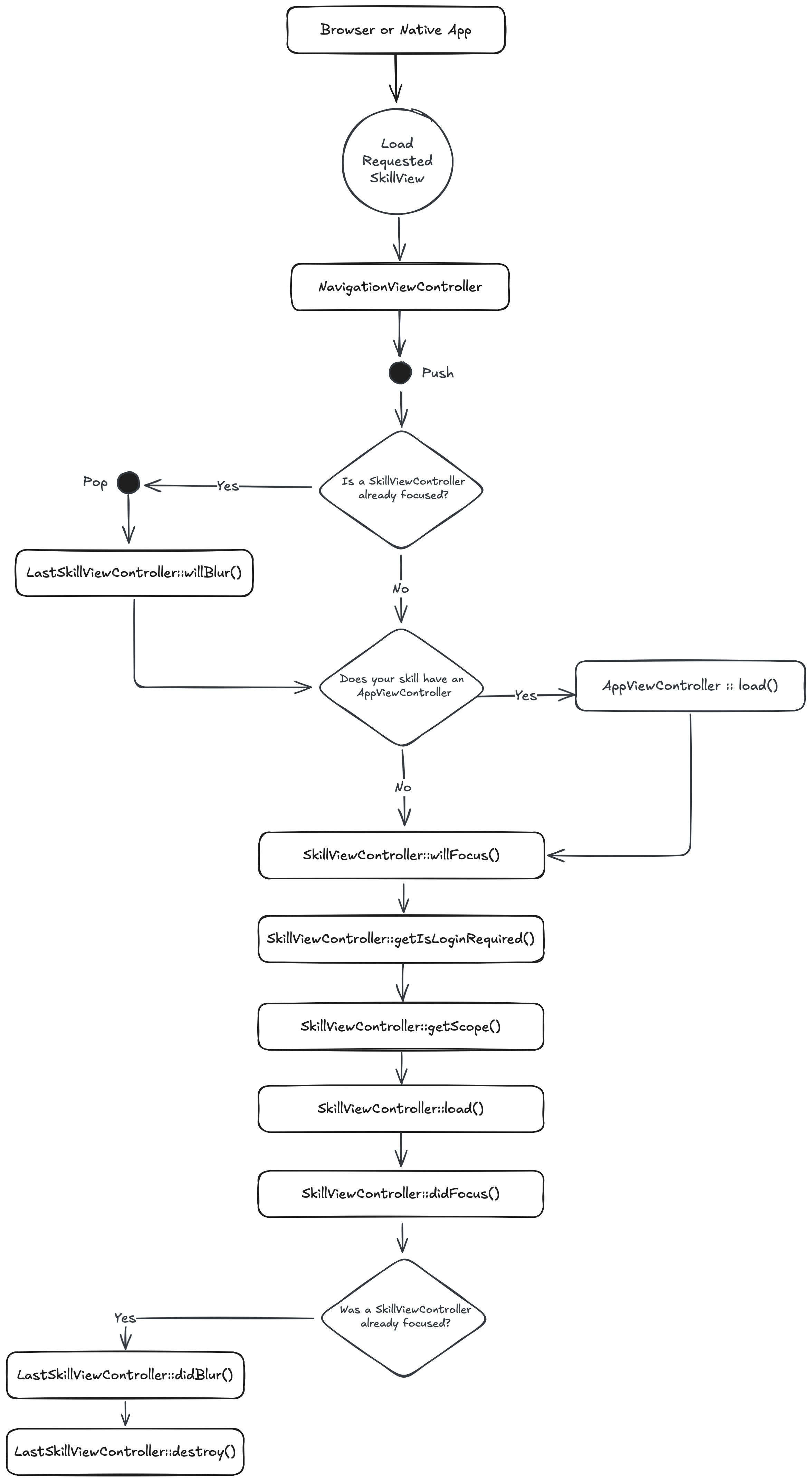
Lifecycle Description
Whenever a SkillView is rendered, your SkillViewController is pushed onto the NavigationViewController (inside the Heartwood Skill) and immediately rendered (by calling render()). Then, the lifecycle methods are called in the following order:
- A request is made to the
Theatreand is handled byHeartwood. Heartwoodloads the requestedSkillViewControllerand pushes it onto theNavigationViewController.- If a
SkillViewis already focused.willBlur(): Promise<void>is called on the focusedSkillViewController- This is chance to do something just before your
SkillViewis sent to the background.
willFocus(): Promise<void>is called on theSkillViewControllerthat is about to be focused.- You can run any last minute operations before your
SkillViewis brought to the foreground. - Your access to resources (like
RouterorAuthenticator) is limited, so you can’t do anything too heavy here.
- You can run any last minute operations before your
- If your
Skillas anAppViewControllerdefined:load()is called on theAppViewController.- This is the time to load anything all your
SkillViewsmay need and that you want to share between them. - You can also the
AppViewControllerto render theNavigationViewControlleryou want shared across all yourSkillViews.
getIsLoginRequired(): Promise<bool>is called on theSkillViewControllerthat is about to be focused.- If
true, theNavigationViewControllerwill render aLoginCardViewControlleras aDialog. - If the person fails to login, they are redirected to the
RootSkillViewControllerof theHeartwood Skill.
- If
getScope(): ScopeFlags[]is called on theSkillViewControllerthat is about to be focused.- Allow you to configure if your
SkillView’s actions are scoped to aLocationor anOrganization. - You can learn more about
Scopein the Scope Section.
- Allow you to configure if your
load(options: SkillViewControllerLoadOptions): Promise<void>is called on theSkillViewControllerthat is about to be focused.- This is the best time for your heavy lifting.
- Your skill view is loaded after all prerequisites are met (logged in &
Scope) - Remember: Your
SkillViewas already focused at this point.
didFocus(): Promise<void>is called on theSkillViewControllerthat is about to be focused.- A chance to do something after your
SkillViewis brought to the foreground & loaded.
- A chance to do something after your
- If there was a previously focused
SkillViewController:didBlur(): Promise<void>is called- Now that the previously focused
SkillViewis in the background, you can do any cleanup.
- Now that the previously focused
destroy(): Promise<void>is called- This is the final chance to do cleanup.
- Remove all listeners, clear intervals, etc.
Root Skill View
Coming soon…
AppViewController
Coming soon…
Rendering Skill Views
Skill Views are the equivalent of pages in a “standard” web application. They are accessible via the url in 2 ways.
- Subdomain:
https://{skillNamespace}.spruce.bot(will render yourRootSkillViewController) - Hash:
https://spruce.bot/#/views/{skillNamespace}.{viewId}
Root Skill View
Let’s get started on rendering a RootSkillView.
Test 1: Load Your (Root) Skill View
We’ll start with the RootSkillViewController. All you have to do to start is try and load your Skill View and the test will fail.
import {
    AbstractSpruceFixtureTest
} from '@sprucelabs/spruce-test-fixtures'

export default class RootSkillViewTest extends AbstractSpruceFixtureTest {
    @test()
    protected async canLoadRootSkillView() {
        this.views.Controller('eightbitstories.root', {}),
    }
}
Production 1: Create Your Root Skill View
This part is pretty easy! Run this following command and follow the instructions!
spruce create.view
Rendering A Different Skill View
Coming soon…
Redirecting Between Skill Views
Coming soon…
Rendering Cards
Rendering Card by Id
Now that you have your RootSkillViewController, you can start adding cards to it. Here is how you can test and implement some cards.
Test 1: Assert card is rendered
import { AbstractSpruceFixtureTest } from '@sprucelabs/spruce-test-fixtures'
import { vcAssert } from '@sprucelabs/heartwood-view-controllers'

export default class RootSkillViewTest extends AbstractSpruceFixtureTest {
    @test()
    protected async rendersExpectedCard() {
        const vc = this.views.Controller('eightbitstories.root', {})
        vcAssert.assertSkillViewRendersCard(vc, 'my-card')
    }
}
Production 1a: Render your card
We’ll quickly create a CardViewController to render in our RootSkillViewController as the only card in a single layout.
import {
    AbstractSkillViewController,
    ViewControllerOptions,
    SkillView,
    CardViewController,
} from '@sprucelabs/heartwood-view-controllers'

export default class RootSkillViewController extends AbstractSkillViewController {
    public static id = 'root'
    protected cardVc: CardViewController

    public constructor(options: ViewControllerOptions) {
        super(options)
        this.cardVc = this.Controller('card', {
            id: 'my-card',
            header: {
                title: 'My Card',
            },
        })
    }

    public render(): SkillView {
        return {
            layouts: [
                {
                    cards: [this.cardVc.render()],
                },
            ],
        }
    }
}
Note: Your card’s
ViewModelis never fully tested. Things like header text changes too much to make a meaningful test. The only time you should test the copy in your view is if it’s dynamically generated.
Production 1b: Cleanup your SkillView
Extracting the construction of your nested view controllers to builder methods makes the constructor of your RootSkillViewController much easier to read and makes refactor easier.
import {
    AbstractSkillViewController,
    ViewControllerOptions,
    SkillView,
    CardViewController,
} from '@sprucelabs/heartwood-view-controllers'

export default class RootSkillViewController extends AbstractSkillViewController {
    public static id = 'root'
    protected cardVc: CardViewController

    public constructor(options: ViewControllerOptions) {
        super(options)
        this.cardVc = this.CardVc()
    }

    private CardVc() {
        return this.Controller('card', {
            id: 'my-card',
            header: {
                title: 'My Card',
            },
        })
    }

    public render(): SkillView {
        return {
            layouts: [
                {
                    cards: [this.cardVc.render()],
                },
            ],
        }
    }
}
Rendering your own ViewController Class
Test 1: Assert card rendered of type
This test picks up where the last one left off. We’re going to test that the CardViewController is rendered as an instance of MyCardViewController.
import { AbstractSpruceFixtureTest } from '@sprucelabs/spruce-test-fixtures'
import { vcAssert } from '@sprucelabs/heartwood-view-controllers'

export default class RootSkillViewTest extends AbstractSpruceFixtureTest {
    @test()
    protected async rendersExpectedCard() {
        const vc = this.views.Controller('eightbitstories.root', {})
        const cardVc = vcAssert.assertSkillViewRendersCard(vc, 'my-card')
        vcAssert.assertControllerInstanceOf(cardVc, MyCardViewController)
    }
}
Note: You will be getting a “MyCardViewController not defined” error here, that is expected. We will fix that in the next step.
Production 1: Create your own ViewController Class
spruce create.view
Make sure you select “Card” as the type of ViewModel you want your new ViewController to render and name it “My Card”.
Note: View controllers will automatically have ‘ViewController’ appended to the end of the name you provide, so “My Card” will become “MyCardViewController”.
Test 2: Import ViewController Class
import { AbstractSpruceFixtureTest } from '@sprucelabs/spruce-test-fixtures'
import { vcAssert } from '@sprucelabs/heartwood-view-controllers'
import MyCardViewController from '../../ViewControllers/MyCard.vc'

export default class RootSkillViewTest extends AbstractSpruceFixtureTest {
    @test()
    protected async rendersExpectedCard() {
        const vc = this.views.Controller('eightbitstories.root', {})
        const cardVc = vcAssert.assertSkillViewRendersCard(vc, 'my-card')
        vcAssert.assertControllerInstanceOf(cardVc, MyCardViewController)
    }
}
Production 1a: Implement your ViewController Class
In Spruce, we use composition over inheritance. That means your MyCardViewController should have a CardViewController as a property and render that, rather than trying to extend CardViewController or implement the CardViewController interface.
export default class MyCardViewController extends AbstractViewController<Card> {
    public static id = 'my-card'
    private cardVc: CardCardViewController

    public constructor(options: ViewControllerOptions) {
        super(options)

        this.cardVc = this.Controller('card', {
            id: 'my-card',
            header: {
                title: "Hey there!",
            },
        })
    }

    public render() {
        return this.cardVc.render()
    }
}
Production 1b: Update your RootSkillViewController
Now it’s just a matter of swapping out card for my-card in your CardVc builder method, renaming a few things, and updating the render method to render your new MyCardViewController.
import {
    AbstractSkillViewController,
    ViewControllerOptions,
    SkillView,
    CardViewController,
} from '@sprucelabs/heartwood-view-controllers'
import MyCardViewController from '../ViewControllers/MyCard.vc'

export default class RootSkillViewController extends AbstractSkillViewController {
    public static id = 'root'
    protected myCardVc: MyCardViewController

    public constructor(options: ViewControllerOptions) {
        super(options)
        this.myCardVc = this.MyCardVc()
    }

    private MyCardVc() {
        return this.Controller('eightbitstories.my-card', {})
    }

    public render(): SkillView {
        return {
            layouts: [
                {
                    cards: [this.myCardVc.render()],
                },
            ],
        }
    }
}
Production 1c: Cleanup MyCardViewController
Now we’ll go throught the usual refactor of extracting the construction of your view controllers to builder methods.
export default class MyCardViewController extends AbstractViewController<Card> {
    public static id = 'my-card'
    private cardVc: CardCardViewController

    public constructor(options: ViewControllerOptions) {
        super(options)
        this.cardVc = this.CardVc()
    }

    private CardVc() {
        return this.Controller('card', {
            id: 'my-card',
            header: {
                title: "Hey there!",
            },
        })
    }

    public render() {
        return this.cardVc.render()
    }
}
Rendering remote cards
The interoperatibility of Spruce allows you to render cards from other skills. It’s a great way to share views accross multiple skills. To pull this off, you’ll leverage the RemoteViewControllerFactory provided by @sprucelabs/spruce-heartwood-utils.
Test 1a: Set stage for importing RemoteViewControllerFactory
For this first test, we’re going to drop in the MockRemoteViewControllerFactory test double to get ready to make some assertions.
import { AbstractSpruceFixtureTest } from '@sprucelabs/spruce-test-fixtures'
import { vcAssert } from '@sprucelabs/heartwood-view-controllers'

export default class RenderingARemoteCard extends AbstractSpruceFixtureTest {
    @test()
    protected async loadsRemoteCard() {
        RemoteViewControllerFactoryImpl.Class = MockRemoteViewControllerFactory
    }
}
Test 1b: Import @sprucelabs/spruce-heartwood-utils
You should get 2 errors, one for each class you need to import. Lets start by adding the correct dependency using yarn.
yarn add @sprucelabs/spruce-heartwood-utils
Now that this is done, you can import the classes you need and the tests will pass.
import { AbstractSpruceFixtureTest } from '@sprucelabs/spruce-test-fixtures'
import { vcAssert } from '@sprucelabs/heartwood-view-controllers'
import { RemoteViewControllerFactoryImpl, MockRemoteViewControllerFactory } from '@sprucelabs/spruce-heartwood-utils'

export default class RenderingARemoteCard extends AbstractSpruceFixtureTest {
    @test()
    protected async loadsRemoteCard() {
        RemoteViewControllerFactoryImpl.Class = MockRemoteViewControllerFactory
    }
}
Test 1c: Assert card is fetched
Now I’m going to execute the operation (in this case this.views.load(...)) where I expect the remote card to be fetched. Then I’ll assert that it was fetched by accessing the MockRemoteViewControllerFactory instance.
import { AbstractSpruceFixtureTest } from '@sprucelabs/spruce-test-fixtures'
import { vcAssert } from '@sprucelabs/heartwood-view-controllers'
import { RemoteViewControllerFactoryImpl, MockRemoteViewControllerFactory } from '@sprucelabs/spruce-heartwood-utils'

export default class RenderingARemoteCard extends AbstractSpruceFixtureTest {
    @test()
    protected async loadsRemoteCard() {
        RemoteViewControllerFactoryImpl.Class = MockRemoteViewControllerFactory


        const vc = this.views.Controller('eightbitstories.root', {})
        await this.views.load(vc)

        MockRemoteViewControllerFactory.getInstance().assertFetchedRemoteController('other-skill.my-card')

    }
}
Production 1: Load the remote card
The first step in production is to load the remote card. I won’t be actually rendering it yet, that’ll be a different test!
import { AbstractSkillViewController } from '@sprucelabs/heartwood-view-controllers'

class RootSkillViewController extends AbstractSkillViewController {
    public static id = 'root'

    public async load() {
        const remote = RemoteViewControllerFactoryImpl.Factory({
            connectToApi: this.connectToApi,
            vcFactory: this.getVcFactory()
        })

        await remote.RemoteController('other-skill.my-card', {})
    }

     public render() {
        return {}
    }
}
Test 2: Drop in the remote card to the MockRemoteViewControllerFactory
You should now be getting an error something like “Couldn’t find a view controller called “other-skill.my-card”.” I’m gonna drop in a CardViewController into the MockRemoteViewControllerFactory to make that error go away.
import { AbstractSpruceFixtureTest } from '@sprucelabs/spruce-test-fixtures'
import { vcAssert, CardViewControllerImpl } from '@sprucelabs/heartwood-view-controllers'
import { RemoteViewControllerFactoryImpl, MockRemoteViewControllerFactory } from '@sprucelabs/spruce-heartwood-utils'

export default class RenderingARemoteCard extends AbstractSpruceFixtureTest {
    @test()
    protected async loadsRemoteCard() {
        RemoteViewControllerFactoryImpl.Class = MockRemoteViewControllerFactory

        MockRemoteViewControllerFactory.dropInRemoteController(
            'forms.remote-form-card',
            CardViewControllerImpl
        )

        const vc = this.views.Controller('eightbitstories.root', {})
        await this.views.load(vc)

        MockRemoteViewControllerFactory.getInstance().assertFetchedRemoteController('other-skill.my-card')

    }
}
Note: I dropped in a
CardViewControllerImplto keep the example simple, but you will probably want to drop in a test double to make more assertions later.
Test 3: Assert Skill View renders the remote card
import { AbstractSpruceFixtureTest } from '@sprucelabs/spruce-test-fixtures'
import { vcAssert, CardViewControllerImpl } from '@sprucelabs/heartwood-view-controllers'
import { RemoteViewControllerFactoryImpl, MockRemoteViewControllerFactory } from '@sprucelabs/spruce-heartwood-utils'

export default class RenderingARemoteCard extends AbstractSpruceFixtureTest {
    @test()
    protected async loadsRemoteCard() {
        RemoteViewControllerFactoryImpl.Class = MockRemoteViewControllerFactory

        MockRemoteViewControllerFactory.dropInRemoteController(
            'forms.remote-form-card',
            CardViewControllerImpl
        )

        const vc = this.views.Controller('eightbitstories.root', {})
        await this.views.load(vc)

        MockRemoteViewControllerFactory.getInstance().assertFetchedRemoteController('other-skill.my-card')

    }

    @test()
    protected async rendersRemoteCard() {
        RemoteViewControllerFactoryImpl.Class = MockRemoteViewControllerFactory

        MockRemoteViewControllerFactory.dropInRemoteController(
            'forms.remote-form-card',
            CardViewControllerImpl
        )

        const vc = this.views.Controller('eightbitstories.root', {})

        await this.views.load(vc)

        MockRemoteViewControllerFactory.getInstance().assertSkillViewRendersRemoteCard(vc, 'other-skill.my-card')
    }
}
Production 2: Render the remote card
import { AbstractSkillViewController } from '@sprucelabs/heartwood-view-controllers'

class RootSkillViewController extends AbstractSkillViewController {
    public static id = 'root'

    private remoteCardVc?: CardViewController

    public async load() {
        const remote = RemoteViewControllerFactoryImpl.Factory({
            connectToApi: this.connectToApi,
            vcFactory: this.getVcFactory()
        })

        this.remoteCardVc = await remote.RemoteController('other-skill.my-card', {})
    }

    public render() {
        if (!this.remoteCardVc) {
            return {}
        }

        return {
            layouts: [
                {
                    cards: [
                        this.remoteCardVc.render()
                    ]
                }
            ]
        }
    }
}
Note: In order to get types to pass, I had to optionally return early from
render(). Becauserender()is called beforeload(), I had to make sure thatthis.remoteCardVcwas optional and that I returned an empty object if it was not set. You can return anything you want before load.
Test 4: Dry the test
import { AbstractSpruceFixtureTest } from '@sprucelabs/spruce-test-fixtures'
import { vcAssert, CardViewControllerImpl } from '@sprucelabs/heartwood-view-controllers'
import { RemoteViewControllerFactoryImpl, MockRemoteViewControllerFactory } from '@sprucelabs/spruce-heartwood-utils'

export default class RenderingARemoteCard extends AbstractSpruceFixtureTest {
    private vc!: RootSkillViewController

    protected async beforeEach() {
        await super.beforeEach()

        RemoteViewControllerFactoryImpl.Class = MockRemoteViewControllerFactory
        MockRemoteViewControllerFactory.dropInRemoteController(
            'forms.remote-form-card',
            CardViewControllerImpl
        )
        this.vc = this.views.Controller('eightbitstories.root', {})
    }

    @test()
    protected async loadsRemoteCard() {
        await this.load()
        this.mockFactory.assertFetchedRemoteController('other-skill.my-card')
    }

    @test()
    protected async rendersRemoteCard() {
        await this.load()
        this.mockFactory.assertSkillViewRendersRemoteCard(vc, 'other-skill.my-card')
    }

    private async load() {
        await this.views.load(vc)
    }

    private get mockFactory() {
        return MockRemoteViewControllerFactory.getInstance()
    }
}
Test 5: Assert render is triggered
Simply setting the remote card to this.remoteCardVc will not cause the card to be rendered. You need to manually trigger a render on your SkillViewController.
import { AbstractSpruceFixtureTest } from '@sprucelabs/spruce-test-fixtures'
import { vcAssert, CardViewControllerImpl } from '@sprucelabs/heartwood-view-controllers'
import { RemoteViewControllerFactoryImpl, MockRemoteViewControllerFactory } from '@sprucelabs/spruce-heartwood-utils'

export default class RenderingARemoteCard extends AbstractSpruceFixtureTest {
    private vc!: RootSkillViewController

    protected async beforeEach() {
        await super.beforeEach()

        RemoteViewControllerFactoryImpl.Class = MockRemoteViewControllerFactory
        MockRemoteViewControllerFactory.dropInRemoteController(
            'forms.remote-form-card',
            CardViewControllerImpl
        )
        this.vc = this.views.Controller('eightbitstories.root', {})
    }

    @test()
    protected async loadsRemoteCard() {
        await this.load()
        this.mockFactory.assertFetchedRemoteController('other-skill.my-card')
    }

    @test()
    protected async rendersRemoteCard() {
        await this.load()
        this.mockFactory.assertSkillViewRendersRemoteCard(vc, 'other-skill.my-card')
    }

    @test()
    protected async triggersRender() {
        await this.load()
        vcAssert.assertTriggerRenderCount(this.vc, 1)
    }

    private async load() {
        await this.views.load(vc)
    }

    private get mockFactory() {
        return MockRemoteViewControllerFactory.getInstance()
    }
}
Production 3: Trigger render in Skill View
import { AbstractSkillViewController } from '@sprucelabs/heartwood-view-controllers'

class RootSkillViewController extends AbstractSkillViewController {
    public static id = 'root'

    private remoteCardVc?: CardViewController

    public async load() {
        const remote = RemoteViewControllerFactoryImpl.Factory({
            connectToApi: this.connectToApi,
            vcFactory: this.getVcFactory()
        })

        this.remoteCardVc = await remote.RemoteController('other-skill.my-card', {})
        this.triggerRender()
    }

    public render() {
        if (!this.remoteCardVc) {
            return {}
        }

        return {
            layouts: [
                {
                    cards: [
                        this.remoteCardVc.render()
                    ]
                }
            ]
        }
    }
}
Active Record Card
The ActiveRecordCard is a special card that is used to quickly render records returned from a listener (usually pulled from a database, but not necessarily). Generally speaking, it is a great way to render a list of records.

Note: This test starts with a MyCardViewContoller that you have already created in the “Rendering Card by Id” section. You should start with that test before continuing.
Test 1: Assert card is rendered as instance of ActiveRecordCardViewController
If you haven’t already created a test, you need to run:
spruce create.test
And call it “My Card” and select AbstractSpruceFixtureTest as the base test class (unless you have a different base class you want to use). The idea here is to test the card independently of the Skill View.
import { vcAssert, AbstractSpruceFixtureTest } from '@sprucelabs/heartwood-view-controllers'
import { test } from '@sprucelabs/test-utils'

export default class MyCardTest extends AbstractSpruceFixtureTest {
    @test()
    protected async rendersAsInstanceOfActiveRecordCard() {
        const vc = this.views.Controller('eightbitstories.my-card', {})
        vcAssert.assertIsActiveRecordCard(vc)
    }
}
Production 1: Render the ActiveRecordCard
import {
    AbstractViewController,
    ViewControllerOptions,
    Card,
    buildActiveRecordCard,
    ActiveRecordCardViewController,
} from '@sprucelabs/heartwood-view-controllers'

export default class MyCardViewController extends AbstractViewController<Card> {
    public static id = 'my-card'
    private activeRecordCardVc: ActiveRecordCardViewController

    public constructor(options: ViewControllerOptions) {
        super(options)
        this.activeRecordCardVc = this.ActiveCardVc()
    }

    private ActiveCardVc() {
        return this.Controller(
            'active-record-card',
            buildActiveRecordCard({
                id: 'my-cards-id',
                header: {
                    title: "Family Members",
                },
                eventName: 'list-installed-skills::v2020_12_25',
                responseKey: 'skills',
                rowTransformer: () => ({
                    id: 'aoeu',
                    cells: [],
                }),
            })
        )
    }

    public render() {
        return this.activeRecordCardVc.render()
    }
}
Note: The
eventNameandresponseKeyare placeholders. You will need to replace them with the actual event name and response key that you are listening for in upcoming tests.
Test 2: Assert ActiveRecordCard is emitting the correct event on load
Even though our goal is to make sure that the ActiveRecordCard is emitting the correct event on load, we’ll first need to make sure that MyCardViewController has a method called load that calls this.activeRecordCardVc.load(). We’re not going to jump right there, though. We’ll start with the test below which will fail because MyCardViewController doesn’t have a load method.
import { vcAssert, AbstractSpruceFixtureTest } from '@sprucelabs/heartwood-view-controllers'
import { eventFaker } from '@sprucelabs/spruce-test-fixtures'
import { test } from '@sprucelabs/test-utils'

export default class WhosOnWifiCardTest extends AbstractSpruceFixtureTest {
    @test()
    protected async rendersAsInstanceOfActiveRecordCard() {
        const vc = this.views.Controller('eightbitstories.my-card', {})
        vcAssert.assertIsActiveRecordCard(vc)
    }

    @test()
    protected async emitsListConnectedPeopleOnLoad() {
        let wasHit = false

        await eventFaker.on('eightbitstories.list-family-members::v2024_07_22', () => {
            wasHit = true
            return {
                familyMembers: [],
            }
        })

        const vc = this.views.Controller('eightbitstories.my-card', {})
        await vc.load()
    }
}
Note: The event
eightbitstories.list-family-members::v2024_07_22is a best guess at what the event name will be. It will show a type error to start, that is fine, we’ll fix it in a moment.
Note: The response to the event,
{ familyMembers: [] }, is what we’d like the event to respond with, once we design it. The idea being, design it how you think it should work, and then make it work that way.
Production 2: Stub the load method to MyCardViewController
import {
    AbstractViewController,
    ViewControllerOptions,
    Card,
    buildActiveRecordCard,
    ActiveRecordCardViewController,
} from '@sprucelabs/heartwood-view-controllers'

export default class MyCardViewController extends AbstractViewController<Card> {
    public static id = 'my-card'
    private activeRecordCardVc: ActiveRecordCardViewController

    public constructor(options: ViewControllerOptions) {
        super(options)
        this.activeRecordCardVc = this.ActiveCardVc()
    }

    private ActiveCardVc() {
        return this.Controller(
            'active-record-card',
            buildActiveRecordCard({
                id: 'my-cards-id',
                header: {
                    title: "Family Members",
                },
                eventName: 'list-installed-skills::v2020_12_25',
                responseKey: 'skills',
                rowTransformer: () => ({
                    id: 'aoeu',
                    cells: [],
                }),
            })
        )
    }

    public async load() {}

    public render() {
        return this.activeRecordCardVc.render()
    }
}
Test 3: Assert the event is being emitted
import { vcAssert, AbstractSpruceFixtureTest } from '@sprucelabs/heartwood-view-controllers'
import { eventFaker } from '@sprucelabs/spruce-test-fixtures'
import { test, assert } from '@sprucelabs/test-utils'

export default class WhosOnWifiCardTest extends AbstractSpruceFixtureTest {
    @test()
    protected async rendersAsInstanceOfActiveRecordCard() {
        const vc = this.views.Controller('eightbitstories.my-card', {})
        vcAssert.assertIsActiveRecordCard(vc)
    }

    @test()
    protected async emitsListConnectedPeopleOnLoad() {
        let wasHit = false

        await eventFaker.on('eightbitstories.list-family-members::v2024_07_22', () => {
            wasHit = true
            return {
                familyMembers: [],
            }
        })

        const vc = this.views.Controller('eightbitstories.my-card', {})
        await vc.load()

        assert.isTrue(wasHit, 'The event eightbitstories.list-family-members::v2024_07_22 was not emitted.')
    }
}
Production 3a: Emit the event on load
Not only are we going to load the ActiveRecordCard on load, but we’re going to update the event eightbitstories.list-family-members::v2024_07_22 and the responseKey to match what we want it to look like.
import {
    AbstractViewController,
    ViewControllerOptions,
    Card,
    buildActiveRecordCard,
    ActiveRecordCardViewController,
} from '@sprucelabs/heartwood-view-controllers'

export default class MyCardViewController extends AbstractViewController<Card> {
    public static id = 'my-card'
    private activeRecordCardVc: ActiveRecordCardViewController

    public constructor(options: ViewControllerOptions) {
        super(options)
        this.activeRecordCardVc = this.ActiveCardVc()
    }

    private ActiveCardVc() {
        return this.Controller(
            'active-record-card',
            buildActiveRecordCard({
                id: 'my-cards-id',
                header: {
                    title: "Family Members",
                },
                eventName: 'eightbitstories.list-family-members::v2024_07_22',
                responseKey: 'familyMembers',
                rowTransformer: () => ({
                    id: 'aoeu',
                    cells: [],
                }),
            })
        )
    }

    public async load() {
        await this.activeRecordCardVc.load()
    }

    public render() {
        return this.activeRecordCardVc.render()
    }
}
Production 3b: Create the event
You should be getting an error that the event eightbitstories.list-family-members::v2024_07_22 doesn’t exist. Let’s create it!
spruce create.event
Make sure to name it “List Family Members”.
Note: Now you can jump into the event definition files and design it how you think it should work. Once you have that, you can run
spruce sync.eventsto generate the event contracts and your test will pass.
Production 3c (Optional): Stub a target
If your event requires a target, let’s stub one in for now:
import {
    AbstractViewController,
    ViewControllerOptions,
    Card,
    buildActiveRecordCard,
    ActiveRecordCardViewController,
} from '@sprucelabs/heartwood-view-controllers'

export default class MyCardViewController extends AbstractViewController<Card> {
    public static id = 'my-card'
    private activeRecordCardVc: ActiveRecordCardViewController

    public constructor(options: ViewControllerOptions) {
        super(options)
        this.activeRecordCardVc = this.ActiveCardVc()
    }

    private ActiveCardVc() {
        return this.Controller(
            'active-record-card',
            buildActiveRecordCard({
                id: 'my-cards-id',
                header: {
                    title: "Family Members",
                },
                eventName: 'eightbitstories.list-family-members::v2024_07_22',
                responseKey: 'familyMembers',
                target: {
                    organizationId: 'aoeu'
                },
                rowTransformer: () => ({
                    id: 'aoeu',
                    cells: [],
                }),
            })
        )
    }

    public async load() {
        await this.activeRecordCardVc.load()
    }

    public render() {
        return this.activeRecordCardVc.render()
    }
}
Test 4a: Dry the tests
Now is as good as time as any to cleaup our test code. We’ll move the construction of the MyCardViewController the beforeEach() of the test to make the test easier to read and refactor later.
import { vcAssert, AbstractSpruceFixtureTest } from '@sprucelabs/heartwood-view-controllers'
import { eventFaker } from '@sprucelabs/spruce-test-fixtures'
import { test, assert } from '@sprucelabs/test-utils'
import MyCardViewController from '../../ViewControllers/MyCard.vc'

export default class WhosOnWifiCardTest extends AbstractSpruceFixtureTest {
    protected vc: MyCardViewController

    protected async beforeEach() {
        await super.beforeEach()
        this.vc = this.views.Controller('eightbitstories.my-card', {})
    }

    @test()
    protected async rendersAsInstanceOfActiveRecordCard() {
        vcAssert.assertIsActiveRecordCard(this.vc)
    }

    @test()
    protected async emitsListConnectedPeopleOnLoad() {
        let wasHit = false

        await eventFaker.on('eightbitstories.list-family-members::v2024_07_22', () => {
            wasHit = true
            return {
                familyMembers: [],
            }
        })

        await this.vc.load()

        assert.isTrue(wasHit, 'The event eightbitstories.list-family-members::v2024_07_22 was not emitted.')
    }
}
Test 4b (Optional): Assert the correct target
If this were a SkillViewController, our load() method would be passed Scope, which would be how we could get the current Organization or Location. But, since this is a ViewController, we don’t have that luxury. We’ll need the person calling load() on our ViewController to pass the important information in and we’ll construct the target from that.
import { SpruceSchemas, vcAssert } from '@sprucelabs/heartwood-view-controllers'
import { eventFaker, AbstractFixtureTest } from '@sprucelabs/spruce-test-fixtures'
import { assert, generateId, test } from '@sprucelabs/test-utils'
import MyCardViewController from '../../../viewControllers/MyCard.vc'

export default class MyCardTest extends AbstractFixtureTest {
    private vc!: MyCardViewController

    protected async beforeEach() {
        await super.beforeEach()
        this.vc = this.views.Controller('eightbitstories.my-card', {})
    }

    @test()
    protected async rendersAsInstanceOfActiveRecordCard() {
        vcAssert.assertIsActiveRecordCard(this.vc)
    }

    @test()
    protected async emitsListConnectedPeopleOnLoad() {
        const organizationId = generateId()

        let wasHit = false
        let passedTarget:
            | SpruceSchemas.Eightbitstories.v2024_07_22.ListFamilyMembersEmitTarget
            | undefined

        await eventFaker.on(
            'eightbitstories.list-family-members::v2024_07_22',
            ({ target }) => {
                passedTarget = target
                wasHit = true
                return {
                    people: [],
                }
            }
        )

        await this.vc.load(organizationId)

        assert.isTrue(wasHit)
        assert.isEqualDeep(passedTarget, { organizationId })
    }
}
Production 4 (Optional): Set the target on the ActiveRecordCard
import {
    AbstractViewController,
    ViewControllerOptions,
    Card,
    buildActiveRecordCard,
    ActiveRecordCardViewController,
} from '@sprucelabs/heartwood-view-controllers'

export default class MyCardViewController extends AbstractViewController<Card> {
    public static id = 'my-card'
    private activeRecordCardVc: ActiveRecordCardViewController

    public constructor(options: ViewControllerOptions) {
        super(options)
        this.activeRecordCardVc = this.ActiveCardVc()
    }

    private ActiveCardVc() {
        return this.Controller(
            'active-record-card',
            buildActiveRecordCard({
                id: 'my-cards-id',
                header: {
                    title: "Family Members",
                },
                eventName: 'eightbitstories.list-family-members::v2024_07_22',
                responseKey: 'familyMembers',
                rowTransformer: () => ({
                    id: 'aoeu',
                    cells: [],
                }),
            })
        )
    }

    public async load(organizationId: string) {
        this.activeRecordCardVc.setTarget({ organizationId })
        await this.activeRecordCardVc.load()
    }

    public render() {
        return this.activeRecordCardVc.render()
    }
}
Note: Because we are setting the target using
setTarget(), we don’t need to pass it to the constructor of theActiveRecordCard. So we removed the stubbed target from the constructor.
Test 5: Refactor the test
The idea here is to remove the redundant assertions and to extract out the eventFaker to an EventFaker class we can reuse across tests.
import { vcAssert } from '@sprucelabs/heartwood-view-controllers'
import { AbstractFixtureTest } from '@sprucelabs/spruce-test-fixtures'
import { assert, generateId, test } from '@sprucelabs/test-utils'
import MyCardViewController from '../../../viewControllers/MyCard.vc'
import EventFaker, { ListFamilyMembersTargetAndPayload } from '../../support/EventFaker'

export default class WhosOnWifiCardTest extends AbstractSpruceFixtureTest {
    private vc!: MyCardViewController
    private static eventFaker: EventFaker

    protected async beforeEach() {
        await super.beforeEach()
        this.eventFaker = new EventFaker()
        this.vc = this.views.Controller('eightbitstories.my-card', {})
    }

    @test()
    protected async rendersAsInstanceOfActiveRecordCard() {
        vcAssert.assertIsActiveRecordCard(this.vc)
    }

    @test()
    protected async emitsListConnectedPeopleOnLoad() {
        const organizationId = generateId()

        let passedTarget:
            | ListFamilyMembersTargetAndPayload['target']
            | undefined

        await this.eventFaker.fakeListFamilyMembers(({ target }) => {
            passedTarget = target
            return {
                people: []
            }
        })

        await this.vc.load(organizationId)

        assert.isEqualDeep(passedTarget, { organizationId })
    }
}
And our new EventFaker implementation:
import { eventFaker, SpruceSchemas } from '@sprucelabs/spruce-test-fixtures'
import { generateId } from '@sprucelabs/test-utils'
import { SpruceSchemas, Person } from '@sprucelabs/spruce-core-schemas'

export class EventFaker {
    public async fakeListFamilyMembers(
        cb?: (targetAndPayload: ListConnectPeopleTargetAndPayload) => void | ListConnectedPeopleResponse
    ) {
        await eventFaker.on(
            'eightbitstories.list-familyMembers::v2024_07_22',
            (targetAndPayload) => {
                return cb?.(targetAndPayload) ?? {
                    people: [],
                }
            }
        )
    }
}

export type ListFamilyMembersTargetAndPayload =
    SpruceSchemas.Eightbitstories.v2024_07_22.ListFamilyMembersEmitTargetAndPayload
export type ListConnectedPeopleResponse =
    SpruceSchemas.Eightbitstories.v2024_07_22.ListFamilyMembersResponsePayload
Test 6a: Assert the expected rows are rendered
import { vcAssert } from '@sprucelabs/heartwood-view-controllers'
import { AbstractFixtureTest } from '@sprucelabs/spruce-test-fixtures'
import { assert, generateId, test } from '@sprucelabs/test-utils'
import MyCardViewController from '../../../viewControllers/MyCard.vc'
import { Person } from '@sprucelabs/spruce-core-schemas'
import EventFaker, { ListFamilyMembersTargetAndPayload } from '../../support/EventFaker'

export default class WhosOnWifiCardTest extends AbstractSpruceFixtureTest {
    private vc!: MyCardViewController
    private static eventFaker: EventFaker

    protected async beforeEach() {
        await super.beforeEach()
        this.eventFaker = new EventFaker()
        this.vc = this.views.Controller('eightbitstories.my-card', {})
    }

    @test()
    protected async rendersAsInstanceOfActiveRecordCard() {
        vcAssert.assertIsActiveRecordCard(this.vc)
    }

    @test()
    protected async emitsListConnectedPeopleOnLoad() {
        const organizationId = generateId()

        let passedTarget:
            | ListFamilyMembersTargetAndPayload['target']
            | undefined

        await this.eventFaker.fakeListFamilyMembers(({ target }) => {
            passedTarget = target
            return {
                people: []
            }
        })

        await this.vc.load(organizationId)

        assert.isEqualDeep(passedTarget, { organizationId })
    }

    @test()
    protected async rendersRowForResults() {
        const organizationId = generateId()

        const person: Person = {
            id: generateId(),
            casualName: generateId(),
            networkInterface: 'eth0',
        }

        await this.eventFaker.fakeListConnectedPeople(() => [person])

        await this.vc.load(organizationId)

        listAssert.listRendersRow(this.vc.getListVc(), person.id)
    }
}
Note: You should get an error that
getListVc()doesn’t exist. To fix this, we’ll need aSpytest double to expose theActiveRecordCard’sgetListVc()method.
Test 6b: Create the Test Double
Here we’re going to create the SpyMyCard test double, override the controller using this.views.setController(), and typecast the controller to SpyMyCard to expose the getListVc() method.
import { vcAssert } from '@sprucelabs/heartwood-view-controllers'
import { AbstractFixtureTest } from '@sprucelabs/spruce-test-fixtures'
import { assert, generateId, test } from '@sprucelabs/test-utils'
import MyCardViewController from '../../../viewControllers/MyCard.vc'
import { Person } from '@sprucelabs/spruce-core-schemas'
import EventFaker, { ListFamilyMembersTargetAndPayload } from '../../support/EventFaker'

export default class WhosOnWifiCardTest extends AbstractSpruceFixtureTest {
    private vc!: SpyMyCard
    private static eventFaker: EventFaker

    protected async beforeEach() {
        await super.beforeEach()
        this.eventFaker = new EventFaker()

        this.views.setController('eightbitstories.my-card', SpyMyCard)
        this.vc = this.views.Controller('eightbitstories.my-card', {}) as SpyMyCard
    }

    @test()
    protected async rendersAsInstanceOfActiveRecordCard() {
        vcAssert.assertIsActiveRecordCard(this.vc)
    }

    @test()
    protected async emitsListConnectedPeopleOnLoad() {
        const organizationId = generateId()

        let passedTarget:
            | ListFamilyMembersTargetAndPayload['target']
            | undefined

        await this.eventFaker.fakeListFamilyMembers(({ target }) => {
            passedTarget = target
            return {
                people: []
            }
        })

        await this.vc.load(organizationId)

        assert.isEqualDeep(passedTarget, { organizationId })
    }

    @test()
    protected async rendersRowForResults() {
        const organizationId = generateId()

        const person: Person = {
            id: generateId(),
            casualName: generateId(),
            networkInterface: 'eth0',
        }

        await this.eventFaker.fakeListConnectedPeople(() => [person])

        await this.vc.load(organizationId)

        listAssert.listRendersRow(this.vc.getListVc(), person.id)
    }
}

class SpyMyCard extends MyCardViewController {
    public getListVc() {
        return this.activeRecordCardVc.getListVc()
    }
}
Note: Even though the test will pass, you’ll get a type error because
activeRecordCardis private inMyCardViewController. We’ll address that in the production code while we make the test pass.
Production 6: Render the row as expected
We are doing 2 things here:
- Setting
activeRecordCardVctoprotectedso thatSpyMyCardcan access it. - Updating the
rowTransformerto use the family member’s id for the row id and the family member’s name for the row cell.
import {
    AbstractViewController,
    ViewControllerOptions,
    Card,
    buildActiveRecordCard,
    ActiveRecordCardViewController,
} from '@sprucelabs/heartwood-view-controllers'

export default class MyCardViewController extends AbstractViewController<Card> {
    public static id = 'my-card'
    protected activeRecordCardVc: ActiveRecordCardViewController

    public constructor(options: ViewControllerOptions) {
        super(options)
        this.activeRecordCardVc = this.ActiveCardVc()
    }

    private ActiveCardVc() {
        return this.Controller(
            'active-record-card',
            buildActiveRecordCard({
                id: 'my-cards-id',
                header: {
                    title: "Family Members",
                },
                eventName: 'eightbitstories.list-family-members::v2024_07_22',
                responseKey: 'familyMembers',
                rowTransformer: (familyMember) => ({
                    id: familyMember.id,
                    cells: [{
                        text: {
                            content: familyMember.name
                        }
                    }],
                }),
            })
        )
    }

    public async load(organizationId: string) {
        this.activeRecordCardVc.setTarget({ organizationId })
        await this.activeRecordCardVc.load()
    }

    public render() {
        return this.activeRecordCardVc.render()
    }
}
Test 7: Dry the test
There is quite a bit happening here:
- Moved a lot of things to the
beforeEach()to simplify the tests- The
organizationId - The
familyMembersreturn from the event - The
lastListFamilyMembersTargetfrom the event
- The
- Created a
load()method to pass theorganizationIdtoload()for us
import { vcAssert } from '@sprucelabs/heartwood-view-controllers'
import { AbstractFixtureTest } from '@sprucelabs/spruce-test-fixtures'
import { assert, generateId, test } from '@sprucelabs/test-utils'
import MyCardViewController from '../../../viewControllers/MyCard.vc'
import { Person } from '@sprucelabs/spruce-core-schemas'
import EventFaker, { ListFamilyMembersTargetAndPayload } from '../../support/EventFaker'

export default class WhosOnWifiCardTest extends AbstractSpruceFixtureTest {
    private vc!: SpyMyCard
    private static eventFaker: EventFaker
    private static organizationId: string
    private static lastListFamilyMembersTarget:
        | ListFamilyMembersTargetAndPayload['target']
        | undefined

    private static familyMembers: Person[] = []

    protected async beforeEach() {
        await super.beforeEach()

        this.eventFaker = new EventFaker()
        this.organizationId = generateId()
        this.familyMembers = []

        this.views.setController('eightbitstories.my-card', SpyMyCard)
        this.vc = this.views.Controller('eightbitstories.my-card', {}) as SpyMyCard

        delete this.lastListFamilyMembersTarget

        await this.eventFaker.fakeListFamilyMembers(({ target }) => {
            this.lastListFamilyMembersTarget = target
            return {
                people: this.familyMembers
            }
        })
    }

    @test()
    protected async rendersAsInstanceOfActiveRecordCard() {
        vcAssert.assertIsActiveRecordCard(this.vc)
    }

    @test()
    protected async emitsListConnectedPeopleOnLoad() {
        await this.load()
        assert.isEqualDeep(this.lastListFamilyMembersTarget, { organizationId: this.organizationId })
    }

    @test()
    protected async rendersRowForResults() {
        this.familyMembers.push({
            id: generateId(),
            casualName: generateId(),
            networkInterface: 'eth0',
        })

        await this.load()

        listAssert.listRendersRow(this.vc.getListVc(), this.familyMembers[0].id)
    }

    protected async load() {
        await this.vc.load(this.organizationId)
    }
}

class SpyMyCard extends MyCardViewController {
    public getListVc() {
        return this.activeRecordCardVc.getListVc()
    }
}
Skill View Layouts
SkillViews can be rendered using a few different layouts. There is a buildSkillViewLayout(...) helper available to make it easy.
Note: Because
Layoutsare presentation only, there isn’t any testing that needs to be done for them.
Layouts in Storybook
You can see the different layout options in the SkillView Layouts Storybook.
Note: In this Storybook example, you’ll see “Legacy” layouts. Those are the old way of rendering layouts and are not recommended for new development.
The BuildSkillViewLayout Interfaces
// The function that builds the layout
function buildSkillViewLayout(layout: LayoutStyle, cards: SkillViewLayoutCards): SkillView

// All the options for layout styles
type LayoutStyle = ("big-left" | "big-right" | "big-top" | "big-top-left" | "grid")

// The interface for the second parameter of the function, where Card is a rendered CardViewController
interface SkillViewLayoutCards {
    leftCards?: Card[];
    rightCards?: Card[];
    topCards?: Card[];
    cards?: Card[];
    bottomCards?: Card[];
}
Example Rendering a Layout
import {
    AbstractSkillViewController,
    CardViewController,
    buildSkillViewLayout,
    SkillView,
} from '@sprucelabs/heartwood-view-controllers'

class RootSkillView extends AbstractSkillViewController {
    private card1Vc: CardViewController
    private card2Vc: CardViewController

    public constructor(options: ViewControllerOptions) {
        super(options)
        this.card1Vc = this.Card1Vc()
        this.card2Vc = this.Card2Vc()
    }

    private Card1Vc() {
        return this.Controller('card', {
            header: {
                title: 'Hello, World!',
            },
        })
    }

    private Card2Vc() {
        return this.Controller('card', {
            header: {
                title: 'Hello, World!',
            },
        })
    }

    public render(): SkillView {
        return buildSkillViewLayout('big-left', {
            leftCards: [this.card1Vc.render()],
            rightCards: [this.card2Vc.render()],
        })
    }
}
Layout Options
Not all Card properties are supported in all layouts. Here is a list of the supported properties for each layout:
big-left:leftCardsrightCards
big-right:rightCardsleftCards
big-top:topCardsbottomCards
big-top-left:leftCardsrightCardsbottomCards
big-top-right:rightCardsleftCardsbottomCards
grid:cards
Rendering Dialogs
Dialogs are cards rendered modally. You can render a basic Card ViewModel or you can render a CardViewController as a dialog.
Dialog Lifecycle
Dialog’s lifecycle is very basic. It only has a didHide() method that is called when the dialog is hidden. This is a great place to remove event listeners or do any cleanup.
Anything else you want done (like loading) has be done manually when you’re rendering the dialog.
Rendering a simple ViewModel based Dialog on load
This is the simplest way to render a dialog. You can render the Card’s ViewModel by calling this.renderInDialog(...) from your SkillViewController or ViewController.
Test 1: Assert dialog is rendered on load
For this example, we’ll keep the dialog simple and render a Card ViewModel in the RootSkillViewController’s load() Lifecycle method.
import { AbstractSpruceFixtureTest } from '@sprucelabs/spruce-test-fixtures'
import { vcAssert } from '@sprucelabs/heartwood-view-controllers'

export default class RenderingADialogTest extends AbstractSpruceFixtureTest {
    @test()
    protected async rendersAlertOnLoad() {
        const vc = this.views.Controller('eightbitstories.root', {})
        await vcAssert.assertRendersDialog(vc, () => this.views.load(vc))
    }
}
Production 1: Render a dialog on load
import { AbstractSkillViewController } from '@sprucelabs/heartwood-view-controllers'

class RootSkillView extends AbstractSkillViewController {
    public async load() {
        this.renderInDialog({
            header: {
                title: 'Hello, World!',
            },
        })
    }
}
Rendering a CardViewController based Dialog on load
Now lets make this dialog more powerful by rendering a CardViewController of our own!
Test 1: Assert dialog is rendered on load
This first test is very simple, just making sure a dialog is rendered.
import { AbstractSpruceFixtureTest } from '@sprucelabs/spruce-test-fixtures'
import { vcAssert, vcPluginAssert } from '@sprucelabs/heartwood-view-controllers'

export default class RenderingADialogTest extends AbstractSpruceFixtureTest {
    @test()
    protected async rendersAlertOnLoad() {
        const vc = this.views.Controller('eightbitstories.root', {})
        await vcAssert.assertRendersDialog(vc, () => this.views.load(vc))
    }
}
Production 1: Render a simple dialog on load
import { AbstractSkillViewController } from '@sprucelabs/heartwood-view-controllers'

class RootSkillViewController extends AbstractSkillViewController {
    public static id = 'root'

    public async load() {
        this.renderInDialog({})
    }

    public render() {
        return {}
    }
}
Test 2: Assert dialog is a specific type
import { AbstractSpruceFixtureTest } from '@sprucelabs/spruce-test-fixtures'
import { vcAssert, vcPluginAssert } from '@sprucelabs/heartwood-view-controllers'

export default class RenderingADialogTest extends AbstractSpruceFixtureTest {

    @test()
    protected async rendersAlertOnLoad() {
        const vc = this.views.Controller('eightbitstories.root', {})
        const dlgVc = await vcAssert.assertRendersDialog(vc, () => this.views.load(vc))
        vcAssert.assertRendersAsInstanceOf(dlgVc, MyCardViewController)
    }

}
You’re going to get a failure here because MyCardViewController doesn’t exist yet. Let’s create it!
Production 2a: Create MyCardViewController to fail next assertion
When you are creating your View, make sure to base it on a Card.
spruce create.view
Call it My Card (or whatever you want).
Note: Don’t add
ViewControllerto the end of the name ofViewControllers. That’ll be added for you.
Note: It is helpful to add the name of the
ViewModelbeing rendered. Examples: If you render aCard, end your name inCard. If you render aForm, end your name inForm.
Note: Don’t add
Dialogto name of yourViewController. Because aCardViewControllercan be rendered in a dialog or in aSkillView, it is better to keep the name free from where it is rendered.
Production 2b: Make MyCardViewController render a Card
It is much better to use composition over inheritance. This is how you can make MyCardViewController render a CardViewController.
import {
    CardViewController,
    AbstractViewController,
    Card
} from '@sprucelabs/heartwood-view-controllers'

export default class MyCardViewController extends AbstractViewController<Card> {
    public static id = 'my-card'
    private cardVc: CardViewController

    public constructor(options: ViewControllerOptions) {
        super(options)
        this.cardVc = this.Controller('card', {
            header: {
                title: 'Hello, World!',
            },
        })
    }

    public render(): CardViewController {
        return this.cardVc.render()
    }
}
Production 2c: Render MyCardViewController in the dialog
Back inside your RootSkillViewController, you can render MyCardViewController directly to .
import { AbstractSkillViewController } from '@sprucelabs/heartwood-view-controllers'

class RootSkillViewController extends AbstractSkillViewController {
    public static id = 'root'

    public async load() {
        const myCardVc = this.Controller('eightbitstories.my-card', {})
        this.renderInDialog(myCardVc.render())
    }

     public render() {
        return {}
    }
}
Running code when a Dialog is closed
Sometimes you’ll need to tear down some resources when a dialog is closed. You can do this by overriding the didHide() method in your ViewController. For this example, we’ll start start with the “Render a CardViewController based Dialog on load” example from above and we’ll use the scenario of wanting to remove event listeners when the dialog is closed.
Test 1a: Call load on Dialog's CardViewController
We have to start by checking if the load method is called on the MyViewController when the dialog is rendered.
Note: We are starting with the “Test 2” from above and adding the
callsLoadOnMyCardAfterShowingAsDialogtest.
import { AbstractSpruceFixtureTest } from '@sprucelabs/spruce-test-fixtures'
import MyCardViewController from '../../viewControllers/MyCardViewController'
import { vcAssert } from '@sprucelabs/heartwood-view-controllers'

export default class RenderingADialogTest extends AbstractSpruceFixtureTest {

    @test()
    protected async rendersAlertOnLoad() {
        const vc = this.views.Controller('eightbitstories.root', {})
        const dlgVc = await vcAssert.assertRendersDialog(vc, () => this.views.load(vc))
        vcAssert.assertRendersAsInstanceOf(dlgVc, MyCardViewController)
    }

    @test()
    protected async callsLoadOnMyCardAfterShowingAsDialog() {
        const vc = this.views.Controller('eightbitstories.root', {})
        const dlgVc = await vcAssert.assertRendersDialog(vc, () => this.views.load(vc))
        const myCardVc = vcAssert.assertRendersAsInstanceOf(dlgVc, MyCardViewController)

        myCardVc.assertLoaded()
    }

}
Test 1b: Test double MyCardViewController
Your test should throw an error because MyCardViewController doesn’t have an assertLoaded() method. We’ll actually never add that, so we’re going to create a MockMyCardViewController that extends MyCardViewController and add the assertLoaded() method.
Note: I chose to create a
Mockvs. aSpy(or any other test double) arbitrarily. You can use any test double you want, it only changes how you do the assertion.
import MyCardViewController from '../../viewControllers/MyCardViewController'
import { AbstractSpruceFixtureTest } from '@sprucelabs/spruce-test-fixtures'
import { vcAssert } from '@sprucelabs/heartwood-view-controllers'

export default class RenderingADialogTest extends AbstractSpruceFixtureTest {

    private vc!: MockMyCardViewController

    protected async beforeEach() {
        await super.beforeEach()
        this.vc = this.views.setController('eightbitstories.my-card', MockMyCardViewController)
    }

    @test()
    protected async rendersAlertOnLoad() {
        const vc = this.views.Controller('eightbitstories.root', {})
        const dlgVc = await vcAssert.assertRendersDialog(vc, () => this.views.load(vc))
        vcAssert.assertRendersAsInstanceOf(dlgVc, MyCardViewController)
    }

    @test()
    protected async callsLoadOnMyCardAfterShowingAsDialog() {
        const vc = this.views.Controller('eightbitstories.root', {})
        const dlgVc = await vcAssert.assertRendersDialog(vc, () => this.views.load(vc))
        const myCardVc = vcAssert.assertRendersAsInstanceOf(dlgVc, MyCardViewController) as MockMyCardViewController

        myCardVc.assertLoaded()
    }

}

class MockMyCardViewController extends MyCardViewController {
    private wasLoadCalled = false

    public async load() {
        await super.load()
        this.wasLoadCalled = true
    }

    public assertLoaded() {
        assert.isTrue(this.wasLoadCalled, `Expected load() to be called on MyCardViewController`)
    }
}
Note: The test will fail because
MyCardViewControllerdoesn’t have aload()method. Add that now to get to the last assertion.
Production 1: Call load() on MyCardViewController
import { AbstractSkillViewController } from '@sprucelabs/heartwood-view-controllers'

class RootSkillViewController extends AbstractSkillViewController {
    public static id = 'root'

    public async load() {
        const myCardVc = this.Controller('eightbitstories.my-card', {})
        this.renderInDialog(myCardVc.render())

        await myCardVc.load()
    }

     public render() {
        return {}
    }
}
Test 2a: Dry the test
I moved a lot to the beforeEach() method and used the static state of the test class to hold the MyCardViewController instance. This makes it much easier to access in tests.
import MyCardViewController from '../../viewControllers/MyCardViewController'
import { AbstractSpruceFixtureTest } from '@sprucelabs/spruce-test-fixtures'
import { vcAssert } from '@sprucelabs/heartwood-view-controllers'

export default class RenderingADialogTest extends AbstractSpruceFixtureTest {

    private vc: MockMyCardViewController

    protected async beforeEach() {
        await super.beforeEach()
        this.vc = this.views.setController('eightbitstories.my-card', MockMyCardViewController)
        this.vc = this.views.Controller('eightbitstories.root', {}) as MockMyCardViewController
    }

    @test()
    protected async rendersAlertOnLoad() {
        await this.loadAndAssertRendersMyCard()
    }

    @test()
    protected async callsLoadOnMyCardAfterShowingAsDialog() {
        const myCardVc = await this.loadAndAssertRendersMyCard()
        myCardVc.assertLoaded()
    }

    private static async load() {
        await this.views.load(this.vc)
    }

    private static async loadAndAssertRendersMyCard() {
        const dlgVc = await vcAssert.assertRendersDialog(this.vc, () => this.load())
        return vcAssert.assertRendersAsInstanceOf(dlgVc, MyCardViewController) as MockMyCardViewController
    }

}

class MockMyCardViewController extends MyCardViewController {
    private wasLoadCalled = false

    public async load() {
        await super.load()
        this.wasLoadCalled = true
    }

    public assertLoaded() {
        assert.isTrue(this.wasLoadCalled, `Expected load() to be called on MyCardViewController`)
    }
}
Test 2b: Start a new test for MyCardViewController
Now that we’ve tested that MyCardViewController is loaded in a dialog from RootSkillViewController, we can test MyCardViewController directly to minimize coupling in our tests.
spruce create.test
Call the test My Card View (or whatever you want) and drop it into behaviors.
Test 2c: Make sure listeners are set on load()
For brevity, I’m going to test that a listener is set and calls a private method on MyCardViewController when the event is emitted. This is only to give you an idea of how to test that listeners are set and removed. It may make sense to test double something to make sure it’s invoked when the event is emitted.
import { AbstractSpruceFixtureTest } from '@sprucelabs/spruce-test-fixtures'
import MyCardViewController from '../../viewControllers/MyCardViewController'

export default class MyCardViewTest extends AbstractSpruceFixtureTest {

    @test()
    protected async setsListenersOnLoad() {
        const vc = this.views.Controller('eightbitstories.my-card', {})
        await vc.load()

        let wasHit = false
        vc.handleDidGenerateStory = async () => {
            wasHit = true
        }

        await this.fakeClient.emitAndFlattenResponse('eightbitstories.did-generate-story::v2024_01_01', {})

        assert.isTrue(wasHit, `Expected handleDidGenerateStory to be called in my Card`)
    }

}
Production 2: Add a listener in MyCardViewController
import {
    CardViewController,
    AbstractViewController,
    Card
} from '@sprucelabs/heartwood-view-controllers'

export default class MyCardViewController extends AbstractViewController<Card> {

    public static id = 'my-card'
    private cardVc: CardViewController

    public constructor(options: ViewControllerOptions) {
        super(options)
        this.cardVc = this.CardVc()
    }

    private CardVc() {
        return this.Controller('card', {
            header: {
                title: 'Hello, World!',
            },
        })
    }

    public async load() {
        const client = await this.connectToApi()
        await client.on('eightbitstories.did-generate-story::v2024_01_01', async () => this.handleDidGenerateStory())
    }

    private async handleDidGenerateStory() {
        // Do something when the event is emitted
    }

    public render(): CardViewController {
        return this.cardVc.render()
    }
}
Note: I also extracted the construction of the
CardViewControllerto a private method to simplify theconstructor.
Test 3: Make sure listeners are removed on when the Dialog was hidden
We are going to essentially copy the last test but add interactor.hide(vc) before emitting the event. Once the tests passes, we’ll refactor.
import { AbstractSpruceFixtureTest } from '@sprucelabs/spruce-test-fixtures'
import { interactor } from '@sprucelabs/heartwood-view-controllers'
import MyCardViewController from '../../viewControllers/MyCardViewController'

export default class MyCardViewTest extends AbstractSpruceFixtureTest {

    @test()
    protected async setsListenersOnLoad() {
        const vc = this.views.Controller('eightbitstories.my-card', {})
        await vc.load()

        let wasHit = false
        vc.handleDidGenerateStory = async () => {
            wasHit = true
        }

        await this.fakeClient.emitAndFlattenResponse('eightbitstories.did-generate-story::v2024_01_01', {})

        assert.isTrue(wasHit, `Expected handleDidGenerateStory to be called in my Card`)
    }

    @test()
    protected async removesListenersOnHide() {
        const vc = this.views.Controller('eightbitstories.my-card', {})
        await vc.load()

        let wasHit = false
        vc.handleDidGenerateStory = async () => {
            wasHit = true
        }

        await interactor.hide(vc)

        await this.fakeClient.emitAndFlattenResponse('eightbitstories.did-generate-story::v2024_01_01', {})

        assert.isFalse(wasHit, `Expected handleDidGenerateStory to not be called in MyCard`)

    }

}
Production 3: Remove listeners on hide()
import {
    CardViewController,
    AbstractViewController,
    Card
} from '@sprucelabs/heartwood-view-controllers'

export default class MyCardViewController extends AbstractViewController<Card> {

    public static id = 'my-card'
    private cardVc: CardViewController

    public constructor(options: ViewControllerOptions) {
        super(options)
        this.cardVc = this.CardVc()
    }

    private CardVc() {
        return this.Controller('card', {
            header: {
                title: 'Hello, World!',
            },
        })
    }

    public async load() {
        const client = await this.connectToApi()
        await client.on('eightbitstories.did-generate-story::v2024_01_01', async () => this.handleDidGenerateStory())
    }

    private async handleDidGenerateStory() {
        // Do something when the event is emitted
    }

    public async didHide() {
        const client = await this.connectToApi()
        await client.off('eightbitstories.did-generate-story::v2024_01_01')
    }

    public render(): CardViewController {
        return this.cardVc.render()
    }
}
Note: The
client.off(...)method accepts 2 arguments. The first is the event name and the second is the callback. If you don’t pass the callback, all listeners for that event are removed. This may prove to be a problem if you have multiple listeners for the same event.
Test 4a: Dry the test
Once again, we are going to move repetitive code to the beforeEach() method and use the static state of the test class to hold helpful details. We’ll also move the monkey patching to beforeEach() to make refactoring it easier.
import { AbstractSpruceFixtureTest } from '@sprucelabs/spruce-test-fixtures'
import { interactor } from '@sprucelabs/heartwood-view-controllers'
import MyCardViewController from '../../viewControllers/MyCardViewController'

export default class MyCardViewTest extends AbstractSpruceFixtureTest {
    private vc!: MyCardViewController
    private wasDidGenerateStoryCalled = false

    private async  beforeEach() {
        await super.beforeEach()

        this.vc = this.views.Controller('eightbitstories.my-card', {}) as MyCardViewController

        this.vc.handleDidGenerateStory = async () => {
            this.wasDidGenerateStoryCalled = true
        }

        await this.vc.load()
    }

    @test()
    protected async setsListenersOnLoad() {
        await this.emitDidGenerateStory()
        assert.isTrue(this.wasDidGenerateStoryCalled, `Expected handleDidGenerateStory to be called in my Card`)
    }

    @test()
    protected async removesListenersOnHide() {
        await interactor.hide(this.vc)
        await this.emitDidGenerateStory()
        assert.isFalse(this.wasDidGenerateStoryCalled, `Expected handleDidGenerateStory to not be called in MyCard`)
    }

    private static async emitDidGenerateStory() {
        await this.fakeClient.emitAndFlattenResponse('eightbitstories.did-generate-story::v2024_01_01', {})
    }
}
Test 4b: Ensure proper listeners turned off (Optional)
You only need to follow this if you need to make sure you are removing the correct listener. This is a little more complicated when using monkey patching because of the way that javascript handles scope and this. So, this will require a little bit of refactoring to keep past tests passing.
We’re going to start by creating the failing test, then refactor from there.
Note: I also refactored the test to cut down on repetition. See
this.hideAndEmitDidGenerateStory()for more information.
import { AbstractSpruceFixtureTest } from '@sprucelabs/spruce-test-fixtures'
import { interactor } from '@sprucelabs/heartwood-view-controllers'
import MyCardViewController from '../../viewControllers/MyCardViewController'

export default class MyCardViewTest extends AbstractSpruceFixtureTest {
    private vc!: MyCardViewController
    private wasDidGenerateStoryCalled = false

    private async  beforeEach() {
        await super.beforeEach()

        this.vc = this.views.Controller('eightbitstories.my-card', {})

        this.vc.handleDidGenerateStory = async () => {
            this.wasDidGenerateStoryCalled = true
        }

        await this.vc.load()
    }

    @test()
    protected async setsListenersOnLoad() {
        await this.emitDidGenerateStory()
        assert.isTrue(this.wasDidGenerateStoryCalled, `Expected handleDidGenerateStory to be called in my Card`)
    }

    @test()
    protected async removesListenersOnHide() {
        await this.hideAndEmitDidGenerateStory()
        assert.isFalse(this.wasDidGenerateStoryCalled, `Expected handleDidGenerateStory to not be called in MyCard`)
    }

    @test()
    protected async removesTheCorrectListener() {
        let wasHit = false

        await this.fakeClient.on('eightbitstories.did-generate-story::v2024_01_01', () => {
            wasHit = true
        })

        await this.hideAndEmitDidGenerateStory()

        assert.isTrue(wasHit, `Oops, I removed too many listeners`)
    }

    private static async emitDidGenerateStory() {
        await this.hide()
        await this.emitDidGenerateStory()
    }

    private static async emitDidGenerateStory() {
        await this.fakeClient.emitAndFlattenResponse('eightbitstories.did-generate-story::v2024_01_01', {})
    }

    private static async hide() {
        await interactor.hide(this.vc)
    }
}
Production 4: Remove proper listener
We’re going to have to work around the way javascript handles scope (and this) to make this work. So, we’ll first make it pass, then refactor in a way that is cleaner.
import {
    CardViewController,
    AbstractViewController,
    Card
} from '@sprucelabs/heartwood-view-controllers'

export default class MyCardViewController extends AbstractViewController<Card> {

    public static id = 'my-card'
    private cardVc: CardViewController

    public constructor(options: ViewControllerOptions) {
        super(options)
        this.cardVc = this.CardVc()
    }

    private CardVc() {
        return this.Controller('card', {
            header: {
                title: 'Hello, World!',
            },
        })
    }

    public async load() {
        const client = await this.connectToApi()
        await client.on('eightbitstories.did-generate-story::v2024_01_01', this.handleListener)
    }

    private handleListener = async () => {
        return this.handleDidGenerateStory()
    }

    private async handleDidGenerateStory() {
        // Do something when the event is emitted
    }

    public async didHide() {
        const client = await this.connectToApi()
        await client.off('eightbitstories.did-generate-story::v2024_01_01', this.handleListener)
    }

    public render(): CardViewController {
        return this.cardVc.render()
    }
}
Note: Notice how I used an arrow function to maintain
thisand had it callthis.handleDidGenerateStory(). This will allow us to remove the listener properly while not breaking the tests.
Test 5: Move to test double
Just for demonstration’s sake, I’m going to move to a Spy to make sure that handleDidGenerateStory() is called when the event is emitted. This will actually simplify the test and case could be made we should have started there, but the power of these testing practices is we get to make the decision on how to best design a solution after it’s actually built. Bonus, this does away with the monkey patching we did before.
import { AbstractSpruceFixtureTest } from '@sprucelabs/spruce-test-fixtures'
import { interactor } from '@sprucelabs/heartwood-view-controllers'
import MyCardViewController from '../../viewControllers/MyCardViewController'

export default class MyCardViewTest extends AbstractSpruceFixtureTest {
    private vc!: SpyMyCardViewController


    private async  beforeEach() {
        await super.beforeEach()

        this.views.setController('eightbitstories.my-card', SpyMyCardViewController)
        this.vc = this.views.Controller('eightbitstories.my-card', {}) as SpyMyCardViewController

        await this.vc.load()
    }

    @test()
    protected async setsListenersOnLoad() {
        await this.emitDidGenerateStory()
        assert.isTrue(this.wasDidGenerateStoryCalled, `Expected handleDidGenerateStory to be called in my Card`)
    }

    @test()
    protected async removesListenersOnHide() {
        await this.hideAndEmitDidGenerateStory()
        assert.isFalse(this.wasDidGenerateStoryCalled, `Expected handleDidGenerateStory to not be called in MyCard`)
    }

    @test()
    protected async removesTheCorrectListener() {
        let wasHit = false

        await this.fakeClient.on('eightbitstories.did-generate-story::v2024_01_01', () => {
            wasHit = true
        })

        await this.hideAndEmitDidGenerateStory()

        assert.isTrue(wasHit, `Oops, I removed too many listeners`)
    }

    private static get wasDidGenerateStoryCalled() {
        return this.vc.wasHandleDidGenerateStoryCalled
    }

    private static async emitDidGenerateStory() {
        await this.hide()
        await this.emitDidGenerateStory()
    }

    private static async emitDidGenerateStory() {
        await this.fakeClient.emitAndFlattenResponse('eightbitstories.did-generate-story::v2024_01_01', {})
    }

    private static async hide() {
        await interactor.hide(this.vc)
    }
}

class SpyMyCardViewController extends MyCardViewController {
    public wasHandleDidGenerateStoryCalled = false

    public async handleDidGenerateStory() {
        await super.handleDidGenerateStory()
        this.wasHandleDidGenerateStoryCalled = true
    }
}
Here is an overview of what I did:
- I created a
Spythat extendsMyCardViewControllerand added a public property calledwasHandleDidGenerateStoryCalled. - Did away with the local property
wasDidGenerateStoryCalledon the test class and replaced it with a getter that returns theSpy’s property. - Removed the monkey patching all together.
Production 5: Simplify implementation
Because we’ve moved to a Spy, we can simplify the implementation of MyCardViewController by removing the additional method this.handleListener(). But, we’ll need to also change this.handleDidGenerateStory() to an arrow function to maintain this.
import {
    CardViewController,
    AbstractViewController,
    Card
} from '@sprucelabs/heartwood-view-controllers'

export default class MyCardViewController extends AbstractViewController<Card> {

    public static id = 'my-card'
    private cardVc: CardViewController

    public constructor(options: ViewControllerOptions) {
        super(options)
        this.cardVc = this.CardVc()
    }

    private CardVc() {
        return this.Controller('card', {
            header: {
                title: 'Hello, World!',
            },
        })
    }

    public async load() {
        const client = await this.connectToApi()
        await client.on('eightbitstories.did-generate-story::v2024_01_01', this.handleDidGenerateStory)
    }


    private async handleDidGenerateStory = async () => {
        // Do something when the event is emitted
    }

    public async didHide() {
        const client = await this.connectToApi()
        await client.off('eightbitstories.did-generate-story::v2024_01_01', this.handleDidGenerateStory)
    }

    public render(): CardViewController {
        return this.cardVc.render()
    }
}
Rendering Forms
Forms, like all other components, are render in the CardSection of your Card. You will rely heavily on the formAssert utility for testing. Before getting too deep, it’ll be helpful to understand some Schema basics.
Rendering a Form
Test 1: Assert form is rendered in your card
import { AbstractSpruceFixtureTest } from '@sprucelabs/spruce-test-fixtures'
import { formAssert } from '@sprucelabs/heartwood-view-controllers'

export default class MyCardTest extends AbstractSpruceFixtureTest {
    @test()
    protected async rendersACard() {
        const vc = this.views.Controller('eightbitstories.my-card', {})
        formAssert.cardRendersForm(vc)
    }
}
Production 1: Render an empty form in your card
This is a big first step, but pay attention to a few things:
- You construct your form using the
buildFormutility for better typing. - The
FormViewControllerinterface is a generic, so it’ll take the type of yourSchemato enable advanced typing. - You render your
Forminto theformproperty of yourCardSection.
import {
    AbstractViewController,
    ViewControllerOptions,
    Card,
    CardViewController,
    buildForm,
    FormViewController,
} from '@sprucelabs/heartwood-view-controllers'
import { buildSchema } from '@sprucelabs/schema'

export default class MyCardViewController extends AbstractViewController<Card> {
    public static id = 'my-card'
    private cardVc: CardViewController
    protected formVc: FormViewController<MyFormSchema>

    public constructor(options: ViewControllerOptions) {
        super(options)

        this.formVc = this.Controller(
            'form',
            buildForm({
                schema: myFormSchema,
                sections: [],
            })
        )
        this.cardVc = this.Controller('card', {
            body: {
                sections: [
                    {
                        form: this.formVc.render(),
                    },
                ],
            },
        })
    }

    public render() {
        return this.cardVc.render()
    }
}

const myFormSchema = buildSchema({
    id: 'myForm',
    fields: {},
})

type MyFormSchema = typeof myFormSchema
Note: You will rely on
buildFormto get better typing while constructing your form.
Test 2a: Asserting desired fields are rendered
Our goal is to check that a desired field is being rendered, but first we’ll get blocked by needing to expose our formVc. We’ll do that using a test double.
import { AbstractSpruceFixtureTest } from '@sprucelabs/spruce-test-fixtures'
import { formAssert } from '@sprucelabs/heartwood-view-controllers'

export default class MyCardTest extends AbstractSpruceFixtureTest {
    @test()
    protected async rendersACard() {
        const vc = this.views.Controller('eightbitstories.my-card', {})
        formAssert.cardRendersForm(vc)
    }

    @test()
    protected async rendersExpectedFields() {
        const vc = this.views.Controller('eightbitstories.my-card', {})
        formAssert.formRendersFields(vc.getForm(), ['destination'])
    }
}
Note: You should see an error that
getForm()doesn’t exist. We’ll create aSpyto fix that.
Test 2b: Create a Spy for MyCardViewController
import { AbstractSpruceFixtureTest } from '@sprucelabs/spruce-test-fixtures'
import { formAssert } from '@sprucelabs/heartwood-view-controllers'
import MyCardViewController from '../../viewControllers/MyCardViewController'

export default class MyCardTest extends AbstractSpruceFixtureTest {
    @test()
    protected async rendersACard() {
        const vc = this.views.Controller('eightbitstories.my-card', {})
        formAssert.cardRendersForm(vc)
    }

    @test()
    protected async rendersExpectedFields() {
        this.views.setController('eightbitstories.my-card', SpyMyCard)
        const vc = this.views.Controller('eightbitstories.my-card', {}) as SpyMyCard
        formAssert.formRendersFields(vc.getForm(), ['field1','field2'])
    }
}

class SpyMyCard extends MyCardViewController {
    public getForm() {
        return this.formVc
    }
}
Note: If you are following along, you will get a type error because
formVcisprivate. You can make itprotectedinMyCardViewControllerto get around this.
Note: Now you should get an error that your form is not rendering the expected fields. It’s time to implement the fields in your form.
Production 2a: Render the expected fields in your form
Getting your fields to render is a 2-step process:
- Add the fields to your
Schema. - Add the fields as a
Sectionto yourForm.
This separation allows you to have “source of truth” in your Schema and then render the fields you actually want in your form.
import {
    AbstractViewController,
    ViewControllerOptions,
    Card,
    CardViewController,
    buildForm,
    FormViewController,
} from '@sprucelabs/heartwood-view-controllers'
import { buildSchema } from '@sprucelabs/schema'

export default class MyCardViewController extends AbstractViewController<Card> {
    public static id = 'my-card'
    private cardVc: CardViewController
    protected formVc: FormViewController<MyFormSchema>

    public constructor(options: ViewControllerOptions) {
        super(options)

        this.formVc = this.Controller(
            'form',
            buildForm({
                schema: myFormSchema,
                sections: [
                    {
                        fields: ['field1', 'field2'],
                    }
                ],
            })
        )
        this.cardVc = this.Controller('card', {
            body: {
                sections: [
                    {
                        form: this.formVc.render(),
                    },
                ],
            },
        })
    }

    public render() {
        return this.cardVc.render()
    }
}

const myFormSchema = buildSchema({
    id: 'myForm',
    fields: {
        field1: {
            type: 'text',
            label: 'Field 1',
        },
        field2: {
            type: 'text',
            label: 'Field 2',
        },
    },
})

type MyFormSchema = typeof myFormSchema
Production 2b: Cleanup your ViewController
Let’s take a sec to cleanup our ViewController's constructor to make it more readable.
import {
    AbstractViewController,
    ViewControllerOptions,
    Card,
    CardViewController,
    buildForm,
    FormViewController,
} from '@sprucelabs/heartwood-view-controllers'
import { buildSchema } from '@sprucelabs/schema'

export default class MyCardViewController extends AbstractViewController<Card> {
    public static id = 'my-card'
    private cardVc: CardViewController
    protected formVc: FormViewController<MyFormSchema>

    public constructor(options: ViewControllerOptions) {
        super(options)

        this.formVc = FormVc()
        this.cardVc = CardVc()
    }

    private FormVc() {
        return this.Controller(
            'form',
            buildForm({
                schema: myFormSchema,
                sections: [
                    {
                        fields: ['field1', 'field2'],
                    }
                ],
            })
        )
    }

    private CardVc() {
        return this.Controller('card', {
            body: {
                sections: [
                    {
                        form: this.formVc.render(),
                    },
                ],
            },
        })
    }

    public render() {
        return this.cardVc.render()
    }
}

const myFormSchema = buildSchema({
    id: 'myForm',
    fields: {
        field1: {
            type: 'text',
            label: 'Field 1',
        },
        field2: {
            type: 'text',
            label: 'Field 2',
        },
    },
})

type MyFormSchema = typeof myFormSchema
Test 3: Dry your tests
Once again, we’re going to utilize our Test Class’s static state to cut down on duplication.
import { AbstractSpruceFixtureTest } from '@sprucelabs/spruce-test-fixtures'
import { formAssert } from '@sprucelabs/heartwood-view-controllers'
import MyCardViewController from '../../viewControllers/MyCardViewController'

export default class MyCardTest extends AbstractSpruceFixtureTest {
    private vc!: SpyMyCard

    protected async beforeEach() {
        await super.beforeEach()
        this.views.setController('eightbitstories.my-card', SpyMyCard)
        this.vc = this.views.Controller('eightbitstories.my-card', {}) as SpyMyCard
    }

    @test()
    protected async rendersACard() {
        formAssert.cardRendersForm(this.vc)
    }

    @test()
    protected async rendersExpectedFields() {
        formAssert.formRendersFields(this.vc.getForm(), ['field1','field2'])
    }
}

class SpyMyCard extends MyCardViewController {
    public getForm() {
        return this.formVc
    }
}
Rendering an Autocomplete Input
The AutocompleteInputViewController is a text input that provides suggestions as you type. Well, you gotta supply the suggestions, but it’s pretty easy.
It’s important to note that the ‘AutocompleteInputViewController’, like all InputViewControllers, has a renderedValue and a value. The renderedValue is what is what is displayed in the input, while the value is what is submitted in the form.
With an AutocompleteInput, we’ll pay attention to changes in the renderedValue as the user types, and then update the value when the user selects a suggestion.
This series of tests is going to pickup where the tests above left off.
Test 1: Assert that field renders using AutocompleteInput
import { AbstractSpruceFixtureTest } from '@sprucelabs/spruce-test-fixtures'
import { formAssert, AutocompleteInputViewController } from '@sprucelabs/heartwood-view-controllers'
import MyCardViewController from '../../viewControllers/MyCardViewController'

export default class MyCardTest extends AbstractSpruceFixtureTest {
    private vc!: SpyMyCard

    protected async beforeEach() {
        await super.beforeEach()
        this.views.setController('eightbitstories.my-card', SpyMyCard)
        this.vc = this.views.Controller('eightbitstories.my-card', {}) as SpyMyCard
    }

    @test()
    protected async rendersACard() {
        formAssert.cardRendersForm(this.vc)
    }

    @test()
    protected async rendersExpectedFields() {
        formAssert.formRendersFields(this.formVc, ['field1','field2'])
    }

    @test()
    protected async rendersAutocompleteInput() {
        formAssert.fieldRendersUsingInstanceOf(
            this.formVc,
            'field1',
            AutocompleteInputViewController
        )
    }

    protected get formVc() {
        return this.vc.getForm()
    }
}

class SpyMyCard extends MyCardViewController {
    public getForm() {
        return this.formVc
    }
}
Note: In addition to the
formAssert.fieldRendersUsingInstanceOfassertion, we’ve added aformVcgetter to cut down on duplication.
Production 1: Render an AutocompleteInput in your form
This is another 2 parter:
- Construct an
AutocompleteInputViewControllerand track it on yourViewController. - Update your
FormSectionto be the “expanded” type, which is an object withfieldandvcproperties (among others).
import {
    AbstractViewController,
    ViewControllerOptions,
    Card,
    CardViewController,
    buildForm,
    FormViewController,
    AutocompleteInputViewController,
} from '@sprucelabs/heartwood-view-controllers'
import { buildSchema } from '@sprucelabs/schema'

export default class MyCardViewController extends AbstractViewController<Card> {
    public static id = 'my-card'
    private cardVc: CardViewController
    protected formVc: FormViewController<MyFormSchema>
    private autocompleteInputVc: AutocompleteInputViewController

    public constructor(options: ViewControllerOptions) {
        super(options)

        this.autocompleteInputVc = this.AutocompleteVc()
        this.formVc = FormVc()
        this.cardVc = CardVc()
    }

    private AutocompleteVc(): AutocompleteInputViewController {
        return this.Controller('autocomplete-input', {})
    }

    private FormVc() {
        return this.Controller(
            'form',
            buildForm({
                schema: myFormSchema,
                sections: [
                    {
                        fields: [
                            {
                                name: 'field1'
                                vc: this.autocompleteInputVc,
                            },
                            'field2'
                        ],
                    }
                ],
            })
        )
    }

    private CardVc() {
        return this.Controller('card', {
            body: {
                sections: [
                    {
                        form: this.formVc.render(),
                    },
                ],
            },
        })
    }

    public render() {
        return this.cardVc.render()
    }
}

const myFormSchema = buildSchema({
    id: 'myForm',
    fields: {
        field1: {
            type: 'text',
            label: 'Field 1',
        },
        field2: {
            type: 'text',
            label: 'Field 2',
        },
    },
})

type MyFormSchema = typeof myFormSchema
Test 2: Assert the field's renderAs
We’ll use formAssert.fieldRendersAs to assert that the field is rendering as an autocomplete.
import { AbstractSpruceFixtureTest } from '@sprucelabs/spruce-test-fixtures'
import { formAssert, AutocompleteInputViewController } from '@sprucelabs/heartwood-view-controllers'
import MyCardViewController from '../../viewControllers/MyCardViewController'

export default class MyCardTest extends AbstractSpruceFixtureTest {
    private vc!: SpyMyCard

    protected async beforeEach() {
        await super.beforeEach()
        this.views.setController('eightbitstories.my-card', SpyMyCard)
        this.vc = this.views.Controller('eightbitstories.my-card', {}) as SpyMyCard
    }

    @test()
    protected async rendersACard() {
        formAssert.cardRendersForm(this.vc)
    }

    @test()
    protected async rendersExpectedFields() {
        formAssert.formRendersFields(this.formVc, ['field1','field2'])
    }

    @test()
    protected async rendersAutocompleteInput() {
        formAssert.fieldRendersUsingInstanceOf(
            this.formVc,
            'field1',
            AutocompleteInputViewController
        )
    }

    @test()
    protected async rendersAsAutocomplete() {
        formAssert.fieldRendersAs(
            this.formVc,
            'field1',
            'autocomplete'
        )
    }

    protected get formVc() {
        return this.vc.getForm()
    }
}

class SpyMyCard extends MyCardViewController {
    public getForm() {
        return this.formVc
    }
}
Production 2: Set field to render as autocomplete
A quick, easy add. Simple set the renderAs property to autocomplete in field.
import {
    AbstractViewController,
    ViewControllerOptions,
    Card,
    CardViewController,
    buildForm,
    FormViewController,
    AutocompleteInputViewController,
} from '@sprucelabs/heartwood-view-controllers'
import { buildSchema } from '@sprucelabs/schema'

export default class MyCardViewController extends AbstractViewController<Card> {
    public static id = 'my-card'
    private cardVc: CardViewController
    protected formVc: FormViewController<MyFormSchema>
    protected autocompleteInputVc: AutocompleteInputViewController

    public constructor(options: ViewControllerOptions) {
        super(options)

        this.autocompleteInputVc = this.AutocompleteVc()
        this.formVc = FormVc()
        this.cardVc = CardVc()
    }

    private AutocompleteVc(): AutocompleteInputViewController {
        return this.Controller('autocomplete-input', {
            onChangeRenderedValue: () =>
                this.autocompleteInputVc.showSuggestions([]),
        })
    }

    private FormVc() {
        return this.Controller(
            'form',
            buildForm({
                schema: myFormSchema,
                sections: [
                    {
                        fields: [
                            {
                                name: 'field1'
                                vc: this.autocompleteInputVc,
                                renderAs: 'autocomplete',
                            },
                            'field2'
                        ],
                    }
                ],
            })
        )
    }

    private CardVc() {
        return this.Controller('card', {
            body: {
                sections: [
                    {
                        form: this.formVc.render(),
                    },
                ],
            },
        })
    }

    public render() {
        return this.cardVc.render()
    }
}

const myFormSchema = buildSchema({
    id: 'myForm',
    fields: {
        field1: {
            type: 'text',
            label: 'Field 1',
        },
        field2: {
            type: 'text',
            label: 'Field 2',
        },
    },
})

type MyFormSchema = typeof myFormSchema
Test 3: Assert that the AutocompleteInput shows suggestions
The next steps are:
- Use the
autocompleteAssertutility to assert that theAutocompleteInputViewControllershows suggestions when therenderedValueis changed. - Update your
Spyto expose theAutocompleteInputViewControllerwithgetAutocompleteVc().
import { AbstractSpruceFixtureTest } from '@sprucelabs/spruce-test-fixtures'
import { test } from '@sprucelabs/test-utils'
import {
    autocompleteAssert,
    AutocompleteInputViewController,
    formAssert,
} from '@sprucelabs/heartwood-view-controllers'
import MyCardViewController from '../../viewControllers/MyCardViewController'

export default class MyCardTest extends AbstractSpruceFixtureTest {
    private vc!: SpyMyCard

    protected async beforeEach() {
        await super.beforeEach()
        this.views.setController('eightbitstories.my-card', SpyMyCard)
        this.vc = this.views.Controller('eightbitstories.my-card', {}) as SpyMyCard
    }

    @test()
    protected async rendersACard() {
        formAssert.cardRendersForm(this.vc)
    }

    @test()
    protected async rendersExpectedFields() {
        formAssert.formRendersFields(this.formVc, ['field1','field2'])
    }

    @test()
    protected async rendersAutocompleteInput() {
        formAssert.fieldRendersUsingInstanceOf(
            this.formVc,
            'field1',
            AutocompleteInputViewController
        )
    }

    @test()
    protected async rendersAsAutocomplete() {
        formAssert.fieldRendersAs(
            this.formVc,
            'field1',
            'autocomplete'
        )
    }

    @test()
    protected async changingDestinationsRendersSuggestions() {
        await autocompleteAssert.actionShowsSuggestions(
            this.vc.getAutocompleteVc(),
            () => this.vc.getAutocompleteVc().setRenderedValue('test')
        )
    }

    protected get formVc() {
        return this.vc.getForm()
    }
}

class SpyMyCard extends MyCardViewController {
    public getAutocompleteVc() {
        return this.autocompleteInputVc
    }

    public getForm() {
        return this.formVc
    }
}
Note: You’re going to get an type error because
autocompleteInputVcis ‘private’. You can make it ‘protected’ inMyCardViewControllerto get around this.
Production 3: Render suggestions in your AutocompleteInput
Notice how we added a onChangeRenderedValue callback to the AutocompleteInputViewController to show suggestions when the renderedValue changes and just pass an empty array for now.
import {
    AbstractViewController,
    ViewControllerOptions,
    Card,
    CardViewController,
    buildForm,
    FormViewController,
    AutocompleteInputViewController,
} from '@sprucelabs/heartwood-view-controllers'
import { buildSchema } from '@sprucelabs/schema'

export default class MyCardViewController extends AbstractViewController<Card> {
    public static id = 'my-card'
    private cardVc: CardViewController
    protected formVc: FormViewController<MyFormSchema>
    protected autocompleteInputVc: AutocompleteInputViewController

    public constructor(options: ViewControllerOptions) {
        super(options)

        this.autocompleteInputVc = this.AutocompleteVc()
        this.formVc = FormVc()
        this.cardVc = CardVc()
    }

    private AutocompleteVc(): AutocompleteInputViewController {
        return this.Controller('autocomplete-input', {
            onChangeRenderedValue: () =>
                this.autocompleteInputVc.showSuggestions([]),
        })
    }

    private FormVc() {
        return this.Controller(
            'form',
            buildForm({
                schema: myFormSchema,
                sections: [
                    {
                        fields: [
                            {
                                name: 'field1'
                                vc: this.autocompleteInputVc,
                            },
                            'field2'
                        ],
                    }
                ],
            })
        )
    }

    private CardVc() {
        return this.Controller('card', {
            body: {
                sections: [
                    {
                        form: this.formVc.render(),
                    },
                ],
            },
        })
    }

    public render() {
        return this.cardVc.render()
    }
}

const myFormSchema = buildSchema({
    id: 'myForm',
    fields: {
        field1: {
            type: 'text',
            label: 'Field 1',
        },
        field2: {
            type: 'text',
            label: 'Field 2',
        },
    },
})

type MyFormSchema = typeof myFormSchema
Test 4: Assert changing the renderedValue emits an event.
import { AbstractSpruceFixtureTest, eventFaker } from '@sprucelabs/spruce-test-fixtures'
import { test } from '@sprucelabs/test-utils'
import {
    autocompleteAssert,
    AutocompleteInputViewController,
    formAssert,
} from '@sprucelabs/heartwood-view-controllers'
import MyCardViewController from '../../viewControllers/MyCardViewController'

export default class MyCardTest extends AbstractSpruceFixtureTest {
    private vc!: SpyMyCard

    protected async beforeEach() {
        await super.beforeEach()
        this.views.setController('eightbitstories.my-card', SpyMyCard)
        this.vc = this.views.Controller('eightbitstories.my-card', {}) as SpyMyCard
    }

    @test()
    protected async rendersACard() {
        formAssert.cardRendersForm(this.vc)
    }

    @test()
    protected async rendersExpectedFields() {
        formAssert.formRendersFields(this.formVc, ['field1','field2'])
    }

    @test()
    protected async rendersAutocompleteInput() {
        formAssert.fieldRendersUsingInstanceOf(
            this.formVc,
            'field1',
            AutocompleteInputViewController
        )
    }

    @test()
    protected async changingDestinationsRendersSuggestions() {
        await autocompleteAssert.actionShowsSuggestions(
            this.autocompleteInputVc,
            () => this.typeIntoField1('test')
        )
    }

    @test()
    protected async typeingIntoField1EmitsEvent() {
        let wasHit = false
        await eventFaker.on('eightbitstories.autocomplete-event::v2020_01_01', () => {
            wasHit = true
            return []
        })

        await this.typeIntoField1('hello world')

        assert.isTrue(wasHit)
    }

    protected get autocompleteVc() {
        return this.vc.getAutocompleteVc()
    }

    protected async typeIntoField1(value: string) {
       return this.autocompleteVc.setRenderedValue(value)
    }

    protected get formVc() {
        return this.vc.getForm()
    }
}

class SpyMyCard extends MyCardViewController {
    public getAutocompleteVc() {
        return this.autocompleteInputVc
    }

    public getForm() {
        return this.formVc
    }
}
Production 4: Emit an event when the renderedValue changes
Time to change the onChangeRenderedValue handler to emit an event when the renderedValue changes.
import {
    AbstractViewController,
    ViewControllerOptions,
    Card,
    CardViewController,
    buildForm,
    FormViewController,
    AutocompleteInputViewController,
} from '@sprucelabs/heartwood-view-controllers'
import { buildSchema } from '@sprucelabs/schema'

export default class MyCardViewController extends AbstractViewController<Card> {
    public static id = 'my-card'
    private cardVc: CardViewController
    protected formVc: FormViewController<MyFormSchema>
    protected autocompleteInputVc: AutocompleteInputViewController

    public constructor(options: ViewControllerOptions) {
        super(options)

        this.autocompleteInputVc = this.AutocompleteVc()
        this.formVc = FormVc()
        this.cardVc = CardVc()
    }

    private AutocompleteVc(): AutocompleteInputViewController {
        return this.Controller('autocomplete-input', {
            onChangeRenderedValue: (value) =>
                this.handleAutocompleteChange(value),
        })
    }

    private async handleAutocompleteChange(_value: string) {
        this.autocompleteInputVc.showSuggestions([])
        const client = await this.connectToApi()
        await client.emitAndFlattenResponses(
            'eightbitstories.autocomplete-event::v2020_01_01'
        )
    }

    private FormVc() {
        return this.Controller(
            'form',
            buildForm({
                schema: myFormSchema,
                sections: [
                    {
                        fields: [
                            {
                                name: 'field1'
                                vc: this.autocompleteInputVc,
                            },
                            'field2'
                        ],
                    }
                ],
            })
        )
    }

    private CardVc() {
        return this.Controller('card', {
            body: {
                sections: [
                    {
                        form: this.formVc.render(),
                    },
                ],
            },
        })
    }

    public render() {
        return this.cardVc.render()
    }
}

const myFormSchema = buildSchema({
    id: 'myForm',
    fields: {
        field1: {
            type: 'text',
            label: 'Field 1',
        },
        field2: {
            type: 'text',
            label: 'Field 2',
        },
    },
})

type MyFormSchema = typeof myFormSchema
Note: We still show an empty array of suggestions to keep the past test working.
Note: You should be getting an error that a listener for
eightbitstories.autocomplete-event::v2020_01_01doesn’t exist for the last test, we’ll refactor our test next to make it work.
Note: To avoid an unused variable warning, you can prepend the variable name with an underscore (
_value).
Test 5a: Fix the previous test + EventFaker
We’re going to take a short detour now to create an EventFaker class to keep our tests DRY.
import { AbstractSpruceFixtureTest, eventFaker } from '@sprucelabs/spruce-test-fixtures'
import { test } from '@sprucelabs/test-utils'
import {
    autocompleteAssert,
    AutocompleteInputViewController,
    formAssert,
} from '@sprucelabs/heartwood-view-controllers'
import MyCardViewController from '../../viewControllers/MyCardViewController'

export default class MyCardTest extends AbstractSpruceFixtureTest {
    private vc!: SpyMyCard
    private static eventFaker: EventFaker

    protected async beforeEach() {
        await super.beforeEach()

        this.views.setController('eightbitstories.my-card', SpyMyCard)

        this.vc = this.views.Controller('eightbitstories.my-card', {}) as SpyMyCard
        this.eventFaker = new EventFaker()

        await this.eventFaker.fakeAutocompleteEvent()
    }

    @test()
    protected async rendersACard() {
        formAssert.cardRendersForm(this.vc)
    }

    @test()
    protected async rendersExpectedFields() {
        formAssert.formRendersFields(this.formVc, ['field1','field2'])
    }

    @test()
    protected async rendersAutocompleteInput() {
        formAssert.fieldRendersUsingInstanceOf(
            this.formVc,
            'field1',
            AutocompleteInputViewController
        )
    }

    @test()
    protected async changingDestinationsRendersSuggestions() {
        await autocompleteAssert.actionShowsSuggestions(
            this.autocompleteInputVc,
            () => this.typeIntoField1('test')
        )
    }

    @test()
    protected async typeingIntoField1EmitsEvent() {
        let wasHit = false
        await this.eventFaker.fakeAutocompleteEvent(() => {
            wasHit = true
            return []
        })

        await this.typeIntoField1('hello world')

        assert.isTrue(wasHit)
    }

    protected get autocompleteVc() {
        return this.vc.getAutocompleteVc()
    }

    protected async typeIntoField1(value: string) {
       return this.autocompleteVc.setRenderedValue(value)
    }

    protected get formVc() {
        return this.vc.getForm()
    }
}

class SpyMyCard extends MyCardViewController {
    public getAutocompleteVc() {
        return this.autocompleteInputVc
    }

    public getForm() {
        return this.formVc
    }
}

class EventFaker {
    public async fakeAutocompleteEvent(cb?: () => void) {
        return this.fakeEvent('eightbitstories.autocomplete-event::v2020_01_01', () => {
            return {
                results: [],
            }
        })
    }
}
Note: By adding the
EventFakerclass and faking the event inbeforeEach, we can be sure that no test fails because of a missing listener.
Test 5b: Assert the expected target & payload
Crud Operations
If you need to build out data management views quickly (something akin to a CMS), you can can leverage the @sprucelabs/spruce-crud-utils. Before digging in, here is an overview of the Views that you will be utilizing to build out your CRUD views.
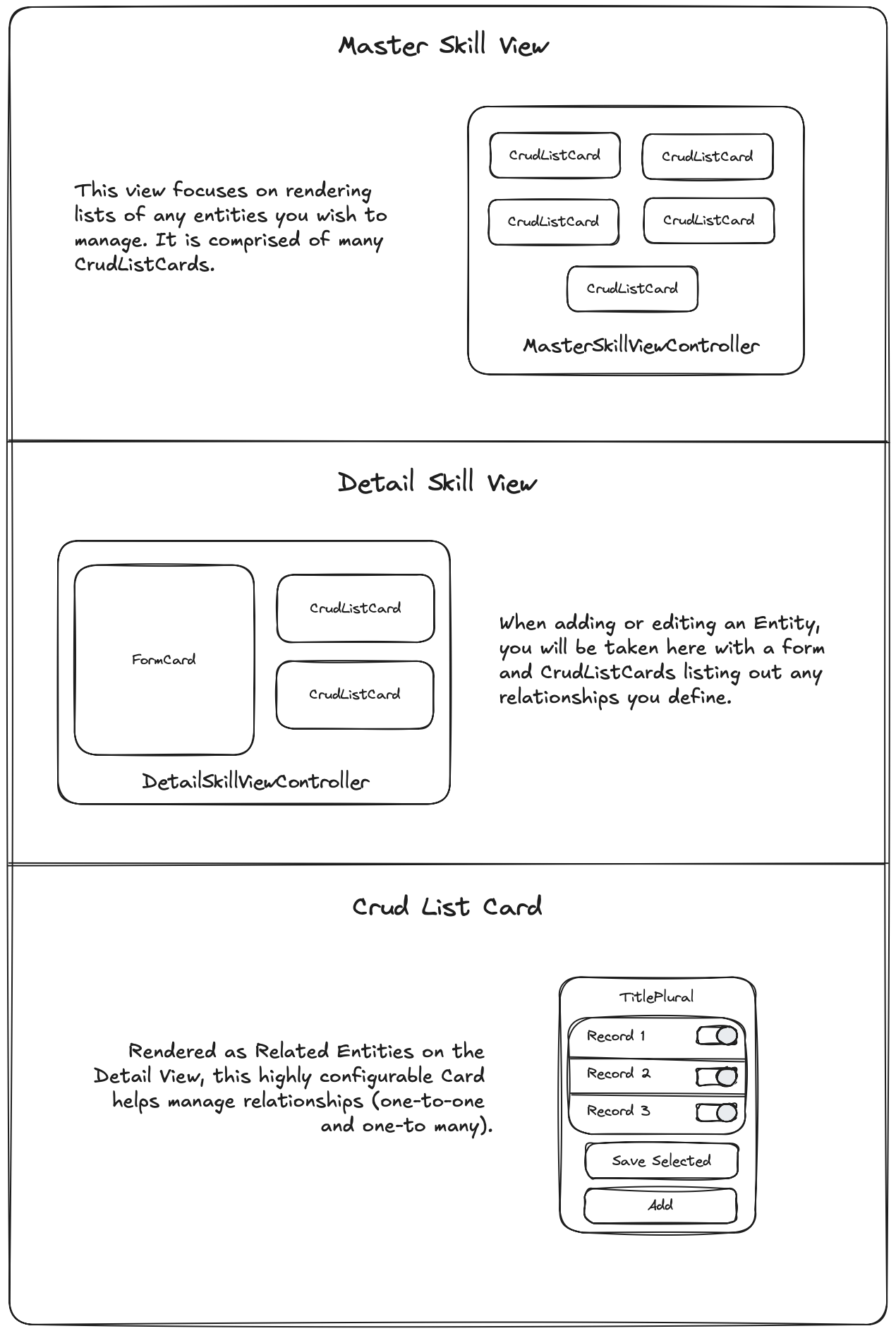
Installing dependencies
Because the CRUD Views and assertions are provided by the @sprucelabs/spruce-crud-utils module, let’s start by adding it to our project.
yarn add @sprucelabs/spruce-crud-utils
Configuring your MasterSkillView
In this walkthrough, we’ll assume you want your RootSkillView to render as a MasterSkillView, but you can obviously use any SkillView you’d like.
Test 1a:Assert renders as MasterSkillView
Notice that we’re importing crudAssert from @sprucelabs/spruce-crud-utils and using it to assert that the RootSkillView renders as a MasterSkillView.
import { AbstractSpruceFixtureTest } from '@sprucelabs/spruce-test-fixtures'
import { test } from '@sprucelabs/test-utils'
import { crudAssert } from '@sprucelabs/spruce-crud-utils'

export default class RootSkillViewTest extends AbstractSpruceFixtureTest {
    @test()
    protected async rendersMaster() {
        const vc = this.views.Controller('eightbitstories.root', {})
        crudAssert.skillViewRendersMasterView(]vc)
    }
}
Note: This is going to be mad about a
beforeEach()setup that needs to be done, follow the instructions to get to the next step.
Test 1b:Fix the crudAssert
The fix happens in your tests beforeEach() method.
import { AbstractSpruceFixtureTest } from '@sprucelabs/spruce-test-fixtures'
import { test } from '@sprucelabs/test-utils'
import { crudAssert } from '@sprucelabs/spruce-crud-utils'

export default class RootSkillViewTest extends AbstractSpruceFixtureTest {

    protected async beforeEach() {
        await super.beforeEach()
        crudAssert.beforeEach(this.views)
    }


    @test()
    protected async rendersMaster() {
        const vc = this.views.Controller('eightbitstories.root', {})
        crudAssert.skillViewRendersMasterView(]vc)
    }
}
Note: Now it’s going to blow up about not setting up the Crud Views properly. We’ll do this in your
RootSkillViewor wherever you’re rendering yourMasterSkillView.
Production 1a:Configure the ViewControllerFactory
Since we’re starting with an empty SkillView, we’ll implement just the constructor and call setController(...) on the ViewControllerFactory to set the CrudMasterSkillViewController and MasterListCardViewController.
import {
    AbstractSkillViewController,
    ViewControllerOptions,
    SkillView,
} from '@sprucelabs/heartwood-view-controllers'
import {
    CrudMasterSkillViewController,
    MasterListCardViewController,
} from '@sprucelabs/spruce-crud-utils'

export default class RootSkillViewController extends AbstractSkillViewController {
    public static id = 'root'

    public constructor(options: ViewControllerOptions) {
        super(options)

        this.getVcFactory().setController(
            'crud.master-skill-view',
            CrudMasterSkillViewController
        )
        this.getVcFactory().setController(
            'crud.master-list-card',
            MasterListCardViewController
        )

    }

    public render(): SkillView {
        return {}
    }
}

> **Note**: This will bring you to the next failing assertion, which requires you to actually render a `MasterSkillView`.
Production 1b:Render your MasterSkillView
Also, the MasterSkillView requires at least one entity, so use buildMasterListEntity(...) to create one (you can put in gibberish for now).
Here are the steps:
- Construct a
MasterSkillView - Pass it at least one
entity(usingbuildMasterListEntity(...)) and put in gibberish for now. - Render the
MasterSkillViewby updating therender()method in yourRootSkillView.
import {
    AbstractSkillViewController,
    ViewControllerOptions,
    SkillView,
} from '@sprucelabs/heartwood-view-controllers'
import {
    CrudMasterSkillViewController,
    MasterListCardViewController,
} from '@sprucelabs/spruce-crud-utils'

export default class RootSkillViewController extends AbstractSkillViewController {
    public static id = 'root'
    private masterSkillViewVc: CrudMasterSkillViewController

    public constructor(options: ViewControllerOptions) {
        super(options)

        this.getVcFactory().setController(
            'crud.master-skill-view',
            CrudMasterSkillViewController
        )
        this.getVcFactory().setController(
            'crud.master-list-card',
            MasterListCardViewController
        )

        this.masterSkillViewVc = this.Controller('crud.master-skill-view', {
            entities: [
                buildMasterListEntity({
                    id: 'aoeu',
                    title: 'aoeu',
                    load: {
                        fqen: 'aoeu',
                        responseKey: 'aoue',
                        rowTransformer: (skill) => ({
                            id: 'aoeuaoeu',
                            cells: [],
                        }),
                    },
                }),
            ],
        })
    }

    public render(): SkillView {
        return this.masterSkillViewVc.render()
    }
}
Note: You are going to get a lot of type errors, which is fine, because we’ll get to that next test!
Test 2:Assert MasterSkillView is loaded
This one is fast, let’s use crudAssert.skillViewLoadsMasterView() to assert that the MasterSkillView is loaded when your SkillView is loaded.
import { AbstractSpruceFixtureTest } from '@sprucelabs/spruce-test-fixtures'
import { test } from '@sprucelabs/test-utils'
import { crudAssert } from '@sprucelabs/spruce-crud-utils'

export default class RootSkillViewTest extends AbstractSpruceFixtureTest {

    protected async beforeEach() {
        await super.beforeEach()
        crudAssert.beforeEach(this.views)
    }


    @test()
    protected async rendersMaster() {
        const vc = this.views.Controller('eightbitstories.root', {})
        crudAssert.skillViewRendersMasterView(]vc)
    }

    @test()
    protected async loadsMaster() {
        const vc = this.views.Controller('eightbitstories.root', {})
        await crudAssert.skillViewLoadsMasterView(vc)
    }
}
Production 2a:Implement MasterSkillView loading
To get this test to pass, you need to implement the load() method in your SkillView and call load(...) on the MasterSkillView.
import {
    AbstractSkillViewController,
    ViewControllerOptions,
    SkillView,
    SkillViewControllerLoadOptions,
} from '@sprucelabs/heartwood-view-controllers'
import {
    CrudMasterSkillViewController,
    MasterListCardViewController,
} from '@sprucelabs/spruce-crud-utils'

export default class RootSkillViewController extends AbstractSkillViewController {
    public static id = 'root'
    private masterSkillViewVc: CrudMasterSkillViewController

    public constructor(options: ViewControllerOptions) {
        super(options)

        this.getVcFactory().setController(
            'crud.master-skill-view',
            CrudMasterSkillViewController
        )
        this.getVcFactory().setController(
            'crud.master-list-card',
            MasterListCardViewController
        )

        this.masterSkillViewVc = this.Controller('crud.master-skill-view', {
            entities: [
                buildMasterListEntity({
                    id: 'aoeu',
                    title: 'aoeu',
                    load: {
                        fqen: 'aoeu',
                        responseKey: 'aoue',
                        rowTransformer: (skill) => ({
                            id: 'aoeuaoeu',
                            cells: [],
                        }),
                    },
                }),
            ],
        })
    }

    public async load(options: SkillViewControllerLoadOptions) {
        await this.masterSkillViewVc.load(options)
    }

    public render(): SkillView {
        return this.masterSkillViewVc.render()
    }
}
Production 2b: Cleanup constructor
import {
    AbstractSkillViewController,
    ViewControllerOptions,
    SkillView,
    SkillViewControllerLoadOptions,
} from '@sprucelabs/heartwood-view-controllers'
import {
    CrudMasterSkillViewController,
    MasterListCardViewController,
} from '@sprucelabs/spruce-crud-utils'

export default class RootSkillViewController extends AbstractSkillViewController {
    public static id = 'root'
    private masterSkillViewVc: CrudMasterSkillViewController

    public constructor(options: ViewControllerOptions) {
        super(options)

        this.getVcFactory().setController(
            'crud.master-skill-view',
            CrudMasterSkillViewController
        )
        this.getVcFactory().setController(
            'crud.master-list-card',
            MasterListCardViewController
        )

        this.masterSkillViewVc = this.MasterSkillViewVc()
    }

    private MastSkillViewVc() {
        return this.Controller('crud.master-skill-view', {
            entities: [
                buildMasterListEntity({
                    id: 'aoeu',
                    title: 'aoeu',
                    load: {
                        fqen: 'aoeu',
                        responseKey: 'aoue',
                        rowTransformer: (skill) => ({
                            id: 'aoeuaoeu',
                            cells: [],
                        }),
                    },
                }),
            ],
        })
    }

    public async load(options: SkillViewControllerLoadOptions) {
        await this.masterSkillViewVc.load(options)
    }

    public render(): SkillView {
        return this.masterSkillViewVc.render()
    }
}
Configuring your DetailSkillView
Now that you have your MasterSkillView rendering, let’s configure your DetailSkillView to render as a CrudDetailSkillView.
Rendering a Location’s Address
A location’s address (location.address) can be rendered easily by user the locationRenderer utility provided by @psrucelabs/spruce-skill-utils module.
import { locationRenderer } from '@sprucelabs/spruce-skill-utils'
console.log(locationRenderer.renderAddress(location.address))
Navigation
The NavigationViewController is rendered in the Control Bar. You don’t have any control over the Control Bar, but you have full control over the NavigationViewController.
Rendering custom navigation in your AppViewController
Coming soon…
Rendering custom navigation for your SkillView
Coming soon…
Redirecting when clicking navigation
Coming soon…
View Controller Plugins
You can globally enhance View Controller functionality by using View Controller Plugins. Here are some plugins that are already available:
- AutoLogoutPlugin: Automatically logs out a person after a certain period of inactivity. You can set the timeout in seconds and also disable it where desired.
- AdjustMmpVcPlugin: Used to communicate with the MMP (Mobile Measurement Partners) Adjust. Others like AppsFlyer may come later. It currently only works inside the Spruce native iOS app.
Implementing a View Controller Plugin
Test 1a: Assert the plugin is installed
import {
    vcAssert,
    vcPluginAssert,
} from '@sprucelabs/heartwood-view-controllers'
import { AutoLogoutPlugin } from '@sprucelabs/spruce-heartwood-utils'

export default class AutoLoggingOutTest extends AbstractSpruceFixtureTest {

    @test()
    protected async autoLogoutPluginInstalled() {
        vcPluginAssert.pluginIsInstalled(
            this.views.Controller('eightbitstories.root', {}),
            'autoLogout',
            AutoLogoutPlugin
        )
    }
}
Note: If you are planning on using your own plugin (one that is not built yet), use it instead of
AutoLogoutPluginas if it exists and then begin with the productions steps below.
Production 1: Install the plugin
- Install the module that holds the plugin:
yarn add {packageName} - Create the plugin:
spruce create.view.plugin - Implement the plugin at
./src/viewPlugins/{pluginName}.ts
Your plugin starts like this:
import { ViewControllerPlugin } from '@sprucelabs/heartwood-view-controllers'

export default class MyViewPlugin implements ViewControllerPlugin {
    ...
}
Now that plugin is created, you can import it into your test.
Note: If you are using a prebuilt plugin, you would implement it like this:
export { AutoLogoutPlugin as default } from '@sprucelabs/spruce-heartwood-utils'
Test Doubling Your Plugin
You can drop in your test double using the views fixture on your AbstractSpruceFixtureTest . Here is how you may do that in your beforeEach():
protected async beforeEach() {
    await super.beforeEach()

    this.spy = new SpyPlugin()
    this.views.addPlugin('autoLogout', this.spy)
}
Now, in any View Controller you create, this.plugins.autoLogout will be the SpyPlugin instance.
class RootSkillView extends AbstractSkillViewController {
    public constructor(options: SkillViewControllerOptions) {
        super(options)
    }

    public async load() {
        this.plugins.autoLogout.doSomething()
    }
}
