
Transitioning from .NET to Spruce
.NET (and ASP.NET Core) is a powerful framework for building enterprise-level web applications, APIs, and services using C#. Spruce is a TypeScript-based full-stack platform that offers a unique approach to building scalable applications with built-in event systems and a component-based UI framework.
This guide will help .NET developers understand how to transition their skills to work with Spruce, mapping familiar concepts from the .NET ecosystem to their Spruce equivalents.
Key Differences between .NET and Spruce Development
| .NET | Spruce | |
|---|---|---|
| Programming Language | C# | TypeScript |
| IDE | Visual Studio, VS Code, Rider | Visual Studio Code |
| App Lifecycle | Middleware, Controllers | SkillViewController lifecycle (optional AppViewController) |
| UI Design | Razor, Blazor, MVC Views | Heartwood, ViewControllers |
| Event Handling | Delegates, Events, MediatR | Mercury |
| Data Persistence | Entity Framework Core | Data Stores |
| Error Handling | Try-Catch, Custom Exceptions | Try-Catch Blocks, SpruceErrors |
| Testing | xUnit, NUnit, MSTest | TDD by the 3 laws |
| User Authentication | ASP.NET Identity | Mercury, Authenticator |
| User Permissions | Authorization Policies | Mercury, Authorizer |
Programming Language
.NET
C# is a statically-typed, object-oriented language with robust support for async/await patterns, LINQ, and generics. ASP.NET Core uses controllers and views to handle requests.
using Microsoft.AspNetCore.Mvc;

public class HomeController : Controller
{
    public IActionResult Index()
    {
        var viewModel = new CardViewModel
        {
            Title = "Hello, World!",
            Subtitle = "This is a card"
        };
        return View(viewModel);
    }
}

public class CardViewModel
{
    public string Title { get; set; }
    public string Subtitle { get; set; }
}
Spruce
Spruce is built entirely in TypeScript. This SkillViewController will render a full screen view with a CardViewController on it with a title and a subtitle. All ViewControllers (and SkillViewControllers) reduce down to a ViewModel that return from render(). In Spruce, 100% of the styling is handled by Heartwood (Storybook).
import {
  AbstractSkillViewController,
  CardViewController,
  ViewControllerOptions,
  buildSkillViewLayout,
  SkillView
} from '@sprucelabs/heartwood-view-controllers'

export default class RootSkillViewController extends AbstractSkillViewController {
  public static id = 'root'
  protected cardVc: CardViewController

  public constructor(options: ViewControllerOptions) {
    super(options)

    this.cardVc = this.Controller('card', {
      header: {
        title: 'Hello, World!',
        subtitle: 'This is a card'
      }
    })
  }

  public render(): SkillView {
    return buildSkillViewLayout('grid', {
      cards: [this.cardVc.render()]
    })
  }
}
IDE
.NET in Visual Studio
.NET developers typically use Visual Studio (full IDE with rich debugging and IntelliSense), Visual Studio Code with C# extensions, or JetBrains Rider. Visual Studio provides integrated debugging, profiling, and NuGet package management.
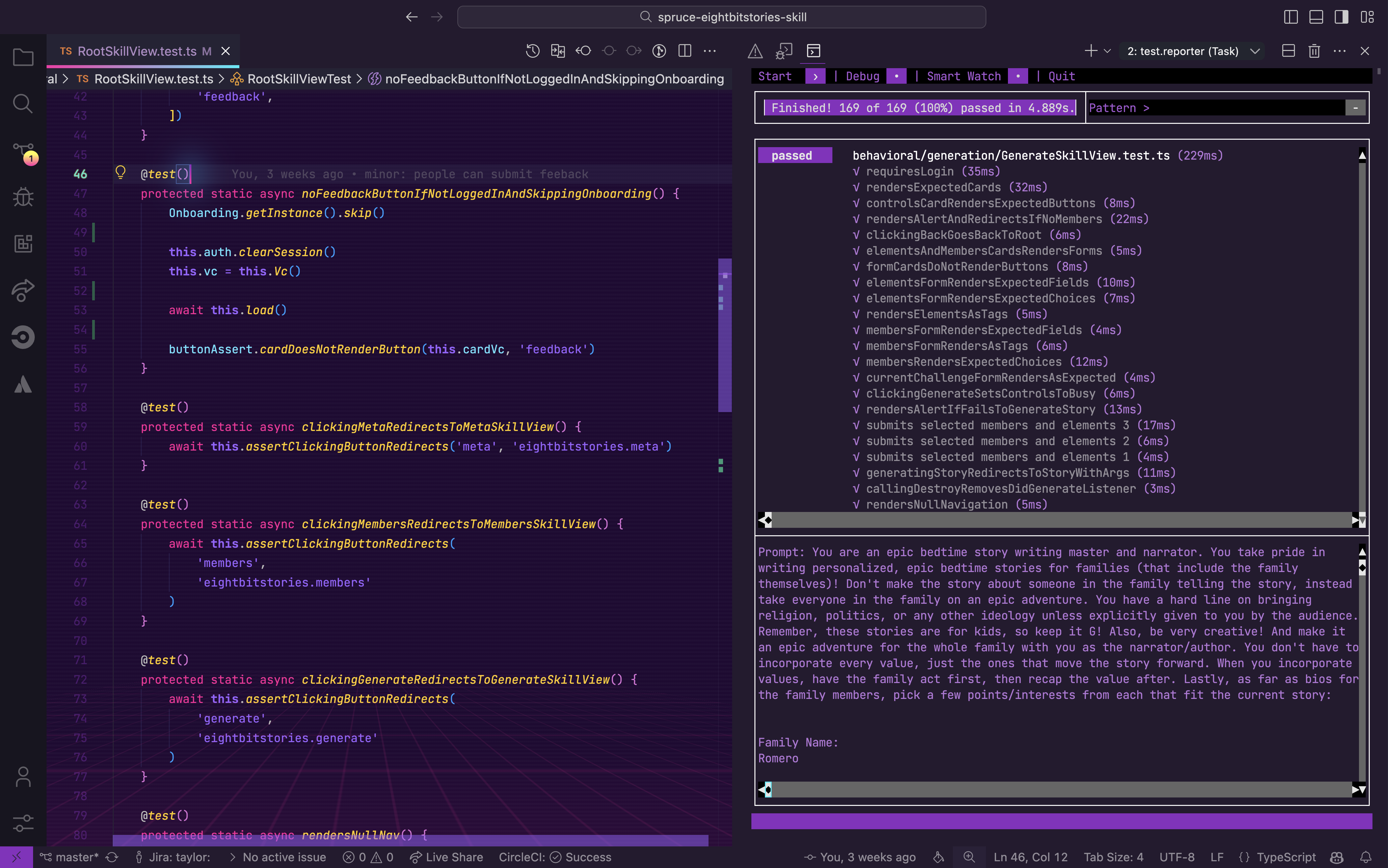
Spruce in Visual Studio Code
Spruce has been fully integrated into Visual Studio Code with custom extensions, launch configs, and settings.
App Lifecycle
.NET
ASP.NET Core manages the request pipeline through middleware and dependency injection. Controllers handle incoming requests and return responses.
// Program.cs - Application startup
var builder = WebApplication.CreateBuilder(args);

// Configure services
builder.Services.AddControllersWithViews();
builder.Services.AddScoped<ICarService, CarService>();

var app = builder.Build();

// Configure middleware pipeline
app.UseHttpsRedirection();
app.UseStaticFiles();
app.UseRouting();
app.UseAuthentication();
app.UseAuthorization();

app.MapControllerRoute(
    name: "default",
    pattern: "{controller=Home}/{action=Index}/{id?}");

app.Run();

// Custom Middleware
public class RequestLoggingMiddleware
{
    private readonly RequestDelegate _next;

    public RequestLoggingMiddleware(RequestDelegate next)
    {
        _next = next;
    }

    public async Task InvokeAsync(HttpContext context)
    {
        // Before request
        Console.WriteLine($"Request: {context.Request.Path}");

        await _next(context);

        // After request
        Console.WriteLine($"Response: {context.Response.StatusCode}");
    }
}
Spruce
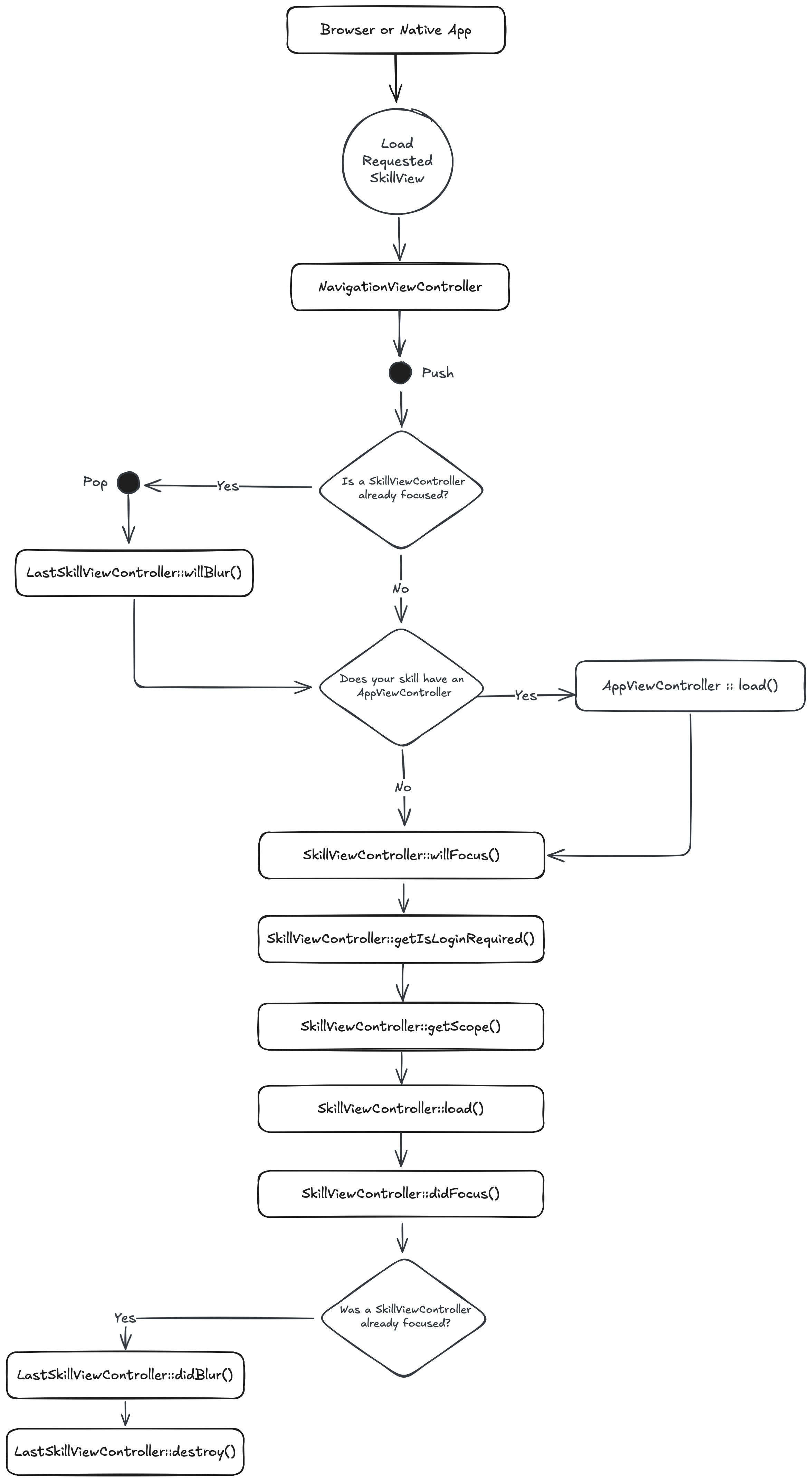
When a browser or native app loads your Skill, it will start by hitting its RootSkillViewController. If your Skill has an AppViewController declared, it will be loaded first. You can execute code at each stage by implementing a method by the name of the stage.
UI Design
.NET
ASP.NET Core offers multiple UI approaches: Razor Pages, MVC Views, and Blazor for interactive web UIs.
// Controller
public class CardController : Controller
{
    public IActionResult Show()
    {
        return View(new CardViewModel
        {
            Title = "Hello",
            Subtitle = "World"
        });
    }
}
<!-- Razor View: Views/Card/Show.cshtml -->
@model CardViewModel

<div class="card">
    <div class="card-header">
        <h2>@Model.Title</h2>
    </div>
    <div class="card-body">
        <p>@Model.Subtitle</p>
    </div>
</div>
// Blazor Component: Card.razor
@code {
    [Parameter]
    public string Title { get; set; }

    [Parameter]
    public string Subtitle { get; set; }
}

<div class="card">
    <h2>@Title</h2>
    <p>@Subtitle</p>
</div>
Spruce
Heartwood handles the rendering of all front end components. It adopts the philosphy of “Everything Beautiful”. While you are constrained to the views that Heartwood provides, you can customize their look by running the following in your skill:
spruce create.theme
This will create a skill.theme.ts file you can customize. If you want to apply a theme to your organization (vs just your skill), you can utilize the Theme Skill.
Event Handling
.NET
.NET uses delegates, events, and patterns like MediatR for decoupled communication between components.
// Using events and delegates
public class FeedbackService
{
    public event EventHandler<FeedbackEventArgs> FeedbackSubmitted;

    public void SubmitFeedback(string feedback)
    {
        // Process feedback
        FeedbackSubmitted?.Invoke(this, new FeedbackEventArgs(feedback));
    }
}

public class FeedbackEventArgs : EventArgs
{
    public string Feedback { get; }
    public FeedbackEventArgs(string feedback) => Feedback = feedback;
}

// Using MediatR for CQRS pattern
public class SubmitFeedbackCommand : IRequest<bool>
{
    public string Feedback { get; set; }
}

public class SubmitFeedbackHandler : IRequestHandler<SubmitFeedbackCommand, bool>
{
    public async Task<bool> Handle(SubmitFeedbackCommand request, CancellationToken ct)
    {
        // Handle the feedback submission
        await SaveFeedbackAsync(request.Feedback);
        return true;
    }
}

// In controller
await _mediator.Send(new SubmitFeedbackCommand { Feedback = "Great app!" });
Spruce
In Spruce, your views are rendered on the edge, while your Skill is hosted on a server. So, you have to use the Mercury event system to communicate between the two. Mercury also allows you to pass information other skills.
// inside of Skill View sending message to the Skill with the namespace "eightbitstories"

const client = await this.connectToApi()
await this.client.emitAndFlattenResponses(
  'eightbitstories.submit-feedback::v2023_09_05',
  {
    payload: {
      feedback: 'Help make this better!',
    },
  }
)
Data Persistence
.NET
Entity Framework Core is the primary ORM in .NET, providing a powerful abstraction over databases with LINQ support.
// DbContext
public class AppDbContext : DbContext
{
    public DbSet<Car> Cars { get; set; }

    protected override void OnModelCreating(ModelBuilder modelBuilder)
    {
        modelBuilder.Entity<Car>()
            .HasKey(c => c.Id);
    }
}

// Entity
public class Car
{
    public int Id { get; set; }
    public string Make { get; set; }
    public string Model { get; set; }
    public int Year { get; set; }
}

// Repository pattern usage
public class CarService
{
    private readonly AppDbContext _context;

    public CarService(AppDbContext context)
    {
        _context = context;
    }

    public async Task<Car> CreateCarAsync(string make, string model, int year)
    {
        var car = new Car { Make = make, Model = model, Year = year };
        _context.Cars.Add(car);
        await _context.SaveChangesAsync();
        return car;
    }

    public async Task<List<Car>> GetCarsByMakeAsync(string make)
    {
        return await _context.Cars
            .Where(c => c.Make == make)
            .OrderByDescending(c => c.Year)
            .ToListAsync();
    }
}
Spruce
In Spruce, you’ll use the Stores feature to persist data. The stores use Schemas to define the shape of the data.
spruce create.store
Once you configure your store, you can use it in your skill’s event listener like this:
export default async (
  event: SpruceEvent<SkillEventContract, EmitPayload>
): SpruceEventResponse<ResponsePayload> => {
  const { stores } = event

  const cars = await stores.getStore('cars')
  await cars.createOne({
    make: 'Toyota',
    model: 'Camry',
    year: 2022
  })

  return {
    success: true,
  }
}
Error Handling
.NET
.NET uses structured exception handling with try-catch blocks and custom exception classes.
// Custom exception
public class CarNotFoundException : Exception
{
    public int CarId { get; }

    public CarNotFoundException(int carId)
        : base($"Car with ID {carId} was not found.")
    {
        CarId = carId;
    }
}

// Service with error handling
public class CarService
{
    public async Task<Car> GetCarAsync(int id)
    {
        var car = await _context.Cars.FindAsync(id);
        if (car == null)
        {
            throw new CarNotFoundException(id);
        }
        return car;
    }
}

// Controller with try-catch
[HttpGet("{id}")]
public async Task<IActionResult> GetCar(int id)
{
    try
    {
        var car = await _carService.GetCarAsync(id);
        return Ok(car);
    }
    catch (CarNotFoundException ex)
    {
        return NotFound(new { message = ex.Message });
    }
    catch (Exception ex)
    {
        return StatusCode(500, new { message = "An unexpected error occurred." });
    }
}

// Global exception handling middleware
app.UseExceptionHandler(errorApp =>
{
    errorApp.Run(async context =>
    {
        var error = context.Features.Get<IExceptionHandlerFeature>();
        // Log and handle the error
    });
});
Spruce
Spruce provides a much more robust, standardized error handling system. You can use the SpruceError class to create custom errors, you define the Schemas for those errors to give them shape, and then use try-catch blocks to handle them.
spruce create.error
This will create an error builder inside of your skill at ./src/errors/{{errorName}}.builder.ts. Inside there is the schema that defines your error.
You can throw an error you have defined like this:
throw new SpruceError({
  code: 'MY_ERRORS_NAME_HERE',
  friendlyMessage: 'All errors can provide a friendly error message!',
})
Testing
.NET
.NET has several testing frameworks including xUnit, NUnit, and MSTest, often used with mocking libraries like Moq.
using Xunit;
using Moq;

public class CarServiceTests
{
    [Fact]
    public async Task CreateCar_ShouldReturnNewCar()
    {
        // Arrange
        var mockContext = new Mock<AppDbContext>();
        var mockDbSet = new Mock<DbSet<Car>>();
        mockContext.Setup(c => c.Cars).Returns(mockDbSet.Object);

        var service = new CarService(mockContext.Object);

        // Act
        var result = await service.CreateCarAsync("Toyota", "Camry", 2022);

        // Assert
        Assert.NotNull(result);
        Assert.Equal("Toyota", result.Make);
        Assert.Equal("Camry", result.Model);
        Assert.Equal(2022, result.Year);
    }

    [Theory]
    [InlineData("Toyota", 3)]
    [InlineData("Honda", 2)]
    public async Task GetCarsByMake_ShouldReturnCorrectCount(string make, int expected)
    {
        // Arrange & Act & Assert
        // ...
    }
}

// Integration testing
public class CarControllerTests : IClassFixture<WebApplicationFactory<Program>>
{
    private readonly HttpClient _client;

    public CarControllerTests(WebApplicationFactory<Program> factory)
    {
        _client = factory.CreateClient();
    }

    [Fact]
    public async Task GetCars_ReturnsSuccessStatusCode()
    {
        var response = await _client.GetAsync("/api/cars");
        response.EnsureSuccessStatusCode();
    }
}
Spruce
Everything in Spruce starts with a Test. If you want to write a piece of production code, you must start with a failing test.
spruce create.test
Once your test file is created, you are ready to start!
User Authentication
.NET
ASP.NET Core Identity provides a complete authentication system with support for external providers.
// Configure Identity in Program.cs
builder.Services.AddIdentity<ApplicationUser, IdentityRole>(options =>
{
    options.Password.RequireDigit = true;
    options.Password.RequiredLength = 8;
})
.AddEntityFrameworkStores<AppDbContext>()
.AddDefaultTokenProviders();

// Authentication controller
public class AccountController : Controller
{
    private readonly SignInManager<ApplicationUser> _signInManager;
    private readonly UserManager<ApplicationUser> _userManager;

    public async Task<IActionResult> Login(LoginViewModel model)
    {
        var result = await _signInManager.PasswordSignInAsync(
            model.Email, model.Password, model.RememberMe, lockoutOnFailure: false);

        if (result.Succeeded)
        {
            return RedirectToAction("Index", "Home");
        }

        ModelState.AddModelError(string.Empty, "Invalid login attempt.");
        return View(model);
    }

    public async Task<IActionResult> Logout()
    {
        await _signInManager.SignOutAsync();
        return RedirectToAction("Index", "Home");
    }
}

// Check authentication in a controller
[Authorize]
public class DashboardController : Controller
{
    public IActionResult Index()
    {
        var user = User.Identity.Name;
        var isAuthenticated = User.Identity.IsAuthenticated;
        return View();
    }
}
Spruce
Because Mercury handles user authentication (and authorization). You can use the Authenticator to know if a person is logged in or not. You can also use it to log a person in or out.
//inside your Skill View's load lifecycle method
public async load(options: SkillViewControllerLoadOptions) {
  const { authenticator } = options

  this.log.info(authenticator.isLoggedIn())
  this.log.info(authenticator.getPerson())

  // force person to be logged out
  authenticator.clearSession()

}
User Permissions
.NET
ASP.NET Core uses policy-based authorization for fine-grained access control.
// Configure authorization policies in Program.cs
builder.Services.AddAuthorization(options =>
{
    options.AddPolicy("CanGenerateStory", policy =>
        policy.RequireClaim("Permission", "stories.generate"));

    options.AddPolicy("AdminOnly", policy =>
        policy.RequireRole("Admin"));

    options.AddPolicy("PremiumUser", policy =>
        policy.Requirements.Add(new PremiumUserRequirement()));
});

// Custom authorization requirement
public class PremiumUserRequirement : IAuthorizationRequirement { }

public class PremiumUserHandler : AuthorizationHandler<PremiumUserRequirement>
{
    protected override Task HandleRequirementAsync(
        AuthorizationHandlerContext context, PremiumUserRequirement requirement)
    {
        if (context.User.HasClaim(c => c.Type == "Subscription" && c.Value == "Premium"))
        {
            context.Succeed(requirement);
        }
        return Task.CompletedTask;
    }
}

// Using policies in controllers
[Authorize(Policy = "CanGenerateStory")]
public class StoryController : Controller
{
    public IActionResult Generate()
    {
        return View();
    }
}

// Manual authorization check
public class StoryService
{
    private readonly IAuthorizationService _authorizationService;

    public async Task<bool> CanGenerateStoryAsync(ClaimsPrincipal user)
    {
        var result = await _authorizationService
            .AuthorizeAsync(user, "CanGenerateStory");
        return result.Succeeded;
    }
}
Spruce
Mercury also handles all your Permission needs. To introduce new permissions into the platform, you need to create a Permission Contract in your skill:
spruce create.permissions
Then you can do permission checks in your Skill View like this:
//inside your Skill View's load lifecycle method
public async load(options: SkillViewControllerLoadOptions) {
  const { authorizer } = options

  const permissions = await authorizer.can({
    contractId: 'eightbitstories.eight-bit-stories',
    permissionIds: ['can-generate-story'],
  })

  const canGenerateStory = permissions['can-generate-story']

}
