
Transitioning from Groovy to Spruce
Groovy is a dynamic language with static-typing and static compilation capabilities, for the Java platform. It integrates smoothly with any Java program and immediately delivers powerful features, including scripting capabilities, Domain-Specific Language authoring, runtime and compile-time meta-programming, and functional programming. Combined with Grails, a powerful web application framework, Groovy provides a productive full-stack development environment. Transitioning to Spruce, a TypeScript-based framework, involves adapting to a new ecosystem centered around JavaScript and TypeScript for full-stack web development.
Key Differences between Groovy and Spruce Development
| Groovy/Grails | Spruce | |
|---|---|---|
| Programming Language | Groovy | TypeScript |
| IDE | IntelliJ IDEA, Eclipse | Visual Studio Code |
| App Lifecycle | Grails Controllers, Services | SkillViewController lifecycle (optional AppViewController) |
| UI Design | GSP Templates, Grails Views | Heartwood, ViewControllers |
| Event Handling | Grails Events, Spring Events | Mercury |
| Data Persistence | GORM | Data Stores |
| Error Handling | Try-Catch Blocks | Try-Catch Blocks, SpruceErrors |
| Testing | Spock, JUnit | TDD by the 3 laws |
| User Authentication | Spring Security Plugin | Mercury, Authenticator |
| User Permissions | Spring Security ACL | Mercury, Authorizer |
Programming Language
Groovy
Groovy offers concise syntax, closures, and dynamic typing while maintaining Java compatibility. Classes and methods are simple and expressive.
class HelloController {
    def index() {
        def greeting = 'Hello, World!'
        def subtitle = 'This is a card'

        // Groovy closures
        def renderCard = { title, sub ->
            [title: title, subtitle: sub]
        }

        render(view: 'index', model: renderCard(greeting, subtitle))
    }
}
Spruce
Spruce is built entirely in TypeScript. This SkillViewController will render a full screen view with a CardViewController on it with a title and a subtitle. All ViewControllers (and SkillViewControllers) reduce down to a ViewModel that return from render(). In Spruce, 100% of the styling is handled by Heartwood (Storybook).
import {
  AbstractSkillViewController,
  CardViewController,
  ViewControllerOptions,
  buildSkillViewLayout,
  SkillView
} from '@sprucelabs/heartwood-view-controllers'

export default class RootSkillViewController extends AbstractSkillViewController {
  public static id = 'root'
  protected cardVc: CardViewController

  public constructor(options: ViewControllerOptions) {
    super(options)

    this.cardVc = this.Controller('card', {
      header: {
        title: 'Hello, World!',
        subtitle: 'This is a card'
      }
    })
  }

  public render(): SkillView {
    return buildSkillViewLayout('grid', {
      cards: [this.cardVc.render()]
    })
  }
}
IDE
Groovy in IntelliJ IDEA
IntelliJ IDEA provides excellent Groovy and Grails support with features like code completion, refactoring, and integrated Grails commands.
Spruce in Visual Studio Code
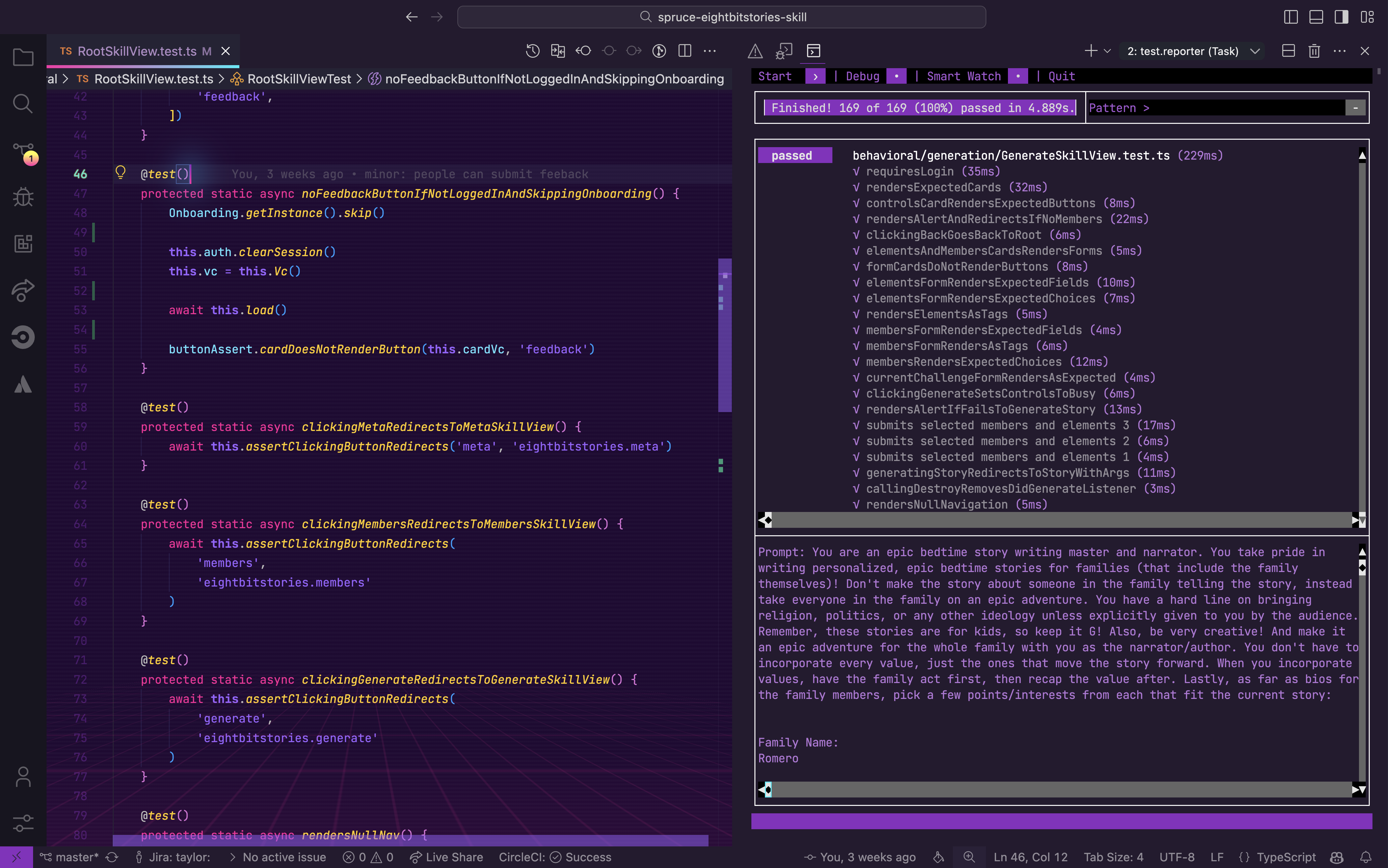
Spruce has been fully integrated into Visual Studio Code with custom extensions, launch configs, and settings.
App Lifecycle
Groovy/Grails
Grails manages the application lifecycle through controllers, services, and interceptors. Controllers handle requests while services contain business logic.
// grails-app/controllers/HelloController.groovy
class HelloController {

    // Injected service
    def helloService

    // Interceptor before action
    def beforeInterceptor = {
        log.info "Request received: ${actionName}"
    }

    def index() {
        def message = helloService.getMessage()
        [message: message]
    }

    def afterInterceptor = { model ->
        log.info "Response sent"
    }
}

// grails-app/services/HelloService.groovy
class HelloService {
    def getMessage() {
        return 'Hello from service!'
    }
}
Spruce
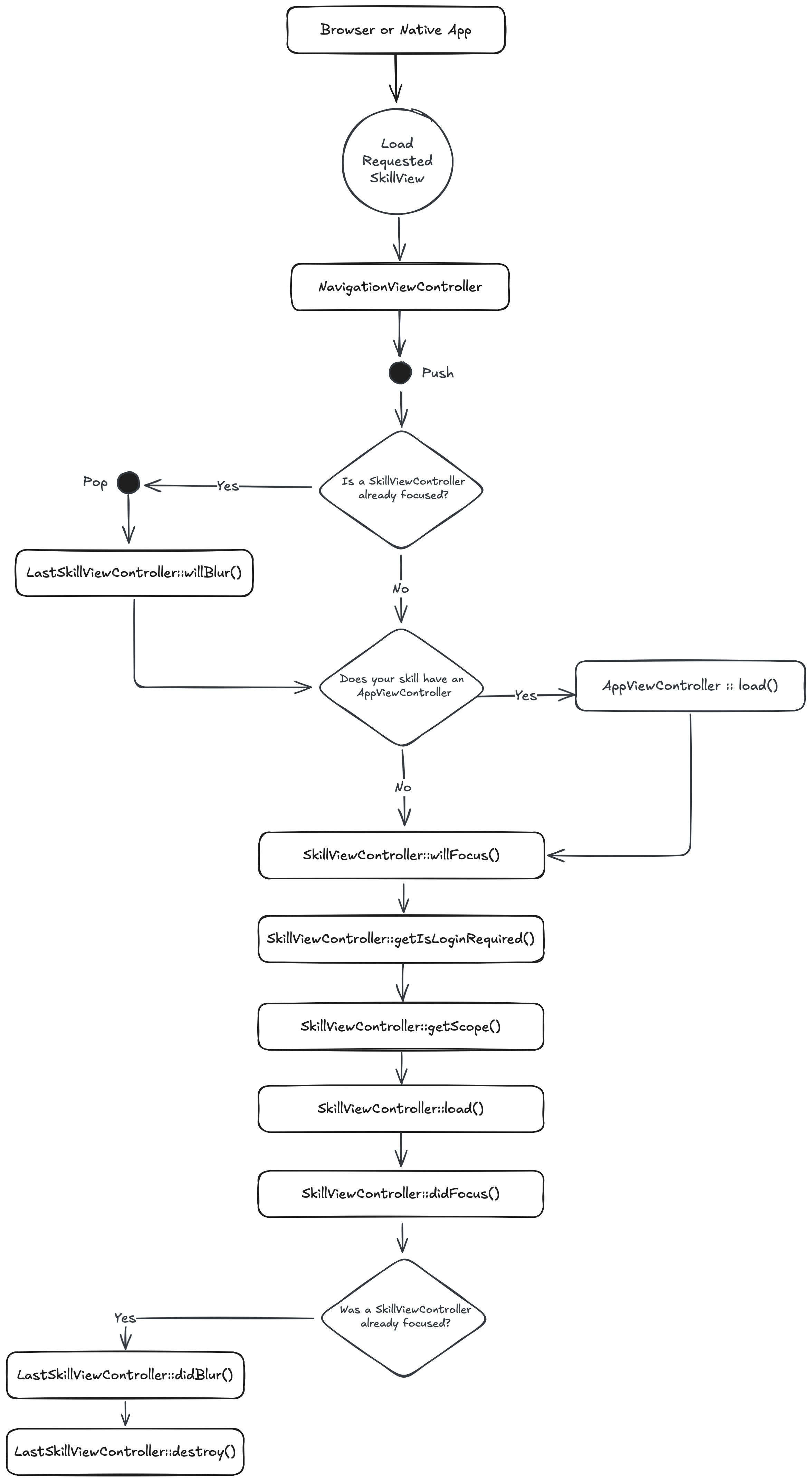
When a browser or native app loads your Skill, it will start by hitting its RootSkillViewController. If your Skill has an AppViewController declared, it will be loaded first. You can execute code at each stage by implementing a method by the name of the stage.
UI Design
Groovy/Grails
Grails uses GSP (Groovy Server Pages) for server-side rendering with tag libraries and layouts.
<!-- grails-app/views/layouts/main.gsp -->
<!DOCTYPE html>
<html>
<head>
    <title><g:layoutTitle default="My App"/></title>
    <g:layoutHead/>
</head>
<body>
    <g:layoutBody/>
</body>
</html>

<!-- grails-app/views/hello/index.gsp -->
<!DOCTYPE html>
<html>
<head>
    <meta name="layout" content="main"/>
</head>
<body>
    <div class="card">
        <h2>${title}</h2>
        <p>${subtitle}</p>
        <g:if test="${showButton}">
            <g:link action="submit" class="btn">Submit</g:link>
        </g:if>
    </div>
</body>
</html>
Spruce
Heartwood handles the rendering of all front end components. It adopts the philosphy of “Everything Beautiful”. While you are constrained to the views that Heartwood provides, you can customize their look by running the following in your skill:
spruce create.theme
This will create a skill.theme.ts file you can customize. If you want to apply a theme to your organization (vs just your skill), you can utilize the Theme Skill.
Event Handling
Groovy/Grails
Grails provides event handling through the Events plugin and Spring’s event system for decoupled communication.
// Publishing events
import grails.events.Events

class FeedbackService implements Events {

    def submitFeedback(String feedback) {
        // Process feedback
        saveFeedback(feedback)

        // Publish event
        notify('feedback.submitted', feedback)
    }
}

// Listening to events
import grails.events.annotation.Subscriber

class NotificationService {

    @Subscriber('feedback.submitted')
    def onFeedbackSubmitted(String feedback) {
        log.info "Feedback received: ${feedback}"
        // Send notification, etc.
    }
}

// Using Spring events
import org.springframework.context.event.EventListener

class FeedbackEvent {
    String feedback
}

@EventListener
void handleFeedback(FeedbackEvent event) {
    println "Handling feedback: ${event.feedback}"
}
Spruce
In Spruce, your views are rendered on the edge, while your Skill is hosted on a server. So, you have to use the Mercury event system to communicate between the two. Mercury also allows you to pass information other skills.
// inside of Skill View sending message to the Skill with the namespace "eightbitstories"

const client = await this.connectToApi()
await this.client.emitAndFlattenResponses(
  'eightbitstories.submit-feedback::v2023_09_05',
  {
    payload: {
      feedback: 'Help make this better!',
    },
  }
)
Data Persistence
Groovy/Grails
GORM (Grails Object Relational Mapping) provides a powerful, expressive way to interact with databases using domain classes.
// grails-app/domain/Car.groovy
class Car {
    String make
    String model
    Integer year

    static constraints = {
        make blank: false, maxSize: 100
        model blank: false, maxSize: 100
        year min: 1900, max: 2100
    }

    static mapping = {
        table 'cars'
        sort year: 'desc'
    }

    String toString() {
        "${year} ${make} ${model}"
    }
}

// Usage in a service or controller
class CarService {
    def createCar() {
        def car = new Car(make: 'Toyota', model: 'Camry', year: 2022)
        car.save(flush: true)
    }

    def findCars() {
        // Dynamic finders
        def toyotas = Car.findAllByMake('Toyota')

        // Criteria queries
        def recentCars = Car.createCriteria().list {
            ge('year', 2020)
            order('year', 'desc')
        }

        // Where queries
        def camrys = Car.where {
            make == 'Toyota' && model == 'Camry'
        }.list()

        return recentCars
    }
}
Spruce
In Spruce, you’ll use the Stores feature to persist data. The stores use Schemas to define the shape of the data.
spruce create.store
Once you configure your store, you can use it in your skill’s event listener like this:
export default async (
  event: SpruceEvent<SkillEventContract, EmitPayload>
): SpruceEventResponse<ResponsePayload> => {
  const { stores } = event

  const cars = await stores.getStore('cars')
  await cars.createOne({
    make: 'Toyota',
    model: 'Camry',
    year: 2022
  })

  return {
    success: true,
  }
}
Error Handling
Groovy/Grails
Groovy uses try-catch blocks and Grails provides exception handling through error controllers and custom exceptions.
// Custom exception
class CarNotFoundException extends RuntimeException {
    CarNotFoundException(String message) {
        super(message)
    }
}

// Service with error handling
class CarService {
    def getCar(Long id) {
        try {
            def car = Car.get(id)
            if (!car) {
                throw new CarNotFoundException("Car with id ${id} not found")
            }
            return car
        } catch (CarNotFoundException e) {
            log.error e.message
            throw e
        } catch (Exception e) {
            log.error "Unexpected error: ${e.message}"
            throw new RuntimeException("Failed to retrieve car", e)
        }
    }
}

// Error controller (grails-app/controllers/ErrorController.groovy)
class ErrorController {
    def handle404() {
        render(view: '/errors/notFound')
    }

    def handle500() {
        render(view: '/errors/serverError')
    }
}
Spruce
Spruce provides a much more robust, standardized error handling system. You can use the SpruceError class to create custom errors, you define the Schemas for those errors to give them shape, and then use try-catch blocks to handle them.
spruce create.error
This will create an error builder inside of your skill at ./src/errors/{{errorName}}.builder.ts. Inside there is the schema that defines your error.
You can throw an error you have defined like this:
throw new SpruceError({
  code: 'MY_ERRORS_NAME_HERE',
  friendlyMessage: 'All errors can provide a friendly error message!',
})
Testing
Groovy/Grails
Spock is the preferred testing framework for Groovy, offering expressive BDD-style tests with powerful mocking capabilities.
import spock.lang.Specification

class CarServiceSpec extends Specification {

    def carService = new CarService()

    def "should create a new car"() {
        given: "car details"
        def make = 'Toyota'
        def model = 'Camry'
        def year = 2022

        when: "creating the car"
        def car = carService.createCar(make, model, year)

        then: "car is saved with correct values"
        car.id != null
        car.make == make
        car.model == model
        car.year == year
    }

    def "should throw exception when car not found"() {
        when: "fetching non-existent car"
        carService.getCar(999L)

        then: "exception is thrown"
        thrown(CarNotFoundException)
    }

    def "should find cars by make"() {
        given: "multiple cars exist"
        carService.createCar('Toyota', 'Camry', 2022)
        carService.createCar('Honda', 'Accord', 2022)

        expect: "filtering by make works"
        carService.findByMake('Toyota').size() == 1
    }
}
Spruce
Everything in Spruce starts with a Test. If you want to write a piece of production code, you must start with a failing test.
spruce create.test
Once your test file is created, you are ready to start!
User Authentication
Groovy/Grails
The Spring Security plugin provides comprehensive authentication support for Grails applications.
// build.gradle
dependencies {
    implementation 'org.grails.plugins:spring-security-core:5.0.0'
}

// grails-app/domain/User.groovy
class User {
    String username
    String password
    boolean enabled = true

    static constraints = {
        username blank: false, unique: true
        password blank: false
    }

    Set<Role> getAuthorities() {
        UserRole.findAllByUser(this)*.role
    }
}

// Controller with security
import grails.plugin.springsecurity.annotation.Secured

class DashboardController {

    def springSecurityService

    @Secured(['ROLE_USER'])
    def index() {
        def currentUser = springSecurityService.currentUser
        [user: currentUser]
    }

    @Secured(['IS_AUTHENTICATED_ANONYMOUSLY'])
    def publicPage() {
        render 'This is public'
    }
}

// Checking authentication in service
class ProfileService {
    def springSecurityService

    def getCurrentUserProfile() {
        if (springSecurityService.isLoggedIn()) {
            def user = springSecurityService.currentUser
            return Profile.findByUser(user)
        }
        return null
    }

    def logout() {
        springSecurityService.logout()
    }
}
Spruce
Because Mercury handles user authentication (and authorization). You can use the Authenticator to know if a person is logged in or not. You can also use it to log a person in or out.
//inside your Skill View's load lifecycle method
public async load(options: SkillViewControllerLoadOptions) {
  const { authenticator } = options

  this.log.info(authenticator.isLoggedIn())
  this.log.info(authenticator.getPerson())

  // force person to be logged out
  authenticator.clearSession()

}
User Permissions
Groovy/Grails
Spring Security provides role-based and ACL-based permission systems for fine-grained access control.
// Role-based permissions
import grails.plugin.springsecurity.annotation.Secured

class StoryController {

    @Secured(['ROLE_AUTHOR'])
    def create() {
        // Only authors can create stories
    }

    @Secured(['ROLE_ADMIN', 'ROLE_AUTHOR'])
    def edit(Long id) {
        // Admins and authors can edit
    }
}

// Checking permissions programmatically
import grails.plugin.springsecurity.SpringSecurityService

class StoryService {

    SpringSecurityService springSecurityService

    def canGenerateStory() {
        def authorities = springSecurityService.principal?.authorities*.authority
        return authorities?.contains('ROLE_STORY_GENERATOR')
    }

    def generateStory() {
        if (!canGenerateStory()) {
            throw new AccessDeniedException('Permission denied')
        }
        // Generate story logic
    }
}

// Using Spring Security expressions
@PreAuthorize("hasRole('ROLE_ADMIN') or #story.author == authentication.name")
def updateStory(Story story) {
    // Only admin or the story author can update
}
Spruce
Mercury also handles all your Permission needs. To introduce new permissions into the platform, you need to create a Permission Contract in your skill:
spruce create.permissions
Then you can do permission checks in your Skill View like this:
//inside your Skill View's load lifecycle method
public async load(options: SkillViewControllerLoadOptions) {
  const { authorizer } = options

  const permissions = await authorizer.can({
    contractId: 'eightbitstories.eight-bit-stories',
    permissionIds: ['can-generate-story'],
  })

  const canGenerateStory = permissions['can-generate-story']

}
