
Transitioning from Spring Boot to Spruce
Spring Boot is a powerful Java framework that simplifies the development of enterprise-grade applications by providing auto-configuration, embedded servers, and production-ready features out of the box. Spruce is a TypeScript-based framework designed for building scalable, event-driven applications. This guide will help Spring Boot developers understand how to transition their skills to work with Spruce.
Key Differences between Spring Boot and Spruce Development
| Spring Boot | Spruce | |
|---|---|---|
| Programming Language | Java | TypeScript |
| IDE | IntelliJ IDEA, Eclipse, STS | Visual Studio Code |
| App Lifecycle | Spring Container, Beans | SkillViewController lifecycle (optional AppViewController) |
| UI Design | Thymeleaf, REST Controllers | Heartwood, ViewControllers |
| Event Handling | ApplicationEvents, @EventListener | Mercury |
| Data Persistence | Spring Data JPA | Data Stores |
| Error Handling | @ExceptionHandler, try-catch | Try-Catch Blocks, SpruceErrors |
| Testing | JUnit, MockMvc, @SpringBootTest | TDD by the 3 laws |
| User Authentication | Spring Security | Mercury, Authenticator |
| User Permissions | Spring Security Authorities | Mercury, Authorizer |
Programming Language
Spring Boot
Spring Boot uses Java with annotations for configuration. Controllers handle HTTP requests and return responses or views.
// HelloController.java
package com.example.demo.controller;

import org.springframework.stereotype.Controller;
import org.springframework.ui.Model;
import org.springframework.web.bind.annotation.GetMapping;

@Controller
public class HelloController {

    @GetMapping("/")
    public String home(Model model) {
        model.addAttribute("title", "Hello, World!");
        model.addAttribute("subtitle", "This is a card");
        return "home";
    }
}
Spruce
Spruce is built entirely in TypeScript. This SkillViewController will render a full screen view with a CardViewController on it with a title and a subtitle. All ViewControllers (and SkillViewControllers) reduce down to a ViewModel that return from render(). In Spruce, 100% of the styling is handled by Heartwood (Storybook).
import {
  AbstractSkillViewController,
  CardViewController,
  ViewControllerOptions,
  buildSkillViewLayout,
  SkillView
} from '@sprucelabs/heartwood-view-controllers'

export default class RootSkillViewController extends AbstractSkillViewController {
  public static id = 'root'
  protected cardVc: CardViewController

  public constructor(options: ViewControllerOptions) {
    super(options)

    this.cardVc = this.Controller('card', {
      header: {
        title: 'Hello, World!',
        subtitle: 'This is a card'
      }
    })
  }

  public render(): SkillView {
    return buildSkillViewLayout('grid', {
      cards: [this.cardVc.render()]
    })
  }
}
IDE
Spring Boot in IntelliJ IDEA
Spring Boot developers typically use IntelliJ IDEA (with Spring support), Eclipse with Spring Tool Suite (STS), or VS Code with Java extensions. IntelliJ provides excellent support for Spring annotations, auto-configuration, and bean management.
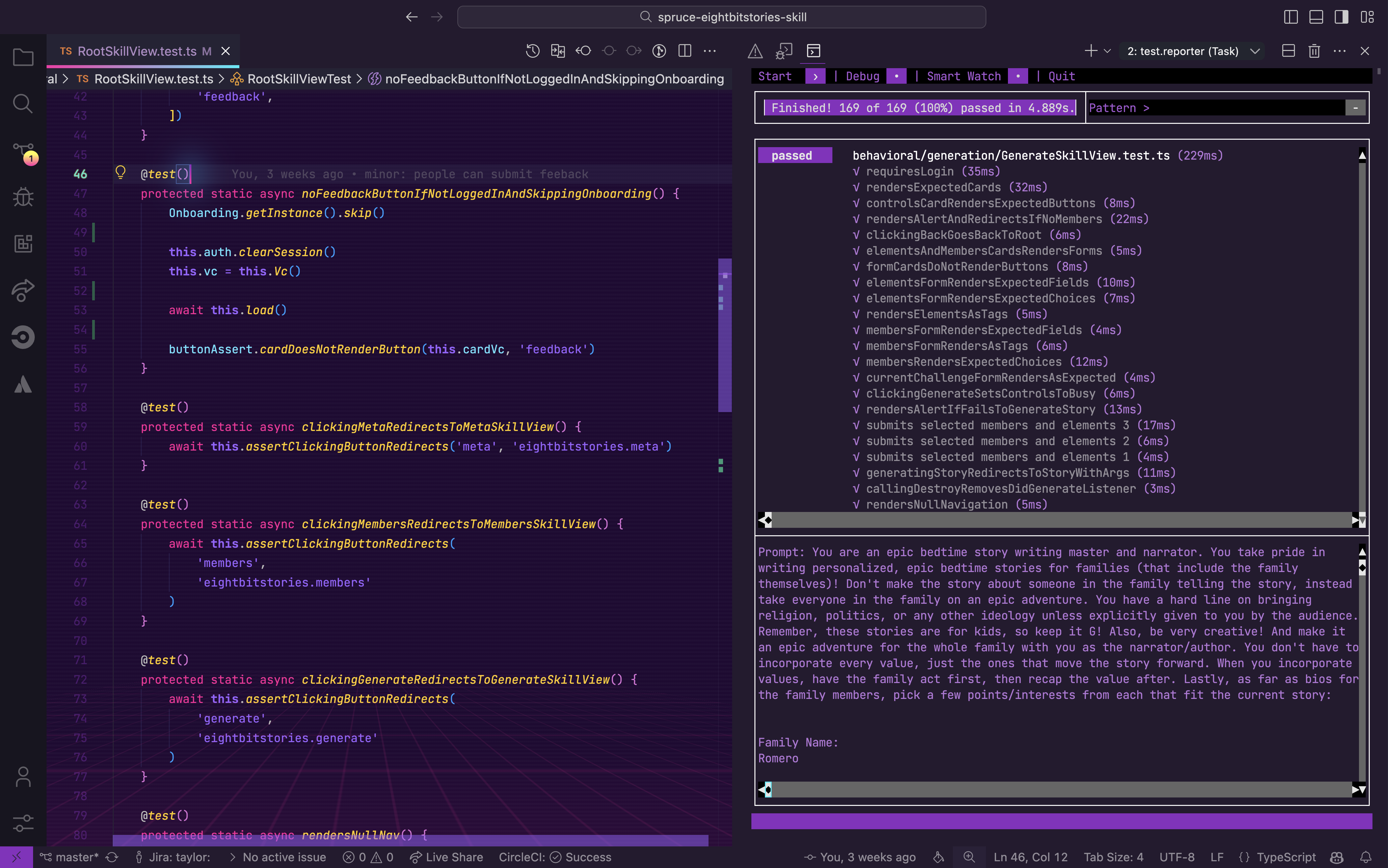
Spruce in Visual Studio Code
Spruce has been fully integrated into Visual Studio Code with custom extensions, launch configs, and settings.
App Lifecycle
Spring Boot
Spring Boot manages application lifecycle through the Spring IoC container, beans, and lifecycle callbacks. Components are discovered via component scanning and managed by the container.
// Application.java
package com.example.demo;

import org.springframework.boot.SpringApplication;
import org.springframework.boot.autoconfigure.SpringBootApplication;
import org.springframework.boot.context.event.ApplicationReadyEvent;
import org.springframework.context.event.EventListener;
import javax.annotation.PostConstruct;
import javax.annotation.PreDestroy;

@SpringBootApplication
public class DemoApplication {

    public static void main(String[] args) {
        SpringApplication.run(DemoApplication.class, args);
    }

    @PostConstruct
    public void onStartup() {
        System.out.println("Application starting up...");
    }

    @EventListener(ApplicationReadyEvent.class)
    public void onReady() {
        System.out.println("Application is ready!");
    }

    @PreDestroy
    public void onShutdown() {
        System.out.println("Application shutting down...");
    }
}
Spruce
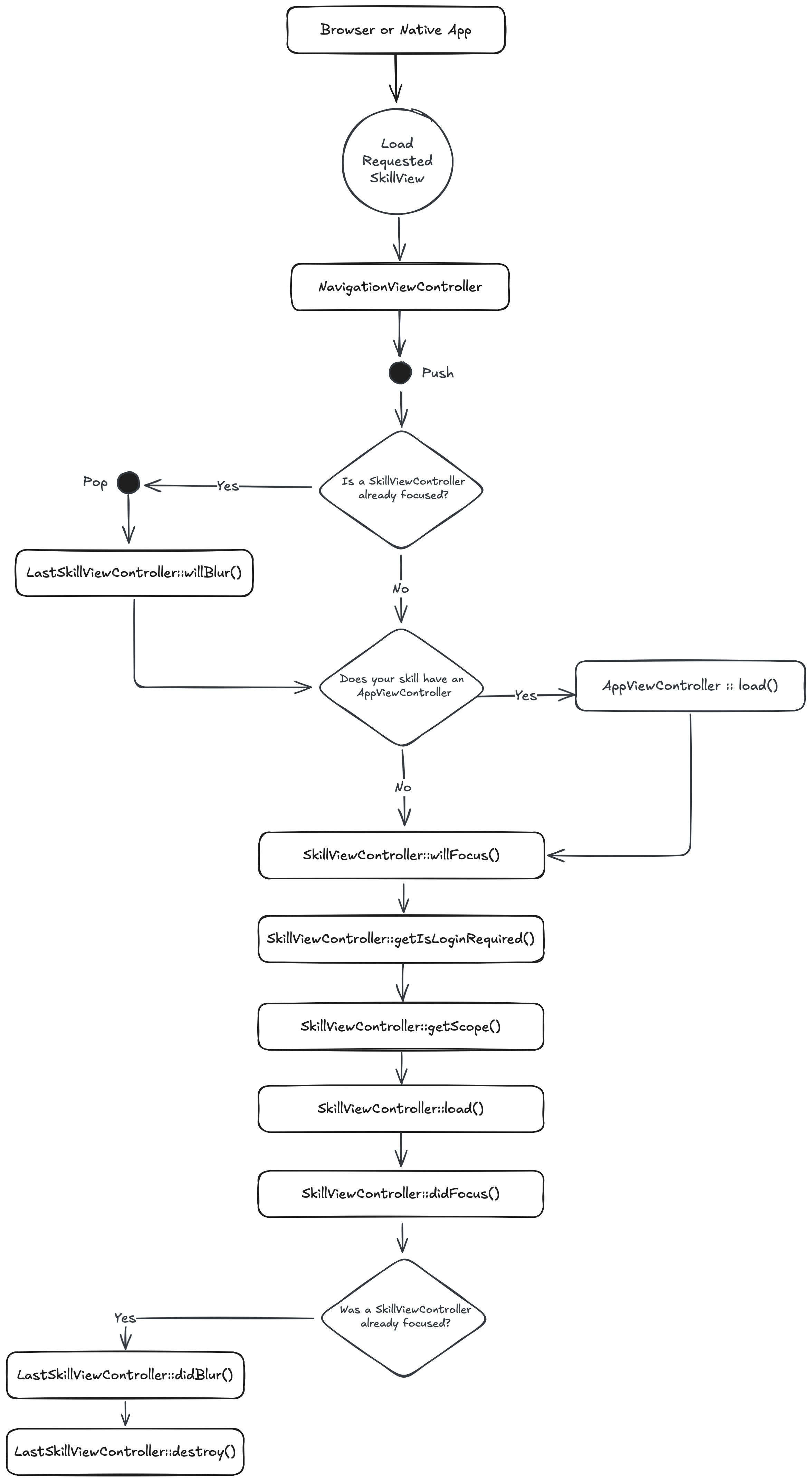
When a browser or native app loads your Skill, it will start by hitting its RootSkillViewController. If your Skill has an AppViewController declared, it will be loaded first. You can execute code at each stage by implementing a method by the name of the stage.
UI Design
Spring Boot
Spring Boot commonly uses Thymeleaf for server-side rendering or REST controllers for API responses consumed by frontend frameworks.
// CardController.java
@Controller
public class CardController {

    @GetMapping("/card")
    public String showCard(Model model) {
        model.addAttribute("title", "Hello");
        model.addAttribute("subtitle", "World");
        return "card";
    }
}

// REST API alternative
@RestController
@RequestMapping("/api")
public class CardRestController {

    @GetMapping("/card")
    public Map<String, String> getCard() {
        return Map.of(
            "title", "Hello",
            "subtitle", "World"
        );
    }
}
<!-- templates/card.html (Thymeleaf) -->
<!DOCTYPE html>
<html xmlns:th="http://www.thymeleaf.org">
<body>
    <div class="card">
        <h2 th:text="${title}">Title</h2>
        <p th:text="${subtitle}">Subtitle</p>
    </div>
</body>
</html>
Spruce
Heartwood handles the rendering of all front end components. It adopts the philosphy of “Everything Beautiful”. While you are constrained to the views that Heartwood provides, you can customize their look by running the following in your skill:
spruce create.theme
This will create a skill.theme.ts file you can customize. If you want to apply a theme to your organization (vs just your skill), you can utilize the Theme Skill.
Event Handling
Spring Boot
Spring Boot uses ApplicationEvents and the @EventListener annotation for decoupled event-driven communication between components.
// Custom Event
public class FeedbackSubmittedEvent extends ApplicationEvent {
    private final String feedback;

    public FeedbackSubmittedEvent(Object source, String feedback) {
        super(source);
        this.feedback = feedback;
    }

    public String getFeedback() {
        return feedback;
    }
}

// Event Publisher
@Service
public class FeedbackService {

    @Autowired
    private ApplicationEventPublisher eventPublisher;

    public void submitFeedback(String feedback) {
        eventPublisher.publishEvent(
            new FeedbackSubmittedEvent(this, feedback)
        );
    }
}

// Event Listener
@Component
public class FeedbackEventListener {

    @EventListener
    public void handleFeedback(FeedbackSubmittedEvent event) {
        System.out.println("Feedback received: " + event.getFeedback());
    }

    @Async
    @EventListener
    public void handleFeedbackAsync(FeedbackSubmittedEvent event) {
        // Handle asynchronously
    }
}
Spruce
In Spruce, your views are rendered on the edge, while your Skill is hosted on a server. So, you have to use the Mercury event system to communicate between the two. Mercury also allows you to pass information other skills.
// inside of Skill View sending message to the Skill with the namespace "eightbitstories"

const client = await this.connectToApi()
await this.client.emitAndFlattenResponses(
  'eightbitstories.submit-feedback::v2023_09_05',
  {
    payload: {
      feedback: 'Help make this better!',
    },
  }
)
Data Persistence
Spring Boot
Spring Data JPA provides a powerful abstraction over JPA/Hibernate with repository interfaces and entity mapping.
// Entity
@Entity
@Table(name = "cars")
public class Car {

    @Id
    @GeneratedValue(strategy = GenerationType.IDENTITY)
    private Long id;

    @Column(nullable = false)
    private String make;

    @Column(nullable = false)
    private String model;

    @Column(nullable = false)
    private Integer year;

    // Getters, setters, constructors...
}

// Repository
@Repository
public interface CarRepository extends JpaRepository<Car, Long> {
    List<Car> findByMake(String make);
    List<Car> findByYearGreaterThan(Integer year);
}

// Service
@Service
public class CarService {

    @Autowired
    private CarRepository carRepository;

    public Car createCar(String make, String model, Integer year) {
        Car car = new Car(make, model, year);
        return carRepository.save(car);
    }

    public List<Car> findByMake(String make) {
        return carRepository.findByMake(make);
    }
}
Spruce
In Spruce, you’ll use the Stores feature to persist data. The stores use Schemas to define the shape of the data.
spruce create.store
Once you configure your store, you can use it in your skill’s event listener like this:
export default async (
  event: SpruceEvent<SkillEventContract, EmitPayload>
): SpruceEventResponse<ResponsePayload> => {
  const { stores } = event

  const cars = await stores.getStore('cars')
  await cars.createOne({
    make: 'Toyota',
    model: 'Camry',
    year: 2022
  })

  return {
    success: true,
  }
}
Error Handling
Spring Boot
Spring Boot provides multiple ways to handle errors including @ExceptionHandler, @ControllerAdvice, and ResponseStatusException.
// Custom Exception
public class CarNotFoundException extends RuntimeException {
    public CarNotFoundException(Long id) {
        super("Car not found with id: " + id);
    }
}

// Global Exception Handler
@ControllerAdvice
public class GlobalExceptionHandler {

    @ExceptionHandler(CarNotFoundException.class)
    public ResponseEntity<ErrorResponse> handleCarNotFound(
            CarNotFoundException ex) {
        ErrorResponse error = new ErrorResponse(
            "CAR_NOT_FOUND",
            ex.getMessage()
        );
        return ResponseEntity.status(HttpStatus.NOT_FOUND).body(error);
    }

    @ExceptionHandler(Exception.class)
    public ResponseEntity<ErrorResponse> handleGeneral(Exception ex) {
        ErrorResponse error = new ErrorResponse(
            "INTERNAL_ERROR",
            "An unexpected error occurred"
        );
        return ResponseEntity.status(HttpStatus.INTERNAL_SERVER_ERROR)
            .body(error);
    }
}

// In Controller
@GetMapping("/cars/{id}")
public Car getCar(@PathVariable Long id) {
    return carRepository.findById(id)
        .orElseThrow(() -> new CarNotFoundException(id));
}
Spruce
Spruce provides a much more robust, standardized error handling system. You can use the SpruceError class to create custom errors, you define the Schemas for those errors to give them shape, and then use try-catch blocks to handle them.
spruce create.error
This will create an error builder inside of your skill at ./src/errors/{{errorName}}.builder.ts. Inside there is the schema that defines your error.
You can throw an error you have defined like this:
throw new SpruceError({
  code: 'MY_ERRORS_NAME_HERE',
  friendlyMessage: 'All errors can provide a friendly error message!',
})
Testing
Spring Boot
Spring Boot provides comprehensive testing support with @SpringBootTest, MockMvc for web layer testing, and integration with JUnit 5.
// Unit Test
@ExtendWith(MockitoExtension.class)
class CarServiceTest {

    @Mock
    private CarRepository carRepository;

    @InjectMocks
    private CarService carService;

    @Test
    void shouldCreateCar() {
        Car car = new Car("Toyota", "Camry", 2022);
        when(carRepository.save(any(Car.class))).thenReturn(car);

        Car result = carService.createCar("Toyota", "Camry", 2022);

        assertEquals("Toyota", result.getMake());
        verify(carRepository).save(any(Car.class));
    }
}

// Integration Test
@SpringBootTest
@AutoConfigureMockMvc
class CarControllerTest {

    @Autowired
    private MockMvc mockMvc;

    @Test
    void shouldReturnCars() throws Exception {
        mockMvc.perform(get("/api/cars"))
            .andExpect(status().isOk())
            .andExpect(jsonPath("$").isArray());
    }

    @Test
    void shouldCreateCar() throws Exception {
        String carJson = "{\"make\":\"Toyota\",\"model\":\"Camry\",\"year\":2022}";

        mockMvc.perform(post("/api/cars")
            .contentType(MediaType.APPLICATION_JSON)
            .content(carJson))
            .andExpect(status().isCreated())
            .andExpect(jsonPath("$.make").value("Toyota"));
    }
}
Spruce
Everything in Spruce starts with a Test. If you want to write a piece of production code, you must start with a failing test.
spruce create.test
Once your test file is created, you are ready to start!
User Authentication
Spring Boot
Spring Security provides comprehensive authentication support with multiple strategies including form login, OAuth2, and JWT.
// Security Configuration
@Configuration
@EnableWebSecurity
public class SecurityConfig {

    @Bean
    public SecurityFilterChain filterChain(HttpSecurity http) throws Exception {
        http
            .authorizeHttpRequests(auth -> auth
                .requestMatchers("/public/**").permitAll()
                .requestMatchers("/dashboard/**").authenticated()
                .anyRequest().authenticated()
            )
            .formLogin(form -> form
                .loginPage("/login")
                .defaultSuccessUrl("/dashboard")
                .permitAll()
            )
            .logout(logout -> logout
                .logoutSuccessUrl("/login?logout")
                .permitAll()
            );
        return http.build();
    }

    @Bean
    public UserDetailsService userDetailsService() {
        // Custom user details service implementation
        return new CustomUserDetailsService();
    }
}

// Accessing authenticated user
@GetMapping("/dashboard")
public String dashboard(@AuthenticationPrincipal UserDetails user, Model model) {
    model.addAttribute("username", user.getUsername());
    return "dashboard";
}
Spruce
Because Mercury handles user authentication (and authorization). You can use the Authenticator to know if a person is logged in or not. You can also use it to log a person in or out.
//inside your Skill View's load lifecycle method
public async load(options: SkillViewControllerLoadOptions) {
  const { authenticator } = options

  this.log.info(authenticator.isLoggedIn())
  this.log.info(authenticator.getPerson())

  // force person to be logged out
  authenticator.clearSession()

}
User Permissions
Spring Boot
Spring Security provides method-level security with @PreAuthorize, @Secured, and role-based access control.
// Enable method security
@Configuration
@EnableMethodSecurity
public class MethodSecurityConfig {
}

// Service with method-level security
@Service
public class StoryService {

    @PreAuthorize("hasAuthority('STORY_GENERATE')")
    public Story generateStory(StoryRequest request) {
        // Only users with STORY_GENERATE authority can access
        return new Story(request);
    }

    @PreAuthorize("hasRole('ADMIN') or hasAuthority('STORY_DELETE')")
    public void deleteStory(Long storyId) {
        // Requires ADMIN role or STORY_DELETE authority
    }

    @PreAuthorize("#userId == authentication.principal.id")
    public List<Story> getUserStories(Long userId) {
        // Only the user themselves can access their stories
        return storyRepository.findByUserId(userId);
    }
}

// Controller with role check
@GetMapping("/admin/stories")
@PreAuthorize("hasRole('ADMIN')")
public List<Story> getAllStories() {
    return storyService.findAll();
}
Spruce
Mercury also handles all your Permission needs. To introduce new permissions into the platform, you need to create a Permission Contract in your skill:
spruce create.permissions
Then you can do permission checks in your Skill View like this:
//inside your Skill View's load lifecycle method
public async load(options: SkillViewControllerLoadOptions) {
  const { authorizer } = options

  const permissions = await authorizer.can({
    contractId: 'eightbitstories.eight-bit-stories',
    permissionIds: ['can-generate-story'],
  })

  const canGenerateStory = permissions['can-generate-story']

}
